Socket
This content relates to a deprecated version of Mbed
Mbed 2 is now deprecated. For the latest version please see the Mbed OS documentation.
For the latest socket API, please see the network socket overview.
Networking
The mbed C++ Socket API provides a simple and consistent way to communicate using bsd-like TCP and UDP sockets over various transports such as ethernet, wifi and mobile networks.
The Socket library is included as part of the networking libraries that implement the different transports, for example:
To use the sockets interfaces, include the appropriate transport library in your program. This page documents the Sockets API they will make available.
There are also various common protocols implemented on top of the sockets libraries to provide higher level APIs such as HTTP Clients; see:
TCP Socket
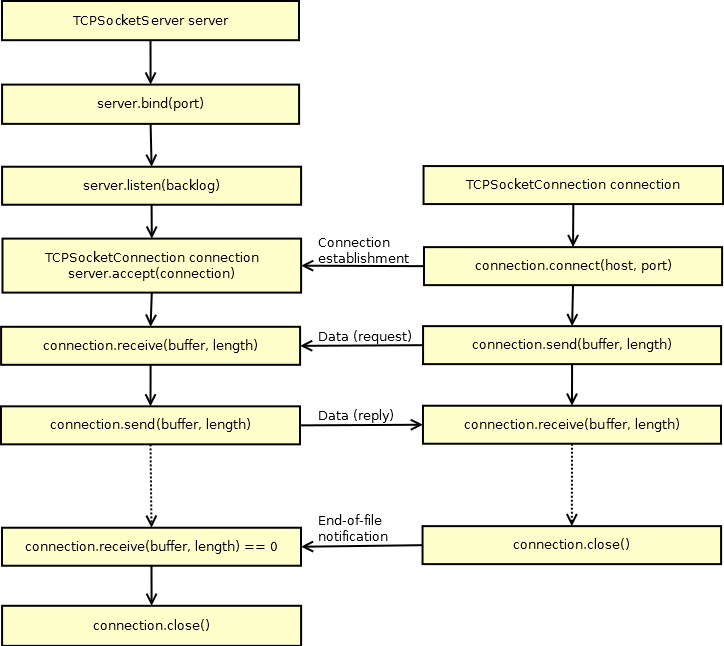
Import library
Public Member Functions |
|
| TCPSocketServer () | |
|
Instantiate a TCP Server.
|
|
| int | bind (int port) |
|
Bind a socket to a specific port.
|
|
| int | listen (int backlog=1) |
|
Start listening for incoming connections.
|
|
| int | accept ( TCPSocketConnection &connection) |
|
Accept a new connection.
|
|
| void | set_blocking (bool blocking, unsigned int timeout=1500) |
|
Set blocking or non-blocking mode of the socket and a timeout on blocking socket operations.
|
|
| int | set_option (int level, int optname, const void *optval, socklen_t optlen) |
|
Set socket options.
|
|
| int | get_option (int level, int optname, void *optval, socklen_t *optlen) |
|
Get socket options.
|
|
| int | close (bool shutdown=true) |
|
Close the socket.
|
|
Import library
Public Member Functions |
|
| TCPSocketConnection () | |
|
TCP socket connection.
|
|
| int | connect (const char *host, const int port) |
|
Connects this TCP socket to the server.
|
|
| bool | is_connected (void) |
|
Check if the socket is connected.
|
|
| int | send (char *data, int length) |
|
Send data to the remote host.
|
|
| int | send_all (char *data, int length) |
|
Send all the data to the remote host.
|
|
| int | receive (char *data, int length) |
|
Receive data from the remote host.
|
|
| int | receive_all (char *data, int length) |
|
Receive all the data from the remote host.
|
|
| void | set_blocking (bool blocking, unsigned int timeout=1500) |
|
Set blocking or non-blocking mode of the socket and a timeout on blocking socket operations.
|
|
| int | set_option (int level, int optname, const void *optval, socklen_t optlen) |
|
Set socket options.
|
|
| int | get_option (int level, int optname, void *optval, socklen_t *optlen) |
|
Get socket options.
|
|
| int | close (bool shutdown=true) |
|
Close the socket.
|
|
| void | reset_address (void) |
|
Reset the address of this endpoint.
|
|
| int | set_address (const char *host, const int port) |
|
Set the address of this endpoint.
|
|
| char * | get_address (void) |
|
Get the IP address of this endpoint.
|
|
| int | get_port (void) |
|
Get the port of this endpoint.
|
|
Friends |
|
| class | TCPSocketServer |
TCP Echo Server
Import program
00001 #include "mbed.h"
00002 #include "EthernetInterface.h"
00003
00004 #define ECHO_SERVER_PORT   7
00005
00006 int main (void) {
00007     EthernetInterface eth;
00008     eth.init(); //Use DHCP
00009     eth.connect();
00010     printf("\nServer IP Address is %s\n", eth.getIPAddress());
00011
00012     TCPSocketServer server;
00013     server.bind(ECHO_SERVER_PORT);
00014     server.listen();
00015
00016     while (true) {
00017         printf("\nWait for new connection...\n");
00018         TCPSocketConnection client;
00019         server.accept(client);
00020         client.set_blocking(false, 1500); // Timeout after (1.5)s
00021
00022         printf("Connection from: %s\n", client.get_address());
00023         char buffer[256];
00024         while (true) {
00025             int n = client.receive(buffer, sizeof(buffer));
00026             if (n <= 0) break;
00027
00028             // print received message to terminal
00029             buffer[n] = '\0';
00030             printf("Received message from Client :'%s'\n",buffer);
00031
00032             // reverse the message
00033             char temp;
00034             for(int f = 0, l = n-1; f<l; f++,l--){
00035                 temp = buffer[f];
00036                 buffer[f] = buffer[l];
00037                 buffer[l] = temp;
00038                 }
00039
00040             // print reversed message to terminal
00041             printf("Sending message to Client: '%s'\n",buffer);
00042
00043             // Echo received message back to client
00044             client.send_all(buffer, n);
00045             if (n <= 0) break;
00046         }
00047
00048         client.close();
00049     }
00050 }
00051
You can test the above server running on your mbed, with the following Python script running on your PC:
import socket
import signal
import sys


def signal_handler(signal, frame):
    print 'You pressed Ctrl+C!'
    s.close()
    sys.exit(0)

signal.signal(signal.SIGINT, signal_handler)

ECHO_SERVER_ADDRESS = "192.168.2.2"
ECHO_PORT = 7
message = 'Hello, world'

s = socket.socket(socket.AF_INET, socket.SOCK_STREAM)
s.connect((ECHO_SERVER_ADDRESS, ECHO_PORT))

print 'Sending', repr(message)
s.sendall(message)
data = s.recv(1024)
s.close()
print 'Received', repr(data)
TCP Echo Client
Import program
00001 #include "mbed.h"
00002 #include "EthernetInterface.h"
00003
00004 const char* ECHO_SERVER_ADDRESS = "192.168.2.2";
00005 const int ECHO_SERVER_PORT = 7;
00006
00007 int main() {
00008     EthernetInterface eth;
00009     eth.init(); //Use DHCP
00010     eth.connect();
00011     printf("\nClient IP Address is %s\n", eth.getIPAddress());
00012
00013     // Connect to Server
00014     TCPSocketConnection socket;
00015     while (socket.connect(ECHO_SERVER_ADDRESS, ECHO_SERVER_PORT) < 0) {
00016         printf("Unable to connect to (%s) on port (%d)\n", ECHO_SERVER_ADDRESS, ECHO_SERVER_PORT);
00017         wait(1);
00018     }
00019     printf("Connected to Server at %s\n",ECHO_SERVER_ADDRESS);
00020
00021     // Send message to server
00022     char hello[] = "Hello World";
00023     printf("Sending  message to Server : '%s' \n",hello);
00024     socket.send_all(hello, sizeof(hello) - 1);
00025
00026     // Receive message from server
00027     char buf[256];
00028     int n = socket.receive(buf, 256);
00029     buf[n] = '\0';
00030     printf("Received message from server: '%s'\n", buf);
00031
00032     // Clean up
00033     socket.close();
00034     eth.disconnect();
00035
00036     while(true) {}
00037 }
You can test the above Client running on your mbed, with the following Python script running on your PC:
import socket
import signal
import sys


def signal_handler(signal, frame):
    print 'You pressed Ctrl+C!'
    s.close()
    sys.exit(0)

signal.signal(signal.SIGINT, signal_handler)

print 'Server Running at ', socket.gethostbyname(socket.gethostname())
s = socket.socket(socket.AF_INET, socket.SOCK_STREAM)
s.bind(('', 7))
s.listen(1)

while True:
    conn, addr = s.accept()
    print 'Connected by', addr
    while True:
        data = conn.recv(1024)
        if not data: break
        conn.sendall(data)
    conn.close()
UDP Socket
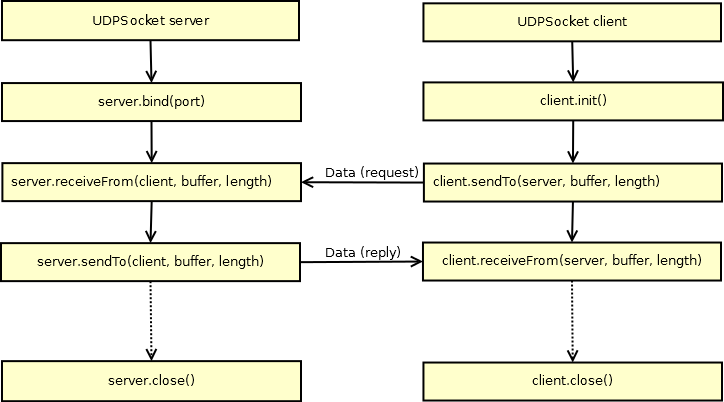
Import library
Public Member Functions |
|
| UDPSocket () | |
|
Instantiate an UDP
Socket
.
|
|
| int | init (void) |
|
Init the UDP Client
Socket
without binding it to any specific port.
|
|
| int | bind (int port) |
|
Bind a UDP Server
Socket
to a specific port.
|
|
| int | join_multicast_group (const char *address) |
|
Join the multicast group at the given address.
|
|
| int | set_broadcasting (bool broadcast=true) |
|
Set the socket in broadcasting mode.
|
|
| int | sendTo ( Endpoint &remote, char *packet, int length) |
|
Send a packet to a remote endpoint.
|
|
| int | receiveFrom ( Endpoint &remote, char *buffer, int length) |
|
Receive a packet from a remote endpoint.
|
|
| void | set_blocking (bool blocking, unsigned int timeout=1500) |
|
Set blocking or non-blocking mode of the socket and a timeout on blocking socket operations.
|
|
| int | set_option (int level, int optname, const void *optval, socklen_t optlen) |
|
Set socket options.
|
|
| int | get_option (int level, int optname, void *optval, socklen_t *optlen) |
|
Get socket options.
|
|
| int | close (bool shutdown=true) |
|
Close the socket.
|
|
Import library
Public Member Functions |
|
| Endpoint (void) | |
|
IP
Endpoint
(address, port)
|
|
| void | reset_address (void) |
|
Reset the address of this endpoint.
|
|
| int | set_address (const char *host, const int port) |
|
Set the address of this endpoint.
|
|
| char * | get_address (void) |
|
Get the IP address of this endpoint.
|
|
| int | get_port (void) |
|
Get the port of this endpoint.
|
|
Friends |
|
| class | UDPSocket |
UDP Echo Server
Import program
00001 #include "mbed.h"
00002 #include "EthernetInterface.h"
00003
00004 #define ECHO_SERVER_PORT   7
00005
00006 int main (void) {
00007     EthernetInterface eth;
00008     eth.init(); //Use DHCP
00009     eth.connect();
00010     printf("\nServer IP Address is %s\n", eth.getIPAddress());
00011
00012     UDPSocket server;
00013     server.bind(ECHO_SERVER_PORT);
00014
00015     Endpoint client;
00016     char buffer[256];
00017     while (true) {
00018         printf("\nWaiting for UDP packet...\n");
00019         int n = server.receiveFrom(client, buffer, sizeof(buffer));
00020         buffer[n] = '\0';
00021
00022         printf("Received packet from: %s\n", client.get_address());
00023         printf("Packet contents : '%s'\n",buffer);
00024         printf("Sending Packet back to Client\n");
00025         server.sendTo(client, buffer, n);
00026     }
00027 }
You can test the above Server running on your mbed, with the following Python script running on your PC:
import socket
import signal
import sys


def signal_handler(signal, frame):
    print 'You pressed Ctrl+C!'
    sock.close()
    sys.exit(0)

signal.signal(signal.SIGINT, signal_handler)

ECHO_SERVER_ADDRESS = '10.2.131.195'
ECHO_PORT = 7

sock = socket.socket(socket.AF_INET, socket.SOCK_DGRAM)

sock.sendto("Hello World\n", (ECHO_SERVER_ADDRESS, ECHO_PORT))
response = sock.recv(256)
sock.close()

print response
UDP Echo Client
Import program
00001 #include "mbed.h"
00002 #include "EthernetInterface.h"
00003
00004 const char* ECHO_SERVER_ADDRESS = "192.168.2.2";
00005 const int ECHO_SERVER_PORT = 7;
00006
00007 int main() {
00008     EthernetInterface eth;
00009     eth.init(); //Use DHCP
00010     eth.connect();
00011     printf("\nClient IP Address is %s \n", eth.getIPAddress());
00012
00013     UDPSocket sock;
00014     sock.init();
00015
00016     Endpoint echo_server;
00017     echo_server.set_address(ECHO_SERVER_ADDRESS, ECHO_SERVER_PORT);
00018
00019     char out_buffer[] = "Hello World";
00020     printf("Sending  message '%s' to server (%s)\n",out_buffer,ECHO_SERVER_ADDRESS);
00021     sock.sendTo(echo_server, out_buffer, sizeof(out_buffer));
00022
00023     char in_buffer[256];
00024     int n = sock.receiveFrom(echo_server, in_buffer, sizeof(in_buffer));
00025
00026     in_buffer[n] = '\0';
00027     printf("Received message from server: '%s'\n", in_buffer);
00028
00029     sock.close();
00030
00031     eth.disconnect();
00032     while(1) {}
00033 }
You can test the above Client running on your mbed, with the following Python script running on your PC:
import socket
import signal
import sys

def signal_handler(signal, frame):
    print 'You pressed Ctrl+C!'
    sock.close()
    sys.exit(0)

signal.signal(signal.SIGINT, signal_handler)

ECHO_PORT = 7

print 'Server Running at ', socket.gethostbyname(socket.gethostname())
sock = socket.socket(socket.AF_INET, socket.SOCK_DGRAM)
sock.bind(('', ECHO_PORT))

while True:
    print "waiting for UDP data packet..."
    data, address = sock.recvfrom(256)
    print "Received packet from", address, "with data",data
    print "Sending  packet back to client"
    sock.sendto(data, address)
Blocking/Non-Blocking and Timeout
The standard Berkeley sockets functions (accept, send, receive, etc) are blocking, for this reason also our Socket methods are blocking by default.
If you want a non-blocking behaviour, waiting for a certain event only for a certain amount of time, you have to explicitly make a call to the set_blocking(bool blocking, unsigned int timeout) method:
// [Default] Blocking: wait the socket being (readable/writable) forever
socket.set_blocking(true)

// Non-Blocking: Return after a maximum of (timeout)ms.
socket.set_blocking(false, timeout)
Broadcasting
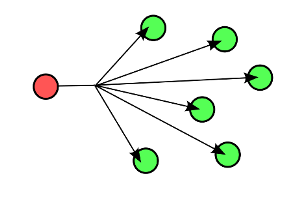
Send Broadcast
Import program
00001 #include "mbed.h"
00002 #include "EthernetInterface.h"
00003
00004 const int BROADCAST_PORT = 58083;
00005
00006 int main() {
00007     EthernetInterface eth;
00008     eth.init(); //Use DHCP
00009     eth.connect();
00010
00011     UDPSocket sock;
00012     sock.init();
00013     sock.set_broadcasting();
00014
00015     Endpoint broadcast;
00016     broadcast.set_address("255.255.255.255", BROADCAST_PORT);
00017
00018     char out_buffer[] = "very important data";
00019
00020     while (true) {
00021         printf("Broadcasting...\n");
00022         sock.sendTo(broadcast, out_buffer, sizeof(out_buffer));
00023         Thread::wait(1000);
00024     }
00025 }
You can receive the messages sent by the above broadcaster running on your mbed, with the following Python script running on your PC:
import socket

BROADCAST_PORT = 58083

s = socket.socket(socket.AF_INET, socket.SOCK_DGRAM)
s.bind(('0.0.0.0', BROADCAST_PORT))

while True:
    print s.recvfrom(256)
Receive Broadcast
Import program
00001 #include "mbed.h"
00002 #include "EthernetInterface.h"
00003
00004 const int BROADCAST_PORT = 58083;
00005
00006 int main() {
00007     EthernetInterface eth;
00008     eth.init(); //Use DHCP
00009     eth.connect();
00010
00011     UDPSocket socket;
00012     socket.bind(BROADCAST_PORT);
00013     socket.set_broadcasting();
00014
00015     Endpoint broadcaster;
00016     char buffer[256];
00017     while (true) {
00018         printf("\nWait for packet...\n");
00019         int n = socket.receiveFrom(broadcaster, buffer, sizeof(buffer));
00020         buffer[n] = '\0';
00021         printf("Packet from \"%s\": %s\n", broadcaster.get_address(), buffer);
00022     }
00023 }
To broadcast messages to the above broadcast receiver running on your mbed you can use the following Python script running on your PC:
import socket
from time import sleep, time

BROADCAST_PORT = 58083

s = socket.socket(socket.AF_INET, socket.SOCK_DGRAM)
s.bind(('', 0))
s.setsockopt(socket.SOL_SOCKET, socket.SO_BROADCAST, 1)

while True:
    print "Broadcasting..."
    data = 'Hello World: ' + repr(time()) + '\n'
    s.sendto(data, ('<broadcast>', BROADCAST_PORT))
    sleep(1)
Multicasting

Send Multicast
Import program
00001 #include "mbed.h"
00002 #include "EthernetInterface.h"
00003
00004 const char* MCAST_GRP = "224.1.1.1";
00005 const int MCAST_PORT = 5007;
00006
00007 int main() {
00008     EthernetInterface eth;
00009     eth.init(); //Use DHCP
00010     eth.connect();
00011
00012     UDPSocket sock;
00013     sock.init();
00014
00015     Endpoint multicast_group;
00016     multicast_group.set_address(MCAST_GRP, MCAST_PORT);
00017
00018     char out_buffer[] = "very important data";
00019     while (true) {
00020         printf("Multicast to group: %s\n", MCAST_GRP);
00021         sock.sendTo(multicast_group, out_buffer, sizeof(out_buffer));
00022         Thread::wait(1000);
00023     }
00024 }
You can receive the messages sent by the above multicaster running on your mbed, with the following Python script running on your PC:
import socket
import struct

MCAST_GRP = '224.1.1.1'
MCAST_PORT = 5007

sock = socket.socket(socket.AF_INET, socket.SOCK_DGRAM, socket.IPPROTO_UDP)
sock.setsockopt(socket.SOL_SOCKET, socket.SO_REUSEADDR, 1)
sock.bind(('', MCAST_PORT))
mreq = struct.pack("4sl", socket.inet_aton(MCAST_GRP), socket.INADDR_ANY)

sock.setsockopt(socket.IPPROTO_IP, socket.IP_ADD_MEMBERSHIP, mreq)

while True:
    print sock.recv(10240)
Receive Multicast
Import program
00001 #include "mbed.h"
00002 #include "EthernetInterface.h"
00003
00004 const char* MCAST_GRP = "224.1.1.1";
00005 const int MCAST_PORT = 5007;
00006
00007 int main() {
00008     EthernetInterface eth;
00009     eth.init(); //Use DHCP
00010     eth.connect();
00011
00012     UDPSocket server;
00013     server.bind(MCAST_PORT);
00014     if (server.join_multicast_group(MCAST_GRP) != 0) {
00015         printf("Error joining the multicast group\n");
00016         while (true) {}
00017     }
00018
00019     Endpoint client;
00020     char buffer[256];
00021     while (true) {
00022         printf("\nWait for packet...\n");
00023         int n = server.receiveFrom(client, buffer, sizeof(buffer));
00024
00025         printf("Packet from \"%s\": %s\n", client.get_address(), buffer);
00026     }
00027 }
To multicast messages to the above multicast receiver running on your mbed you can use the following Python script running on your PC:
import socket
from time import sleep, time

MCAST_GRP = '224.1.1.1'
MCAST_PORT = 5007

sock = socket.socket(socket.AF_INET, socket.SOCK_DGRAM, socket.IPPROTO_UDP)
sock.setsockopt(socket.IPPROTO_IP, socket.IP_MULTICAST_TTL, 2)

while True:
    print "Multicast to group: %s\n" % MCAST_GRP
    data = 'Hello World: ' + repr(time()) + '\n'
    sock.sendto(data, (MCAST_GRP, MCAST_PORT))
    sleep(1)