Choose where to save files FAQ
This content relates to a deprecated version of Mbed
Mbed 2 is now deprecated. For the latest version please see the Mbed OS documentation.
Question :
When I try to download a compiled program with Firefox, I can't choose where to download it to, and I can't right-click and "Save Target As..." as I can with Internet Explorer. How do I resolve this?
Answer :
Firefox manages downloads for you and will download all files to a particular default location. On Windows this will be "Desktop"
If you disable this feature Firefox ask you where to want to save downloaded files to. To do this, follow Tools -> Options and you will see the Option window like below :
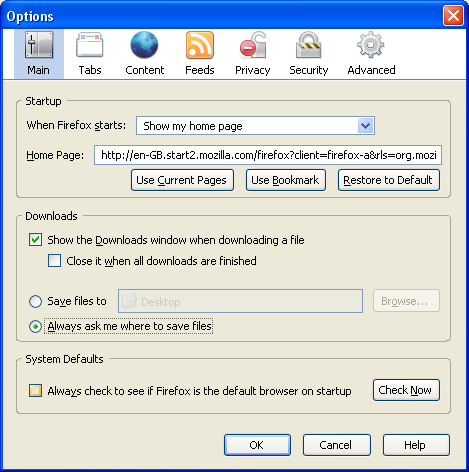
In the Downloads area, select the radio button labelled "Always ask me where to save files". Click, OK and you're finished.
Next time you click on a .bin file in Firefox, you will be prompted to browse to the location you wish to save the file to. You can browse to your mbed board, and save the binary there directly!