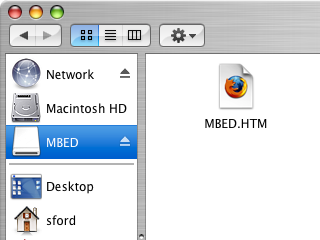
Use the USB lead to connect your mbed Microcontroller to a PC. The status light will come on, indicating it has power. After a few seconds of activity, the PC will recognise the mbed Microcontroller as a standard USB drive.
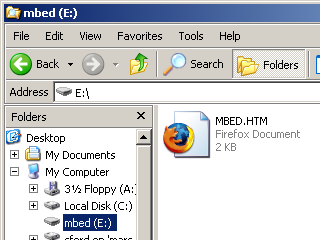
Go to the new USB Drive, and click MBED.HTM to open it in a web browser. Choose "Signup", and create your mbed Account. This will give you access to the Website, Tools, Libraries and Documentation.
I think you have to delete old files and keep only the desired one and hit the reset button.
That's what I'm doing and it works (not all times dues to programinh mistakes !!)
I think you have to delete old files and keep only the desired one and hit the reset button.
That's what I'm doing and it works (not all times dues to programinh mistakes !!)
It seems like my microcontroller working only when the USB cord is connected to my laptop. When the USB was not connected, the microcontroller worked only for a few seconds. Could the current drop in the circuit cause microcontroller to not working properly?
When I set up my mbed for the first time I tried connecting the USB cable to the USB socket of the development board to which the mbed was attached. The power light came on but nothing happened (no USB drive appeared) until I connected the cable directly to the USB socket on the mbed board itself. I think it is safer always to use the mbed's own USB socket when setting up for the first time.
"How to clean the mbed storage?" was posted in Japanese (two posts above).
Sometime, the mbed has weird files or the getting storage space smaller even if all files are deleted (invisible files are still there).
In such case, you can format the mbed. The mbed will be cleaned. The "MBED.HTM" file will come back by power-cycling.
『余分なファイルが残ってしまった場合の削除方法』について何も書かれていないので書いておきます(この質問をたった今,見つけたもので)
変なファイルが残ったり,あるいはファイルを全部消してもストレージの空き容量が少なくなったり(これは不可視ファイルが残ってたりします)することがあります.\\
このような場合にはmbedをフォーマットしてしまいます.これで元通りに戻ってくれます.ちなみに「MBED.HTM」ファイルは,電源の再投入(USBの再接続)で復活します.
"How to clean the mbed storage?" was posted in Japanese (two posts above).
Sometime, the mbed has weird files or the getting storage space smaller even if all files are deleted (invisible files are still there). \\
In such case, you can format the mbed. The mbed will be cleaned. The "MBED.HTM" file will come back by power-cycling.
The blue light is present,
but I do not see the E drive on the computer.
PC is running Windows 7.
Was working fine just yesterday ...
any ideas??
- Jim
Yikes!!
My USB interface seems to have gone away.
The blue light is present,
but I do not see the E drive on the computer.
PC is running Windows 7.
Was working fine just yesterday ...
any ideas??
--- Jim
Please login to post comments.