Note: the source code for this program can be seen in the next section, Creating a program
Save the program binary file to your mbed Microcontroller Disk, just like you would with a normal USB disk. The Status LED will flash as the PC writes the file to the Microcontroller disk.
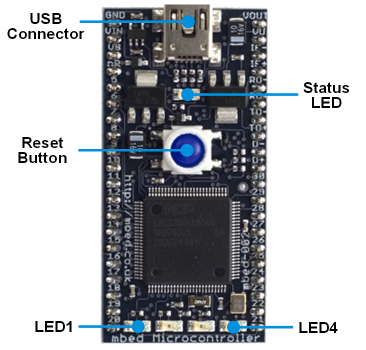
When the Reset Button in pressed, the newest program on the mbed Microcontroller Disk will be loaded in to the Microcontroller FLASH memory. The Status LED will flash as this happens.
When the program is has been loaded onto the microcontroller, it will then start it running.
The Microcontroller is now running the program; flashing LED1 forever! If you reset the Microcontroller, or disconnect and reconnect the power, the program will simply restart.
It is the newest program on the mbed Microcontroller that is run after reset. We can therefore download a new program or overwrite an existing one to update the program that will run.
Hi,
the link "FAQs/Firefox-Save-As" above leads to "Access denied".
Anything wrong ??
I've got the same thing. But I'll wager the guide will point users to "Tools > Options > General > Save Files To..." in the Firefox 3.x browser.
<<quote jhaus55>>
Hi,
the link "FAQs/Firefox-Save-As" above leads to "Access denied".
Anything wrong ??
<</quote>>
Warning if you are using windows, the Windows File Protection (WFP) system (http://support.microsoft.com/kb/222193/en-us)
can bug and refuse to finish the file transfer (a small windows opens during the transfer and doesn't close).
So, if you unplugged the mbed during such problem, you can destroy the file system of the mbed...
It happened to my mbed:
two new files appear : USBCð 3 997 696KB and USBC-ZL. 753 664KB)
and the .bin file can no more be remove or update
So the mbed works with this only program, and I have found no solutions for the moment to solve this issue...
Warning if you are using windows, the Windows File Protection (WFP) system (http://support.microsoft.com/kb/222193/en-us)
can bug and refuse to finish the file transfer (a small windows opens during the transfer and doesn't close).
So, if you unplugged the mbed during such problem, you can destroy the file system of the mbed...
It happened to my mbed:
two new files appear : USBCð-- 3 997 696KB and USBC-ZL. 753 664KB)
and the .bin file can no more be remove or update
So the mbed works with this only program, and I have found no solutions for the moment to solve this issue...
i wrote a Windows script file to automatically copy move files to the MBED. save the attached script somewhere safe and then run it once (as administrator!) to associate .bin files with the script. from then on, you can double click on .bin files, or configure your browser automatically run them after downloading. enjoy.
(updated to move instead of copy, to prevent multiple versions of the same program building up.)
i wrote a Windows script file to automatically --copy-- move files to the MBED. save the attached script somewhere safe and then run it once (as administrator!) to associate .bin files with the script. from then on, you can double click on .bin files, or configure your browser automatically run them after downloading. enjoy.
[[/media/uploads/chag/transfer_to_mbed.cmd]]
(updated to move instead of copy, to prevent multiple versions of the same program building up.)
I'm sold. Registered for the development software, got the ARM controller connected to my computer, AND was able to load and run a program on it all within 1 minute of opening the box. Perfect way to handle the unboxing, mbed - don't change a thing! :)
Also, hello mbed community!! よろしくおねがい~
I'm sold. Registered for the development software, got the ARM controller connected to my computer, AND was able to load and run a program on it all within 1 minute of opening the box. Perfect way to handle the unboxing, mbed - don't change a thing! :)
Also, hello mbed community!! よろしくおねがい~
Worked right out of the box with Win 7 on a Toshiba laptop. LED1 flashes as promised! One suggestion: the program should not be called "Hello World" unless the actual phrase is displayed or printed somewhere. Small point, but tradition is tradition.
the program should not be called "Hello World" unless the actual phrase is displayed or printed somewhere. Small point, but tradition is tradition.
You are right ! I suggest "Flash the world " A novice user might try to catch the hello world at a terminal. There is a Terminal Hello World , which should be the original Hello world version
<<quote jlegris>>
the program should not be called "Hello World" unless the actual phrase is displayed or printed somewhere. Small point, but tradition is tradition.
<</quote>>
You are right ! I suggest "Flash the world " A novice user might try to catch the hello world at a terminal. There is a Terminal Hello World , which should be the original Hello world version
Hi,
Does anyone know why my EMBED is filing up with a bunch of 0 KB files. (see below). It seems to happen when I delete a bin file on the EMBED, windows times out giving me access error.
I tried deleting it again but I get a message "can not read file"
Hi,
Does anyone know why my EMBED is filing up with a bunch of 0 KB files. (see below). It seems to happen when I delete a bin file on the EMBED, windows times out giving me access error.
I tried deleting it again but I get a message "can not read file"
Any idea on how to get rid of them?
° 0 KB File
USBC(╗Öä. 0 KB File
USBC(╗Öä. 0 KB File
USBC(╗Öä. 0 KB File
Thanks
http://wikisend.com/download/169246/mbed_autotransfer.exe
This will automatically transfer bin files to mbed. This is the compiled version of
chag's vb script. This is faster than the .cmd one since this is a .exe file.
I was able to run first program fine in few minutes on Nxp1768. Now, I wanted to upload a new "test" program. I changed source code and tried to compile the test program. I got fist time right and will not get SUCCESS message at all further for new compilations. It does nothing. Are there restrictions when controller is running Hello World and now you want to run new program? Some documentation would help. For example, only one binary should stay at a time in MBED drive. What are requirements for compiler to run a new program? What is setup?
You can put as many binaries as you like on the mbed drive, it will load the latest one upon reset. Of course until the drive is full, then just throw the old ones away. There shouldnt be any restrictions. But if the compiler does not return success, does it also not return an error?
Some browsers (at least chrome) have the irritating habit that if you cancel downloading an attachement once (such as the bin file here), it will automatically block all downloads from the entire site. So you could try using a different browser to see if that helps.
You can put as many binaries as you like on the mbed drive, it will load the latest one upon reset. Of course until the drive is full, then just throw the old ones away. There shouldnt be any restrictions. But if the compiler does not return success, does it also not return an error?
Some browsers (at least chrome) have the irritating habit that if you cancel downloading an attachement once (such as the bin file here), it will automatically block all downloads from the entire site. So you could try using a different browser to see if that helps.
My laptop froze while uploading a binary to mbed, and I had to restart. When I checked mbet, it now has two "USBCG⌐." files in it, and I am not able to remove them. "The file name you specified is not valid or too long". Is it safe to format mbed, or is there any other way to remove?
Please login to post comments.