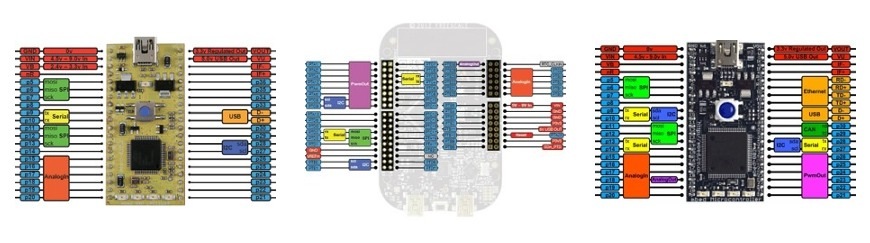
The PortIn interface is used to read an underlying GPIO port as one value. This is much faster than BusIn as you can read a port in one go, but much less flexible as you are constrained by the port and bit layout of the underlying GPIO ports.
A mask can be supplied so only certain bits of a port are used, allowing other bits to be used for other interfaces.
// Switch on an LED if any of mbed pins 21-26 is high#include "mbed.h"
PortIn p(Port2, 0x0000003F); // p21-p26
DigitalOut ind(LED4);
int main() {
while(1) {
int pins = p.read();
if(pins) {
ind = 1;
} else {
ind = 0;
}
}
}
Hi LFY
http://mbed.org/users/Lerche/notebook/lpc1768-pin-functions/
In the above link, you'll find a table of the pins of LPC1768, where 21-26 all are on port2.
Lerche
So this means e.g. that the mbed pin p11 to p18 are all Port 0 ?? How would you put mbed pin p20 to p27 (mixture of Port0, Port1 and Port2) together to use the input values as one hex number?
Take a look at BusIn; that gives you total flexibility of what pins go where (at the cost of performance; it basically has to read each pin individually, but in your code you only need to read one value)
Hi Arasch,
Take a look at BusIn; that gives you total flexibility of what pins go where (at the cost of performance; it basically has to read each pin individually, but in your code you only need to read one value)
With the pin functions table I get for the pin sequence p11 to p18 the hex number 0x7878000, so the call here would be PortIn p(Port0, 0x7878000). Is this right? Somehow this does not seem to work.
Have you tried:
p(Port0,0x0007F800)
The thing is that because you already call Port0, you have to mask inside that port. Not sure, but could be this way.
<<quote arasch>>
With the pin functions table I get for the pin sequence p11 to p18 the hex number 0x7878000, so the call here would be PortIn p(Port0, 0x7878000). Is this right? Somehow this does not seem to work.
<</quote>>
Have you tried:
p(Port0,0x0007F800)
The thing is that because you already call Port0, you have to mask inside that port. Not sure, but could be this way.
With the pin functions table I get for the pin sequence p11 to p18 the hex number 0x7878000, so the call here would be PortIn p(Port0, 0x7878000). Is this right? Somehow this does not seem to work.
Have you tried:
p(Port0,0x0007F800)
The thing is that because you already call Port0, you have to mask inside that port. Not sure, but could be this way.
Actually you should have (Port0, 0x07878000); p11-p18(p0.16-18, p0.23-26)
port 0 == 0000 0111 1000 0111 1000 0000 0000 0000
<<quote tunkki>>
<<quote arasch>>
With the pin functions table I get for the pin sequence p11 to p18 the hex number 0x7878000, so the call here would be PortIn p(Port0, 0x7878000). Is this right? Somehow this does not seem to work.
<</quote>>
Have you tried:
p(Port0,0x0007F800)
The thing is that because you already call Port0, you have to mask inside that port. Not sure, but could be this way.
<</quote>>
Actually you should have (Port0, 0x07878000); // p11-p18(p0.16-18, p0.23-26)
//port 0 == 0000 0111 1000 0111 1000 0000 0000 0000
Actually you should have (Port0, 0x07878000); p11-p18(p0.16-18, p0.23-26)
port 0 == 0000 0111 1000 0111 1000 0000 0000 0000
Thanks tunkki, (Port0, 0x07878000); p11-p18(p0.15-18, p0.23-26) for port 0 == 0000 0111 1000 0111 1000 0000 0000 0000 works.
Now I only have to take care that the pin sequence using the mask is different to the mbed pins.
I need also a second 8bit connection. One possibility was to use
p9 -> P0.0
p10 -> P0.1
p30 -> P0.4
p29 -> P0.5
P8 -> P0.6
p7 -> P0.7
p6 -> P0.8
p5 -> P0.9
This is port0 == 0000 0000 0000 0000 0000 0011 1111 0011
which is (Port0, 0x000003F3)
<<quote tunkki>>
Actually you should have (Port0, 0x07878000); // p11-p18(p0.16-18, p0.23-26)
//port 0 == 0000 0111 1000 0111 1000 0000 0000 0000
<</quote>>
Thanks tunkki, (Port0, 0x07878000); p11-p18(p0.15-18, p0.23-26) for port 0 == 0000 0111 1000 0111 1000 0000 0000 0000 works.
Now I only have to take care that the pin sequence using the mask is different to the mbed pins.
I need also a second 8bit connection. One possibility was to use
p9 -> P0.0
p10 -> P0.1
p30 -> P0.4
p29 -> P0.5
P8 -> P0.6
p7 -> P0.7
p6 -> P0.8
p5 -> P0.9
This is port0 == 0000 0000 0000 0000 0000 0011 1111 0011
which is (Port0, 0x000003F3)
Posting new comments for this page has been disabled
Please login to post comments.