BusIn

The BusIn interface is used to create a number of DigitalIn pins that can be read as one value.

Any of the numbered mbed pins can be used as a DigitalIn in the BusIn.

Hello World!

» Import this program

#include "mbed.h"

BusIn nibble(p5, p6, p18, p11);

int main() {
    while(1) {
        switch(nibble) {
            case 0x3: printf("Hello!\n"); break; // p5 and p6 are 1
            case 0x8: printf("World!\n"); break; // p11 is 1
        }
    }
}

API

API summary

» Import latest build into a program

Public Member Functions

  BusIn (PinName p0, PinName p1=NC, PinName p2=NC, PinName p3=NC, PinName p4=NC, PinName p5=NC, PinName p6=NC, PinName p7=NC, PinName p8=NC, PinName p9=NC, PinName p10=NC, PinName p11=NC, PinName p12=NC, PinName p13=NC, PinName p14=NC, PinName p15=NC)
  Create an BusIn , connected to the specified pins.
int  read ()
  Read the value of the input bus.
  operator int ()
  A shorthand for read()

Interface

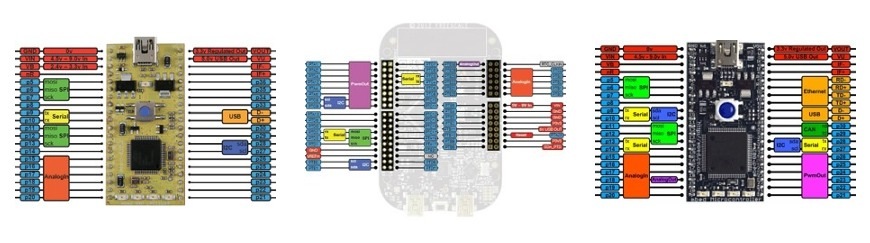
The BusIn Interface can use any pins with a blue label.
/media/uploads/chris/pinout-thumbnails.jpg
See the Pinout page for more details


1 related question:

7 comments:

09 Jun 2011

I would like to suggest that the constructor be documented to state that the parameters are specified in LSB-to-MSB order, rather than implicitly as demonstrated in the example.

Although this ordering makes sense from an API definition standpoint, it's likely the opposite sense that a noob would assume (MSB on the left, LSB on the right).

06 Dec 2011

I am a newbie. Here what is meant by case 0x3, case 0x8

08 Dec 2011

Hello Atanu, You can imagine BUS as series of bits. In example is created BUS named nibble (it means half byte - four bits) but You can name it as You wish. If You read state of the bus, You will get number (easy to use HEX numbers) which represents state of inputs in the BUS. This is input BUS so each pin in bus can have value 0 or 1. So if You read BUS, You will get 0000 - bin (0x0 hex) if no input or 1111 - bin (0xF hex) if all inputs in BUS are high. You will get 0x3 hex (0011 in bin) reading if pin 5 and 6 is High. And reading 0x8 hex (1000 bin) if pin 11 is high.

In the code is used "switch" command and as parameter is used actual status of BUS. So if p5 and p6 are high program reads bus as 0011 bin (0x3 Hex) and does what is specified in "case" for this value. In this example it prints Hello on terminal. If only p11 is High program reads it as 0x8 hex and again does what is specified in "case" for this value - prints World on terminal. For other combinations of pins are not specified cases so if pin 18 is high, program does nothing. But You can try to add Your case to see how it works.

Example state of bus:

pin - pin 11 , pin 18 , pin 6 , pin 5

state - 0 0 1 1

Pins 11 & 18 are low - 0 and pins 6 & 5 are high - 1. The reading of the bus is 0011 bin or 0x03 in hex.

You can also look on internet for "bit masking" You can use bitmasking to determine which of busIn pins are high - (nibble && 0x8).

29 Jul 2012

This doesn't have a mode() member... how would one configure all the pins on a bus to have PullUp or PullDown enabled?

Edit: nvm, switched to BusInOut which has mode() and I just leave it on input.

02 Oct 2012

So the highest pin number is the most significant bit?

03 Oct 2012

Little Endian or Big Endian is from Gulliver's Travels...Thanks wikipedia

19 Oct 2012

how can I do use the read() function???

Posting comments for this page has been disabled