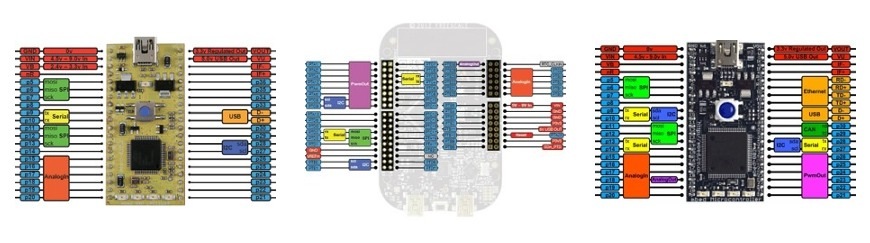
#include "mbed.h"
SPI spi(p5, p6, p7); // mosi, miso, sclk
DigitalOut cs(p8);
int main() {
// Chip must be deselected
cs = 1;
// Setup the spi for 8 bit data, high steady state clock,// second edge capture, with a 1MHz clock rate
spi.format(8,3);
spi.frequency(1000000);
// Select the device by seting chip select low
cs = 0;
// Send 0x8f, the command to read the WHOAMI register
spi.write(0x8F);
// Send a dummy byte to receive the contents of the WHOAMI registerint whoami = spi.write(0x00);
printf("WHOAMI register = 0x%X\n", whoami);
// Deselect the device
cs = 1;
}
The default settings of the SPI interface are 1MHz, 8-bit, Mode 0
The SPI Interface can be used to write data words out of the SPI port, returning the data received back from the SPI slave. The SPI clock frequency and format can also be configured. The format is set to data word length 8 to 16 bits, and the mode as per the table below:
Mode
Polarity
Phase
0
0
0
1
0
1
2
1
0
3
1
1
The SPI master generates a clock to synchronously drive a serial bit stream slave. The slave returns a bit stream, also synchronous to the clock.
I am trying to use the SPI interface. When I instantiate using "SPI spi(p9, p10, p11); mosi, miso, sclk" and ONLY that line, the 4 blue LEDs at the bottom of the MBED 1768 flash in an alternating sequence (2 outside, 2 inside, repeat). I have no other LED code active. What is going on? Should I worry? Also, it looks like this means I cannot use those 4 LEDs with the SPI code.
I am trying to use the SPI interface. When I instantiate using "SPI spi(p9, p10, p11); // mosi, miso, sclk" and ONLY that line, the 4 blue LEDs at the bottom of the MBED 1768 flash in an alternating sequence (2 outside, 2 inside, repeat). I have no other LED code active. What is going on? Should I worry? Also, it looks like this means I cannot use those 4 LEDs with the SPI code.
Oops. Apparently a typo in above comment. Should be:
I am trying to use the SPI interface. When I instantiate using
"SPI spi(p9, p10, p11); mosi, miso, sclk"
and ONLY that line, the 4 blue LEDs at the bottom of the MBED 1768 flash in an alternating sequence (2 outside, 2 inside, repeat). I have no other LED code active. What is going on? Should I worry? Also, it looks like this means I cannot use those 4 LEDs with the SPI code.
Oops. Apparently a typo in above comment. Should be:
I am trying to use the SPI interface. When I instantiate using
"SPI spi(p9, p10, p11); // mosi, miso, sclk"
and ONLY that line, the 4 blue LEDs at the bottom of the MBED 1768 flash in an alternating sequence (2 outside, 2 inside, repeat). I have no other LED code active. What is going on? Should I worry? Also, it looks like this means I cannot use those 4 LEDs with the SPI code.
Hmmm. Should be a double backslash after "... p11);" The comment processor apparently swallows the double slash for line comments. Happened both times, even though it showed OK in preview.
The flashing lights are the Blue Lights of Death, which tend to mean there is some runtime error. In your case, it is that you are trying to create a SPI interface on pins that don't support it.
The SPI Interface can be used on mbed pins p5/p6/p7 and p11/p12/p13
Hi David,
The flashing lights are the [[Debugging |Blue Lights of Death]], which tend to mean there is some runtime error. In your case, it is that you are trying to create a SPI interface on pins that don't support it.
The SPI Interface can be used on mbed pins p5/p6/p7 and p11/p12/p13
It should be 48MHz I think; SSP prescaler divides the pclk (96MHz) by a minimum of 2 for master mode. But will confirm this and any other restrictions (and update the documentation) when I'm next at a computer.
Simon
Hi Mark,
It should be 48MHz I think; SSP prescaler divides the pclk (96MHz) by a minimum of 2 for master mode. But will confirm this and any other restrictions (and update the documentation) when I'm next at a computer.
Simon
There is an important option missing in this. Some devices operate in LSBFIRST mode (i.e. Futaba GP9002A01A Display). So I need to reverse the bits before calling write. That should obviously be handled in the class itself as it is much less efficient i.e. SPI::setBitOrder(BITORDER); and BITORDER as an enum or whatever like LSBFIRST MSBFIRST
One nice thing about the mbed SPI is you can opt to not use the MISO pin if you are talking to a "write only" device (like a 74HC595):
SPI sinkDriver (p5, NC, p7);
This frees up p6 as another usable pin for general purpose digital I/O. The same thing applies to the 2nd SPI interface on p11, p12, and p13.
One nice thing about the mbed SPI is you can opt to not use the MISO pin if you are talking to a "write only" device (like a 74HC595):
<<code>>
SPI sinkDriver (p5, NC, p7);
<</code>>
This frees up p6 as another usable pin for general purpose digital I/O. The same thing applies to the 2nd SPI interface on p11, p12, and p13.
One nice thing about the mbed SPI is you can opt to not use the MISO pin if you are talking to a "write only" device (like a 74HC595):
SPI sinkDriver (p5, NC, p7);
This frees up p6 as another usable pin for general purpose digital I/O. The same thing applies to the 2nd SPI interface on p11, p12, and p13.
Does the same apply for "read only" devices, i.e.,
SPI reader (NC, p6, p7); mosi, miso, sclk ?
Thanks!
<<quote m2pc>>
One nice thing about the mbed SPI is you can opt to not use the MISO pin if you are talking to a "write only" device (like a 74HC595):
<<code>>
SPI sinkDriver (p5, NC, p7);
<</code>>
This frees up p6 as another usable pin for general purpose digital I/O. The same thing applies to the 2nd SPI interface on p11, p12, and p13.
<</quote>>
Does the same apply for "read only" devices, i.e.,
SPI reader (NC, p6, p7); // mosi, miso, sclk ?
Thanks!
we probed scl and MOSI and CS its working fine
we are not getting MISO
spi.write(0x8C3); address to read channel 4
can plz help
Is my sample coding is correct?
we have interfaced ADC (AD7924) with Mbed via SPI interface
coding written as follows
#include "mbed.h"
SPI spi(p5, p6, p7); // mosi, miso, sclk
DigitalOut cs(p10);
//Serial pc(USBTX, USBRX); // tx, rx
Serial pc(p28, p27);
int adc;
int main()
{
pc.baud(115200);
pc.format(8,Serial::None,1);
spi.format(16,3);
spi.frequency(1000000);
pc.printf("Hello world\r\n");
cs=0;
spi.write(0x8C3);
int adc = spi.write(0x000);
pc.printf("%d\r\n", adc);
cs=1;
}
we probed scl and MOSI and CS its working fine
we are not getting MISO
spi.write(0x8C3);// address to read channel 4
can plz help
Is my sample coding is correct?
If you're hitting the bit order problem Jay Jay mentioned above, and need a quick way of reversing bits, the following works nicely (for 8-bit byte oriented data only):
// From: http://graphics.stanford.edu/~seander/bithacks.html#ReverseByteWith32Bits - by Sean Anderson, July 13, 2001
unsigned char reverse_bits(unsigned char b)
{
return ((b * 0x0802LU & 0x22110LU) | (b * 0x8020LU & 0x88440LU)) * 0x10101LU >> 16;
}
... and if you're wondering how it works, "magic".
If you're hitting the bit order problem Jay Jay mentioned above, and need a quick way of reversing bits, the following works nicely (for 8-bit byte oriented data only):
<<code>>
// From: http://graphics.stanford.edu/~seander/bithacks.html#ReverseByteWith32Bits - by Sean Anderson, July 13, 2001
unsigned char reverse_bits(unsigned char b)
{
return ((b * 0x0802LU & 0x22110LU) | (b * 0x8020LU & 0x88440LU)) * 0x10101LU >> 16;
}
<</code>>
... and if you're wondering how it works, "magic".
I am using two SPIs for two ICs(AD5452:12bit DA and AD7276:12bit AD). When running each separately, it works fine, but when running both alternatively, it suddenly becomes very slow.
Does anyone have idea if the switching from one SPI module to another require overhead time? (about 20us!)
I am using two SPIs for two ICs(AD5452:12bit DA and AD7276:12bit AD). When running each separately, it works fine, but when running both alternatively, it suddenly becomes very slow.
Does anyone have idea if the switching from one SPI module to another require overhead time? (about 20us!)
The example shows how to read a register on spi bus. I need to program my a2d chip by writeing to its 3 control registers. Could you please let me know how do I wirte to a register?
Hello,
The example shows how to read a register on spi bus. I need to program my a2d chip by writeing to its 3 control registers. Could you please let me know how do I wirte to a register?
The SPI constructor seemingly programs the mbed pins for use as spi port. Now I have an interesting situation: I need to temporyrily grab the pins and control their state for doing a reset on the controlled chip. I guess I could do this by instatiating DigitalOut on the stack for the pins within my subroutine. How would I revert to spi operation afterwards? Is the previous state of the spi restored when I call the destructor of DigitalOut?
Unfortunately the documentation is silent on this question, and the source code is not available :-(
Thank you, Roland
The SPI constructor seemingly programs the mbed pins for use as spi port. Now I have an interesting situation: I need to temporyrily grab the pins and control their state for doing a reset on the controlled chip. I guess I could do this by instatiating DigitalOut on the stack for the pins within my subroutine. How would I revert to spi operation afterwards? Is the previous state of the spi restored when I call the destructor of DigitalOut?
Unfortunately the documentation is silent on this question, and the source code is not available :-(
Thank you, Roland
Roland Schwarz: I'm having a similar issue to the one you described, here's a quick hack:
after you're done using the DigitalOut (mine was a DigitalInOut) initialize another instance of the SPI class anywhere in your code(with the desired SPI port pins as parameters):
void reinit_spi()
{
SPI ccspi2(p11, p12, p13);
}
the constructor will be called and the underlying registers will be configured correctly. Once this is done you can go back and use your previous instance (and it will work, yeah... I know it's ugly but it's either this or direct register access)
Hope it helps
Roland Schwarz: I'm having a similar issue to the one you described, here's a quick hack:
after you're done using the DigitalOut (mine was a DigitalInOut) initialize another instance of the SPI class anywhere in your code(with the desired SPI port pins as parameters):
void reinit_spi()
{
SPI ccspi2(p11, p12, p13);
}
the constructor will be called and the underlying registers will be configured correctly. Once this is done you can go back and use your previous instance (and it will work, yeah... I know it's ugly but it's either this or direct register access)
Hope it helps
Hey i'm trying to test the SPI connection on my ADXL345 Accelerometer and all i'm currently getting returned from this program is 0x0.. currently have SCL > p7, SDA > p5, SDO > p6, CS > p8 + GND > GND and VOUT TO 3v3
I assume you are using the ADXL hello world program? If not, try it. If you are, then most likely problem is a wiring error.
Yeah, i'm using the hello world program - any way i can contact you to discuss it?
<<quote Sissors>>
I assume you are using the ADXL hello world program? If not, try it. If you are, then most likely problem is a wiring error.
<</quote>>
Yeah, i'm using the hello world program - any way i can contact you to discuss it?
SPI is a duplex bus so you write and read on the same cycle.
I am reading a ADIS16488 IMU.
You send a 16-bit sequence that includes a register value that will be read on the next cycle.
So for the mbed mechanization of SPI
The "write" and corresponding "read" really happen simultaneously.
That is the read (in my case) is a response to the last write ...
it's a bit confusing i think ..
SPI is a duplex bus so you write and read on the same cycle.
I am reading a ADIS16488 IMU.
You send a 16-bit sequence that includes a register value that will be read on the next cycle.
So for the mbed mechanization of SPI
The "write" and corresponding "read" really happen simultaneously.
That is the read (in my case) is a response to the last write ...
it's a bit confusing i think ..
Please login to post comments.