The DigitalOut Interface can be used on any pin with a blue label, and also with the on-board LEDs (LED1-LED4)
The DigitalOut Interface can be used to set the state of the output pin, and also read back the current output state. Set the DigitalOut to zero to turn it off, or 1 to turn it on.
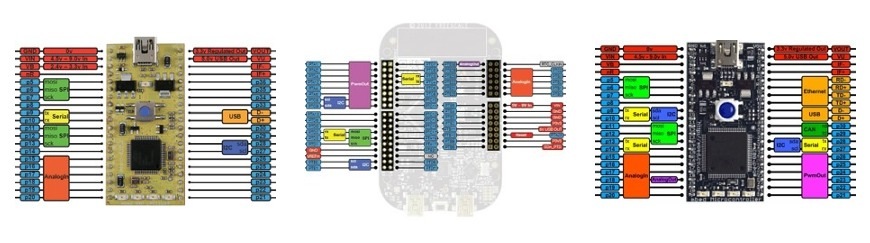
Just for fun, here's a "chase" program that shows how to use an array of DigitalOut objects to control the onboard LEDs for the LPC1768 contest board:
#include "mbed.h"
DigitalOut leds[] = {(LED1), (LED2),(LED3)};
int main() {
int i, previous;
int numLeds = sizeof(leds)/sizeof(DigitalOut);
while(1) {
for (i = 0; i < numLeds; i++){
if (i == 0) previous = (numLeds - 1);
else previous = i - 1;
leds[i] = 1;
leds[previous] = 0;
wait(0.2);
}
}
}
Just for fun, here's a "chase" program that shows how to use an array of DigitalOut objects to control the onboard LEDs for the LPC1768 contest board:
<<code>>
#include "mbed.h"
DigitalOut leds[] = {(LED1), (LED2),(LED3)};
int main() {
int i, previous;
int numLeds = sizeof(leds)/sizeof(DigitalOut);
while(1) {
for (i = 0; i < numLeds; i++){
if (i == 0) previous = (numLeds - 1);
else previous = i - 1;
leds[i] = 1;
leds[previous] = 0;
wait(0.2);
}
}
}
<</code>>
You're welcome - I hope it's useful to someone. I also created a notebook page that has a version that compares using DigitalOut and BusOut to achieve the same effect.
LED1 is the left-most LED of the mbed board - so there is no (external) port available.
<<quote Zhenning>>
DigitalOut myled(LED1);
How to know which port is led 1 is connected?
<</quote>>
LED1 is the left-most LED of the mbed board - so there is no (external) port available.
int main() {
int i,r;
int numLeds = sizeof(leds)/sizeof(DigitalOut);
i = -1;
r = 1;
while(1) {
if (i > numLeds-2) r = -1;
if (i == 0) r=1;
i=i+r;
if (i<numLeds) leds[i] = 1;
if (((i>0)&&(r==1))||((i>-1)&&(r==-1))) leds[i-r] = 0;
wait(0.1);
}
}
Knight Rider from Turkey:) this is the very first code of mine.
#include "mbed.h"
DigitalOut leds[] = {(LED1), (LED2),(LED3),(LED4)};
int main() {
int i,r;
int numLeds = sizeof(leds)/sizeof(DigitalOut);
i = -1;
r = 1;
while(1) {
if (i > numLeds-2) r = -1;
if (i == 0) r=1;
i=i+r;
if (i<numLeds) leds[i] = 1;
if (((i>0)&&(r==1))||((i>-1)&&(r==-1))) leds[i-r] = 0;
wait(0.1);
}
}
int main() {
int i,r;
int numLeds = sizeof(leds)/sizeof(DigitalOut);
i = -1;
r = 1;
while(1) {
if (i > numLeds-2) r = -1;
if (i == 0) r=1;
i=i+r;
if (i<numLeds) leds[i] = 1;
if (((i>0)&&(r==1))||((i>-1)&&(r==-1))) leds[i-r] = 0;
wait(0.1);
}
}
Lol nice Hello World program.
<<quote fyazgan>>
int main() {
int i,r;
int numLeds = sizeof(leds)/sizeof(DigitalOut);
i = -1;
r = 1;
while(1) {
if (i > numLeds-2) r = -1;
if (i == 0) r=1;
i=i+r;
if (i<numLeds) leds[i] = 1;
if (((i>0)&&(r==1))||((i>-1)&&(r==-1))) leds[i-r] = 0;
wait(0.1);
}
}
<</quote>>
Lol nice Hello World program.
int main() {
int i,r;
int numLeds = sizeof(leds)/sizeof(DigitalOut);
i = -1;
r = 1;
while(1) {
if (i > numLeds-2) r = -1;
if (i == 0) r=1;
i=i+r;
if (i<numLeds) leds[i] = 1;
if (((i>0)&&(r==1))||((i>-1)&&(r==-1))) leds[i-r] = 0;
wait(0.1);
}
}
Lol nice Hello World program.
THNX
<<quote Nakor>>
<<quote fyazgan>>
int main() {
int i,r;
int numLeds = sizeof(leds)/sizeof(DigitalOut);
i = -1;
r = 1;
while(1) {
if (i > numLeds-2) r = -1;
if (i == 0) r=1;
i=i+r;
if (i<numLeds) leds[i] = 1;
if (((i>0)&&(r==1))||((i>-1)&&(r==-1))) leds[i-r] = 0;
wait(0.1);
}
}
<</quote>>
Lol nice Hello World program.
<</quote>>
THNX
That's a standard C idiom that allows you to get the amount of memory allocated for an object. In this case, the number of elements in the array equals the size of the entire array divided by the size of a single element. By calculating the number of LEDs this way, I don't have to have storage for an explicit size constant, which makes life easier when adding or removing elements from the array.
Hope that helps.
Cheers,
Jeff
Hi, Yeaw -
That's a standard C idiom that allows you to get the amount of memory allocated for an object. In this case, the number of elements in the array equals the size of the entire array divided by the size of a single element. By calculating the number of LEDs this way, I don't have to have storage for an explicit size constant, which makes life easier when adding or removing elements from the array.
Hope that helps.
Cheers,
Jeff
The reason is because those pins are not connected to the LPC1768, they are driven by the external Ethernet Phy (mounted on the underside of the mbed). These pins have been made special-function because of the layout and filtering requirements that Ethernet imposes.
Have a look at the schematics for the the mbed NXP LPC1768 in the handbook, all will become clear!
Hope that helps'
Chris
Hi Kevin,
In short, no.
The reason is because those pins are not connected to the LPC1768, they are driven by the external Ethernet Phy (mounted on the underside of the mbed). These pins have been made special-function because of the layout and filtering requirements that Ethernet imposes.
Have a look at the schematics for the the mbed NXP LPC1768 in the handbook, all will become clear!
Hope that helps'
Chris
Maybe this info is known, but in case not:
LED1 is connected to pin 18, (etc for the other 3 LEDS) on the mbed board.
LED1 = P1.18
LED2 = P1.20
LED3 = P1.21
LED4 = P1.23
donde
Just to avoid confusion for anyone reading this, this is incorrect. While LED1 is connected to P1.18, this is not pin 18 on the mbed board. P1.18 means port 1, bit 18. p18 on the board is connected to P0.26. These ports (P0.x, P1.x, etc.) are internal to the LPC1768 on the board, and only a select few are actually broken out to pins on the DIP package.
EDIT: This is off topic for this page, but for more information on what each pin is connected to, see this document:
Just to avoid confusion for anyone reading this, this is incorrect. While LED1 is connected to P1.18, this is not pin 18 on the mbed board. P1.18 means port 1, bit 18. p18 on the board is connected to P0.26. These ports (P0.x, P1.x, etc.) are internal to the LPC1768 on the board, and only a select few are actually broken out to pins on the DIP package.
EDIT: This is off topic for this page, but for more information on what each pin is connected to, see this document:
http://mbed.org/media/uploads/chris/mbed-005.1.pdf
<<quote donde>>
Maybe this info is known, but in case not:
LED1 is connected to pin 18, (etc for the other 3 LEDS) on the mbed board.
LED1 = P1.18
LED2 = P1.20
LED3 = P1.21
LED4 = P1.23
donde
<</quote>>
Euhm, so it is correct what he says, it is connected to P1.18, he never claims it is connected to p18. In the compiler you can address it with P1_18 (or just LED1).
Edit: my bad, didnt correctly read his post, you are right :)
Euhm, so it is correct what he says, it is connected to P1.18, he never claims it is connected to p18. In the compiler you can address it with P1_18 (or just LED1).
Edit: my bad, didnt correctly read his post, you are right :)
I think when he refers to "pin 18 on the mbed board", it's safe to say he's talking about p18. Yes, he's right when he says the LEDs are connected to P1.18, P1.20, etc, but again, when he says pin 18 on the mbed board, it's misleading.
Euhm, so it is correct what he says, it is connected to P1.18, he never claims it is connected to p18. In the compiler you can address it with P1_18 (or just LED1).
I think when he refers to "pin 18 on the mbed board", it's safe to say he's talking about p18. Yes, he's right when he says the LEDs are connected to P1.18, P1.20, etc, but again, when he says pin 18 on the mbed board, it's misleading.
<<quote Sissors>>
Euhm, so it is correct what he says, it is connected to P1.18, he never claims it is connected to p18. In the compiler you can address it with P1_18 (or just LED1).
<</quote>>
I think when he refers to "pin 18 on the mbed board", it's safe to say he's talking about p18. Yes, he's right when he says the LEDs are connected to P1.18, P1.20, etc, but again, when he says pin 18 on the mbed board, it's misleading.
Euhm, so it is correct what he says, it is connected to P1.18, he never claims it is connected to p18. In the compiler you can address it with P1_18 (or just LED1).
<<quote lbrowne88>>
I think when he refers to "pin 18 on the mbed board", it's safe to say he's talking about p18. Yes, he's right when he says the LEDs are connected to P1.18, P1.20, etc, but again, when he says pin 18 on the mbed board, it's misleading.
<<quote Sissors>>
Euhm, so it is correct what he says, it is connected to P1.18, he never claims it is connected to p18. In the compiler you can address it with P1_18 (or just LED1).
<</quote>>
<</quote>>
Please login to post comments.