Recent changes
FIR Filter
Homepage
MPL115A2
Compiler Error 42
From the mbed microcontroller Cookbook.  

QEI

A rotary encoder converts angular position to an analog or digital code.

This page will deal a specific type of incremental rotary encoder - an optical quadrature encoder, which is very popular tool for determining how much a wheel has rotated and thus how far something, such as a robot, has moved.

An optical encoder consists of a disc with alternating areas of reflection and non-reflection. An emitter and receiver such as an LED and photodiode read the resulting optical pattern from the position of the optical encoder.

An incremental encoder has no knowledge of its absolute position and is simply able to count pulses which can be used to update a position in external electronics.

For the rest of this page, the phrase "quadrature encoder" will be used to mean "optical quadrature encoder".

Quadrature Encoder

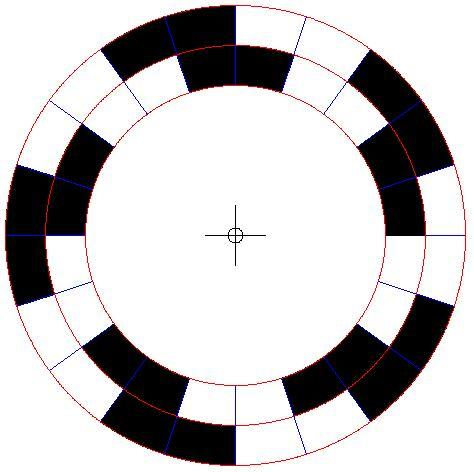
A quadrature encoder consists of a disc with two tracks, containing alternating areas of reflection and non reflection, 90 degrees out of phase.
http://mbed.org/media/uploads/aberk/encoderwheel.png

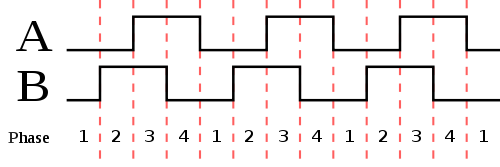
As it rotates in front of an emitter/receiver pair for each track (which we will call channel A, and channel B), it will produce the following results.
http://mbed.org/media/uploads/aberk/quadraturephase.png

There are four distinct states that can be achieved with this disc, which are gray codes. Each time there is a valid state change, the pulse count is incremented, or decremented depending on the direction. A state change is only valid if only one of the tracks has changed. If both tracks change at the same time the state change is invalid.

Clockwise rotations

PhaseChannel AChannel B
100
201
311
410

Counter clockwise rotations

PhaseChannel AChannel B
110
211
301
400

Software

The QEI library uses X2 encoding by default, which looks at the state every time a rising or falling edge occurs on channel A. It can also use X4 encoding which looks at the state every time a rising or falling edge occurs on channel A or channel B. After each rising or falling edge the pulse count is updated appropriately, depending on the direction of rotation.

Channel A and channel B are used as InterruptIn pins to ensure as few pulses as possible are missed that might cause invalid state readings or an incorrect count, which could be the case if polling was used.

An optional index channel is available which is essentially a third track on the disc which has one pulse per revolution. Thus it can keep track of the number of revolutions of the disc.

After creation of a QEI object, any change in the position of the encoder wheel will cause an update of the internal pulse count. The library methods can be used to find out what the current pulse count is (which with supporting code can be used to determine absolute position) and reset the pulse and revolution count.

The current state of the encoder can also be queried, but it is there purely for convenience - most, if not all users will not require this method.

It should be noted that the internal revolution count is only updated by the index channel. If no index channel is used, it is still easy to work out the current revolution count by dividing the pulse count by number of pulses per revolution for the disc, but this must be done in external code.

Interrupt Latency

As this library uses to interrupts to determine the pulse count, there is an upper limit on the number of pulses per second it can detect, which is dependent on the time it takes to service the interrupt.

The interrupt handler takes 2 microseconds to service, which means the library can deal with edges on the InterruptIn pins at frequencies of up to 500kHz, which equates to 500,000 pulses per second.

Hello World!

» Import this program

00001 #include "QEI.h"
00002 
00003 Serial pc(USBTX, USBRX);
00004 //Use X4 encoding.
00005 //QEI wheel(p29, p30, NC, 624, QEI::X4_ENCODING);
00006 //Use X2 encoding by default.
00007 QEI wheel (p29, p30, NC, 624);
00008 
00009 int main() {
00010 
00011     while(1){
00012         wait(0.1);
00013         pc.printf("Pulses is: %i\n", wheel.getPulses());
00014     }
00015 
00016 }

API

» Import this library into a program

Public Member Functions

QEI (PinName channelA, PinName channelB, PinName index, int pulsesPerRev, Encoding encoding=X2_ENCODING)
Constructor.
void reset (void)
Reset the encoder.
int getCurrentState (void)
Read the state of the encoder.
int getPulses (void)
Read the number of pulses recorded by the encoder.
int getRevolutions (void)
Read the number of revolutions recorded by the encoder on the index channel.

Hardware

Although this page has dealt primarily with optical quadrature encoders, the interface will deal with any encoder that provides quadrature outputs. These include the Pololu Encoder and this DC Gearhead Robot Motor which has a built in quadrature encoder.

Alternatively you can make your own with a pair of QRD1114 IR sensors, and an encoder disc which you can generate and then print using this useful online tool.

By lining each QRD1114 up with each track of the encoder disc, you have a very cheap and reliable quadrature encoder which can be used to accurately determine the position [from a set starting point] of a wheeled object.

Library

» Import this library into a programQEI

Quadrature encoder interface library.

Reference


calendar Page history
Last modified 15 Oct 2010, by   user Aaron Berk   tag Encoder, QEI, quadrature | 23 comments  

23 comments on QEI:

21 Jul 2010

This is great work, very useful. But if the API uses interrupts won't there be a max pulses per sec as the interrupt handler will need time to recover between pulses? If so what is the max counts per sec? Have you done any testing on this?

22 Jul 2010

Hi Martin,

You are correct with your questions and this is something I shall add to the page as a warning to make it clear.

I have just done some testing now as it would be good to get some sort figure for the max counts per second.

I simply added a timer to the QEI class, took a reading at the start of the encode() method every time it was called, and then worked out the time in between calls. I am using this motor which has a built in encoder. I recorded the values at both the highest speed I could run the motor, and the slowest. Here are the results:

/media/uploads/aberk/slowisrhist.jpg

/media/uploads/aberk/fastisrhist.jpg

I suspect there is some non-linearity in the encoder that's built into these motors due to some of those outliers that occured on a consistent basis.

The mean time between ISRs in both cases was approximately 1ms, leading to a very tentative of figure of about 1000 counts per second.

The encode() method currently has two pin reads in it - I imagine the time could be shaved away by using a Bus or Port object, which I will try to test in the coming week or two.

04 Aug 2010

Hmm, I thought it was faster than this..? With a single InterruptIn, I've measured frequency to about 10KHz.. And you should only need to capture one of the edges (i.e. use only one InterruptIn) and poll the other input once an interrupt has been generated to determine direction. This should also increase the speed.

11 Aug 2010

I've just realised I've been measuring completely the wrong thing...

The right thing to measure of course is how long it takes to service the interrupt handler which turns out to be 0.000002 seconds which is 2 microseconds.

Therefore the theoretical maximum frequency the library can deal with is 500kHz, which is 500,000 counts per second. A 624 count encoder would have to be going faster than 800rpm in order for the library to miss counts :)

21 Aug 2010

500KHz = 500,000 cycles per second

624 counts * 800RPM = 499200 counts per MINUTE

624 counts * 800RPM * 60 = 29,952,000 counts per second

Or did I miss something?

21 Aug 2010

oops should have finished with:

624 counts * 800RPM/60 = 8320 counts per second...

So really you could run 2000 count encoder at 15,000rpm? 2000 * 15,000rpm = 30,000,000/60 = 500,000 per sec

23 Aug 2010

No, I think you're right; I forgot to change from minutes to seconds, but it should make sense with 800rpm changed to 800rps [=48,000rpm], as that would be 499,200 counts per second which is close to the limit of 500,000 counts per second.

Sounds spot on for the 2000 count encoder calculation!

23 Aug 2010

I ran my encoder with QEI yesterday and it always counts more negative. In X2 it counts the correct pulses per rev (4000) but it accumulates a more negative count whether I rotate CW or CCW. ex. rotate 1 rev CW "Pulses is:-4000"....rotate 1 rev back in CCW dir "Pulses is:-8000"

Briefly looking at the QEI.h it looks like you relay on a 4bit pattern for direction -but you only have two channels (pins) connected?

Also, X4 doesn't generate any pulses -I simply uncommented X4 line and commented out X2 below it. Was that correct?

23 Aug 2010

errr... hate not being able to edit mistakes.

"looks like you relay on a 4bit pattern for direction" should be "looks like you rely on a 4bit pattern to determine direction"

24 Aug 2010

Could you give me some more details about how your hardware is set up including what encoder you're using?

Have you tried swapping channel A and channel B?

A 2-bit pattern is used to determine direction, which is made up from the value on each of two pins/channels.

Yes, to use the X4 encoding scheme with the QEI_HelloWorld program simply uncomment line 00005 and comment line 00007. Let me know about your set up and hopefully we can get the bottom of your phantom pulses.

24 Aug 2010

Hello,

I'm using a 2000 count "pulse coder" (an old fanuc encoder). It's 5V -roughly TTL has A, /A, B, /B & Z, /Z(index). Only the A & B are connected. I will try switching the A & B. If I remember correctly A = p30 B = p29 but I'm not sure. I'll check when I get home and let you know the specifics and the results.

FWIW - If the numbers are correct, the theoretical performance of your encoder library + mbed is easily on par with a commercial CNC control... well, at the the reading a single encoder part :-) I'll let you know actual performance as soon as I can get my encoder to count correctly so I run the servo motor

Cheers

24 Aug 2010

Switching a & b has no effect

24 Aug 2010

Also, I've 'scoped the channels, they're switching correctly

25 Aug 2010

Can you print out the states you're getting using getCurrentState()?

This should determine why the pulse count isn't being updated properly.

25 Aug 2010

I'm an idiot... I was wired to A & /A, not A & B.... ughhh

Works fine. I'll let you know how it does at 2000rpm+

17 Oct 2010

on my MBED, pin 20 cannot be used, Although it compiles, a long serial error message gets sent out ?? any thaughts

Cheers Ceri.

17 Oct 2010

Hi Cheers Ceri. >>http://mbed.org/handbook/InterruptIn >>>Any of the numbered mbed pins can be used as an InterruptIn, except p19 and p20.

24 Oct 2010

Has anyone really tested this? I have simple code using the QEI modified to count on just one input. The counts are then printed to the PC serial port. The program stops printing at around 8Khz. Seems to me you might count at 500Khz, but there wouldn't be anything else happening.

Subsequently, I have used the counter class presented in the InterruptIn documentation. It has the same limitations.

More importantly, is there a QEI library that uses the on-chip QEI, not a software one?

29 Oct 2010

user Jonathan Masters wrote:

More importantly, is there a QEI library that uses the on-chip QEI, not a software one?

I looked into making a library for the H/W QEI peripheral, but gave up when I found that the LPC1768 A input is physically attached to LED2, B to LED4 and the index is not attached to anything at all (P1.20, P1.23, P1.24 respectively).

Jim

26 Nov 2010

Mmm. Hobby/experimenter PCB designers keep making the same mistake. Hardwiring LED/resistors to pins. (The Arduino does the same on its pin13) This basically disables that pin from other uses because the electrical properties are now different from the other pins.

Making an LED flash is the hello-world! of MCUs. So, the reason to give beginners hardwired LEDs disappears after day-1. After that it is a matter of convenience.

An argument against providing jumpers or dip-switches to bypass the LEDs is cost - really! just put 2 empty through hole pads and a trace cut area and I'll do the rest myself.

Please. On the next design, bring out ALL usable LPC1768 pins to external DIP pins and let us figure out how to make most use of the microprocessor. Making the PCB longer to accommodate the additional pins may be needed.

The whole runtime error notification via Siren-lights is great, but NOT at the expense of accessing important features of the MCU. A suggestion, just make the status LED1 flash distinctly like SOS . . . _ _ _ . . . or something.

21 Jan 2011

user Jim Patterson wrote:

user Jonathan Masters wrote:

More importantly, is there a QEI library that uses the on-chip QEI, not a software one?

I looked into making a library for the H/W QEI peripheral, but gave up when I found that the LPC1768 A input is physically attached to LED2, B to LED4 and the index is not attached to anything at all (P1.20, P1.23, P1.24 respectively).

Jim

You could have a look at the hardware driver shown in my notebook http://mbed.org/users/hexley/libraries/QEI_hw/lk55sm, and look at the notes on how to connect to the mbed shown here http://mbed.org/users/hexley/notebook/qei_hw-interface-implementation-notes/

03 Nov 2011

Hi all! I am playing around with the encoders and they work fine. Is it possible to use an internal pull-up resistor on the A- and B- channel and connecting the common to ground? Now I have the common connected to plus (via an external 1 KOhm resistor) but I would like to use the internal pull-ups to reduce component count...

Regards, Willem Braat (Netherlands)

05 Mar 2012

Hi, I just wanted to say thanks for the very useful and easy to use library! Cheers!

Please login to post comments.