MODGPS
MODGPS is an easy to use library that allows you to get basic time/date and location information from an attached GPS module.
Connecting up the GPS module
The MODGPS library only requires you to connect the TX serial out from your GPS module to one of the three available RX serial inputs on the Mbed.
Optionally, if your GPS module has a One Pulse Per Socond (1PPS) output you can connect this to any of the Mbed pins that is supported as an InterruptIn. Without this the GPS the library will return the time to within +/-0.5 of a second. However, connecting the 1PPS signal if available will increase the acuracy to +/-0.001 of a second. Note, the 1PPS output is sometimes incompatible with the Mbed input. In this case you may need to buffer the signal using a transistor or FET. Buffering the signal will often turn a default 1PPS active leading edge to an active trailing edge. More on this later.
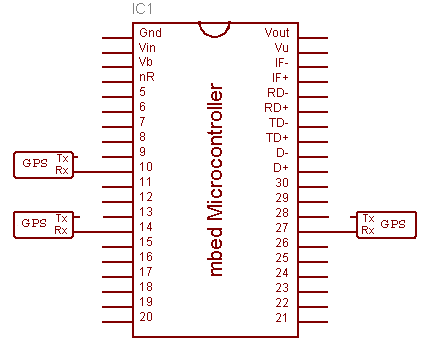
Using the MODGPS library
First, import the library into the online compiler.
Import libraryMODGPS
Allows for a GPS module to be connected to a serial port and exposes an easy to use API to get the GPS data. New feature, added Mbed/LPC17xx RTC synchronisation
Last commit 21 Apr 2011 by  Andy K
Once imported, change your projects main.cpp to:-
#define COMPILE_EXAMPLE_CODE_MODGPS
#define PCBAUD 115200
#define GPSRX p25
#define GPSBAUD 9600
//#define PPSPIN p29
#include "/MODGPS/example1.cpp"
Note, please set PCBAUD to whatever you normally connect your Mbed to Pc/Mac/Linux box. The GPSBAUD is set to 9600 which is common among many GPS modules. If it is different set that too. The PC serial isn't required but you will get more information. Optionally define PPSPIN if you have connected it. If it's not connected leave the #define commented out, otherwise remove the leading comment.
Now switch everything on. LED1 should begin slowly flashing. If you connected any optional 1PPS singal then LED2 will flash once per second.
When the library receives a GPS NMEA RMC data packet LED3 flashes and when a NMEA GGA packet is received LED4 flashes.
If you have a PC connected to the USB serial port on the Mbed, additional data is displayed.
Using the MODGPS library
First, create an instance of the GPS object and pass in the RX pin it's connected to:-
#include "mbed.h"
#include "GPS.h"

GPS gps(NC, p25);
Getting data from the MODGPS library is very simple. There are several ways, the simplest of them shown below.
- To get location data:-
    double latitude  = gps.latitude();
    double longitude = gps.longitude();
    double altitude  = gps.altitude();
- Or, to get all data together:-
    GPS_Geodetic g;
    gps.geodetic(&g);
    double latitude  = g.lat;
    double longitude = g.lon;
    double altitude  = g.alt;
- To get time data:-
    GPS_Time t;
    gps->timeNow(&t);
    pc.printf("%02d:%02d:%02d %02d/%02d/%04d\r\n",
            t.hour, t.minute, t.second, t.day, t.month, t.year);
The API contains many more functions such as Julian Date, Sidereal time and more. Follow the link to find the full list and documentation.