InterruptIn

The InterruptIn interface is used to trigger an event when a digital input pin changes.

Hello World!

» Import this program

#include "mbed.h"
 
InterruptIn button(p5);
DigitalOut led(LED1);
DigitalOut flash(LED4);
 
void flip() {
    led = !led;
}
 
int main() {
    button.rise(&flip);  // attach the address of the flip function to the rising edge
    while(1) {           // wait around, interrupts will interrupt this!
        flash = !flash;
        wait(0.25);
    }
}

API

API summary

» Import latest build into a program

Public Member Functions

  InterruptIn (PinName pin)
  Create an InterruptIn connected to the specified pin.
void  rise (void(*fptr)(void))
  Attach a function to call when a rising edge occurs on the input.
template<typename T >
void  rise (T *tptr, void(T::*mptr)(void))
  Attach a member function to call when a rising edge occurs on the input.
void  fall (void(*fptr)(void))
  Attach a function to call when a falling edge occurs on the input.
template<typename T >
void  fall (T *tptr, void(T::*mptr)(void))
  Attach a member function to call when a falling edge occurs on the input.
void  mode (PinMode pull)
  Set the input pin mode.

Interface

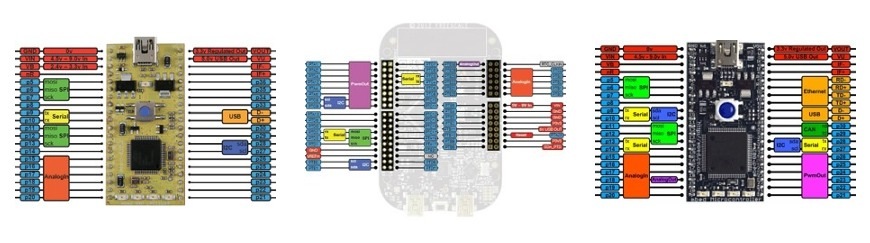
Certain pins cannot be used for InterruptIn

  • mbed NXP LPC1768: Any of the numbered mbed pins can be used as an InterruptIn, except p19 and p20.
  • mbed FRDM KL25Z: Only the pins of port A and D can be used. (PTA[0-31] and PTD[0-31]).
/media/uploads/chris/pinout-thumbnails.jpg
See the Pinout page for more details

The pin input will be logic '0' for any voltage on the pin below 0.8v, and '1' for any voltage above 2.0v. By default, the InterruptIn is setup with an internal pull-down resistor.

No blocking code in ISR

In ISR you should avoid any call to wait, infinitive while loop, or blocking calls in general.

No printf, malloc, or new in ISR

In ISR you should avoid any call to bulky library functions. In particular, certain library functions (like printf, malloc and new) are non re-entrant and their behaviour could be corrupted when called from an ISR.

Examples

An example class for counting rising edges on a pin

#include "mbed.h"

class Counter {
public:
    Counter(PinName pin) : _interrupt(pin) {        // create the InterruptIn on the pin specified to Counter
        _interrupt.rise(this, &Counter::increment); // attach increment function of this counter instance
    }

    void increment() {
        _count++;
    }

    int read() {
        return _count;
    }

private:
    InterruptIn _interrupt;
    volatile int _count;
};

Counter counter(p5);

int main() {
    while(1) {
        printf("Count so far: %d\n", counter.read());
        wait(2);
    }
}

To read an input, see DigitalIn

For timer-based interrupts, see Ticker (repeating interrupt) and Timeout (one-time interrupt)


2 related questions:


36 comments:

26 Oct 2010

I don't see the Edit Page in here, but I would like to add the read function, so other people see it too.

Can anyone fix this?

Lerche

30 Oct 2010

Is the first example correct. I can't seem to get it working. Only led4 is blinking.

30 Oct 2010

Well, you need a input of some sort on pin 5 to make the interrupt trigger. Lerche

23 Feb 2011

I have two InterruptIn pins and two different functions when pins are asserted. I noticed that only 1 ISR is executed. Other is not even once executed!!!! Can anyone help me on this????

Nitin

23 Feb 2011

Nitin, check that you are not using p19 or p20. If that's not it, please post the program and more details in the forum.

24 Feb 2011

Hi Igor, I am not using p19,p20. I am trying to interface OV7670 camera. Initialization is done by atmega32. TRIG pin is toggled once to indicate atmega32 to start initialization. After initialization, Atmega32 sets ECHO pin in order to acknowledge the initialization request. After initialization, I am supposed to get 16-bit data from cam. Cam's data lines are 8-bit. So, 16-bit is got when PCLK(CAM) pin toggles twice. There is also a VSYNC pin to indicate the start of frame. So I have 2 ISR as there are 2 InterruptIn pin. Following is the code, Only ISR vsync() gets executed. ISR pclk() is not executed even once. When i comment out ISR vsync(), ISR pclk() gets executed upon interrupt request!!!! And one more problem is that when I try reading the 8-bit data lines in BusIn mode, I get proper data (ISR vsync() commented). But in PortIn mode I get garbage data. Please help me....

#include "mbed.h"
#include "pcf8833.h"                      //Nokia 6100 LCD header

/*
Camera data pins    Mbed pins 
D0                    p26
D1                    p25 
D2                    p24
D3                    p23
D4                    p22
D5                    p21
D6                    p19
D7                    p20
*/


PortIn PORT1(Port1,0xC0000000);           //Camera output data D7,D6
PortIn PORT2(Port2,0x3F);                 //Camera output data D5-D0  

DigitalOut myled(LED1);

DigitalOut OSC_E(p7);                     //Camera oscillation Enable pin 
DigitalOut TRIG(p8);                      //Trigger pin used to request camera initialization(initialization will be done by atmega32)  

DigitalIn ECHO(p9);                       //Echo pin is set by atmega32 in order to indicate that its has completed initializing the camera

InterruptIn VSYNC(p5);                    //Camera VSYNC
InterruptIn PCLK(p14);                    //Camera pixel clk

unsigned int count,count1;
void pclk(void)
{
    OSC_E=0;                             //stop camera oscillation
    WriteSpiData(((PORT1.read()>>24)&0xC0)|(PORT2.read()&0x3F));  //read 8-bit data on display on Nokia LCD
    OSC_E=1;                             //start camera oscillation
    
}
void vsync(void)
{
    OSC_E=0;
    WriteSpiCommand(PASET);              //To set LCD cursor position at 0,0
    WriteSpiData(0);
    WriteSpiData(131);

    WriteSpiCommand(CASET);
    WriteSpiData(0);
    WriteSpiData(131);
    WriteSpiCommand(RAMWR);
    OSC_E=1;
}
int main() {
    wait(1);
    InitLcd();
    LCDClearScreen(Red);
    LCDClearScreen(Green);
    OSC_E=1;
    TRIG=1;
    TRIG=0;
    while(!ECHO);
    PCLK.rise(&pclk);
    VSYNC.fall(&vsync);
    while(1) {
    }
}

Thanks Nitin

02 Jun 2011

Hello,

Does InterruptIn have priority over rest of the code? What i am trying to do is to increase the value of a variable even when the code is stuck with an other line of the code. (Writing in a file in my case)

thanks Levi

08 Jul 2011

Basically 'yes'. Daniel

28 Aug 2011

@Nitin

I'm about to use multiple interrupts too so I've made some tests. It turn out that when I wired two pins, with different ISRs, to the same interrupt source, sometimes (!) only one routine get to execute. Triggered separately they both work as expected. To be fair it's a breadboard test with some dirty wiring and no debouncing that may cause loss of a flank to one of the interrupts. A quick (i.e not very computed) lowpass filter does not eliminate the problem but makes it occur less frequent.

My vote is on the electrical.

/Per

22 Sep 2011

Hello,

once created an InterruptIn and .rise attached to it, how to stop them?

I use p17, p18. I tried to delete the entire InterruptIn object, but they still keep responding.

Bug or feature? Or did I understand something wrong regarding deleting objects.

Thanks Ju

26 Sep 2011

Hi there.

This function is working fine for me with one exception.

How can I initialize the state? Depending on when I boot up my sensor is either HIGH or LOW and I need to display that on my screen. Any ideas how to read the state of the pin and then 'force' the appropriate interrupt so I have the correct startup state displayed?

Since this is an interrupt function, there is no way to read the initial value.

26 Sep 2011

I have a question about the digital inputs on the mbed. I read the tutorial posted on the mbed website that gives some basic programming guides and examples.

What I'm interested in is looking at one of the digital inputs for a certain period of time. For example, if the input is high for 5 seconds continuously without fluctuations, then and only then send the desired output.

I know that I can implement this using some conditional programming and IF conditions, but I don't know how to tell the mbed to look at the input for a specific amount of time.

Can anyone please help me with this?

27 Sep 2011

Eric:

There are a few ways depending on your system and how fast this input may change.

1) Stay in a loop for 5 seconds and continually poll the input. Exit on a timer or a change in pin level. 2) Set up a timer interrupt. (Ticker) and have an interrupt occur every 100ms. Check the state of the pin every 100ms (on the Ticker interrupt) and count up to 5 seconds. When the 5 seconds is up, disable the timer. 3) Start a timer and check that timer when an interrupt on that pin finally occurs. If it is past the 5 seconds, then the data is valid, if it is before the 5 seconds, then the ISR simply ignores the data.

There are a few more but this will at least get you started.

06 Oct 2011

I just made a measuremement using mbed2368 in an oscilloscope to see how fast my InterruptIn responds? I found it is 10uS. Do you people think my measurement is correct, if yes Is there any way the 10uS latency can be reduced say towards 1uS?

code I tested: with osciloscope channel1 connected to clk (square pulse generated in main p21) and second channel of CRO one to output(p22). and saw the delay between the rising edges to be 10uS.

  1. include "mbed.h"

DigitalOut clk(p21); InterruptIn button(p26); DigitalOut output(p22); DigitalOut flash(LED1);

void flip() { output = !output; }

int main() { button.rise(&flip); attach the address of the flip function to the rising edge while(1) { wait around, interrupts will interrupt this! flash = !flash; clk = !clk; wait(0.25); } }

pl. comment.

12 Jan 2012

Hi:

In the InterruptIn example above, if the interrupt pin is set to p20 for mbed LPC1768, it will not work.

#include "mbed.h"

InterruptIn button(p20);
DigitalOut led(LED1);
DigitalOut flash(LED4);

void flip() {
    led = !led;
}

int main() {
    button.rise(&flip);  // attach the address of the flip function to the rising edge
    while(1) {           // wait around, interrupts will interrupt this!
        flash = !flash;
        wait(0.25);
    }
}

From PinName.h, for LPC1768

p20 = P0_22

LED1 = P1_8

LED2 = P1_9

LED3 = P1_10

LED4 = P1_11

Any clue?

12 Jan 2012

second row from this page says: "Any of the numbered mbed pins can be used as an InterruptIn, except p19 and p20. "

12 Jan 2012

Perhaps some kind of ASSERT is implemented in the source code to flag it as error.

12 Jan 2012

p19 and p20 are on port1

http://mbed.org/users/Lerche/notebook/lpc1768-pin-functions/

In pinname.h it says (following your link):

Quote:

57 , p19 = P1_30

58 , p20 = P1_31

25 Jan 2012

Quote:

Any of the numbered mbed pins can be used as an InterruptIn, except p19 and p20.

Is this true for the Cortex-M0 mbed too?

02 Jun 2012

What interrupt level is used for these types of interrupts?

25 Sep 2012

I am having problems with the following code.

Main.cpp

#include "mbed.h"
#include "rtos.h"
#include "os_tasks.h"
#include "isr.h"

DigitalOut led1(LED1); 
DigitalOut led2(LED2);
DigitalOut led3(LED3);
Serial pc(USBTX, USBRX); // tx, rx
InterruptIn button(p5);

int main(void) { 
    button.rise(&button_ISR);  
    RtosTimer os_5ms_timer(os_5ms_task, osTimerPeriodic, (void *)0);   
    os_5ms_timer.start(5);         
    Thread::wait(osWaitForever);
}

isr.cpp

#include "mbed.h"
#include "os_tasks.h"
#include "objects.h"

void button_ISR() {
    pc.printf("In button_ISR \n\r");
} 

1. If I directly call button_ISR from Main, I get the expected printout.

2. My problem is with getting the interrupt to occur. I have a wire with one end connected to p21 (VOUT). I momentarily insert the other end into p5 on a breadboard or directly touch p5 and expect the interrupt to occur. Is this not right? Should I do something else?

Thanks.

25 Sep 2012

Never used RTOS, so dunno if that code is all correct. However by default pull-ups are enabled on all pins, so they are high state, you dont change that, and you connect an interrupt on rising edge of the pin. However since the pin will always be high the interrupt never happens.

Quick way to check it would be to connect p5 to GND, and then remove that connection. Pull up should then give you a rising edge that it should trigger on. (Btw p21 is a GPIO pin, I think you mean p40, numbering on right side is inverted compared to left side).

25 Sep 2012

Vout is p40, not p21. You probably need a puldown resistor on the inputpin to make sure it is at low-level during idle state and detects a rising edge when you momentarily connect the wire. It is likely that you get multiple interrupts when you touch the pin with a wire.

26 Sep 2012

Indeed Vout is p40, not p21. I had the right pin but was counting it wrong from top to bottom on the right side also.

I still can't get interrupt to work. I wonder whether I am getting multiple interrupts I don't quite believe this either.

I can read p5 as digitalin. As is, it comes up low. When I short it to vout, it comes up high. This is different from what you guys are saying above but agrees with the http://www.amazon.com/Fast-Effective-Embedded-Systems-Design/dp/0080977685. I can post the page number later if someone wishes.

Can someone else try the interruptin? Thanks.

26 Sep 2012

You are right, by default inputs are set as pull-down (not what you would expect imo, but you are right). But undefined pins have pull up enabled (at least I can get your rising edge interrupt to happen by connecting p5 to random other pin).

Anyway found your interrupt problem, it was the little issue that I have no experience with RTOS, but I happened to read a bit about it yesterday, and the important part:

Quote:

Because of the mutexes in the ARM C standard library you can not use printf, malloc and new in ISR!

Now I still dont have a clue what a mutex is :P, but you arent allowed to use printf in an ISR, there is your problem. I checked it with toggling an LED instead of using printf, and that works fine (by connecting p5 to p40). Do take into account you will get multiple interrupts, unless you add debouncing.

26 Sep 2012

Erik,

The example for InterruptIn in the book did use LED toggles. I wish that I had tried the example exactly as specified in the book :-)

Thanks a whole bunch. Have a great day.

18 Oct 2012

I have this really silly problem with Interrupts. I connected my mBed pin p8 to a function generator and provided a square wave of 1Khz to that pin. I am not sure why the code doesn't enter into the interrupt function. I have just copied and pasted the same example code given on the top of the page.

My ultimate goal is to make a frequency counter with the mBed.

18 Oct 2012

user Neel Shah wrote:

I have this really silly problem with Interrupts. I connected my mBed pin p8 to a function generator and provided a square wave of 1Khz to that pin. I am not sure why the code doesn't enter into the interrupt function. I have just copied and pasted the same example code given on the top of the page.

My ultimate goal is to make a frequency counter with the mBed.

And you have checked that the InterruptIn is set for p8 right? :-) And that you have GND connected to GND from the freqgen? :-)

Lerche

18 Oct 2012

@Lerche: Yes I have checked that! and my GNDs are also connected.

Furthermore I have also got an o'scope connected to the pin just to verify that the freqgen is really generating a square wave at 1Khz. Also I have varied the frequency from 300Hz to 1Khz!

Don't exactly know whats going wrong!

19 Oct 2012

user Dimiter K wrote:

Is the first example correct. I can't seem to get it working. Only led4 is blinking.

Could you get it to work? The same is happening to me as well.

19 Oct 2012

Could you post the code?
It would be easier to clarify if something went wrong there. :-)
Lerche

19 Oct 2012

@lerche: Here you go:

  1. include "mbed.h"

InterruptIn button(p5); DigitalOut led(LED1); DigitalOut flash(LED4);

void flip() { led = !led; }

int main() { button.rise(&flip); attach the address of the flip function to the rising edge while(1) { wait around, interrupts will interrupt this! flash = !flash; wait(0.25); } }

Here only led4 is toggling and not 1

20 Oct 2012

Neel:

Code tags help a lot:

include "mbed.h"
InterruptIn button(p5);
DigitalOut led(LED1); 
DigitalOut flash(LED4);

void flip() { 
     led = !led; 
}

int main() { 
     button.rise(&flip);           //attach the address of the flip function to the rising edge 
     while(1) { 
          flash = !flash; 
          wait(0.25);             //wait around, interrupts will interrupt this!
     } 
}

The button referring to your freqgen right?
Have you got a scope?
Then you could check the signal on p5 on the mbed.
Lerche

29 Nov 2012

hi I want to design a controller to lower the speed of a motor if it exceeds a preset value. that means I have to know the know the current speed and compare with the set value. I tried to use an interruptin to count the number of pulses from a shaft encoder attached to the dc motor. but it wasn't working. can anyone help me with the cide that count the number of pulses in a second; hence determine the speed of the motor? .Thanks

03 Dec 2012

Can i detach an InterruptIn?

03 Dec 2012

Attaching NULL should detach it.