Dynamixel AX12 Servo

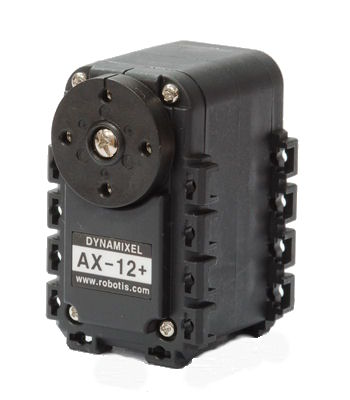
This little beast is a highly featured piece of kit. It's not the cheapest servo money can buy, but it is certainly very versatile, and delivers a serious bang for your buck.
AX12

Hello World!

» Import this program

00001 #include "mbed.h"
00002 #include "AX12.h"
00003 
00004 int main() {
00005 
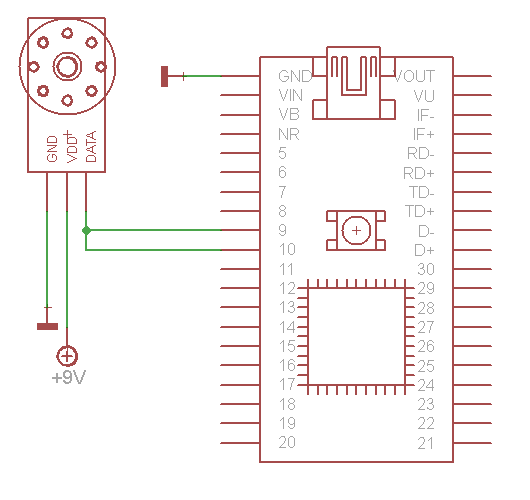
00006     AX12 myax12 (p9, p10, 1);
00007 
00008     while (1) {
00009         myax12.SetGoal(0);    // go to 0 degrees
00010         wait (2.0);
00011         myax12.SetGoal(300);  // go to 300 degrees
00012         wait (2.0);
00013     }
00014 }

AX12 AX12

Library

» Import this library into a program

Public Member Functions

  AX12 (PinName tx, PinName rx, int ID, int baud=1000000)
  Create an AX12 servo object connected to the specified serial port, with the specified ID.
int  SetMode (int mode)
  Set the mode of the servo.
int  SetBaud (int baud)
  Set baud rate of all attached servos.
int  SetGoal (int degrees, int flags=0)
  Set goal angle in integer degrees, in positional mode.
int  SetCRSpeed (float speed)
  Set the speed of the servo in continuous rotation mode.
int  SetCWLimit (int degrees)
  Set the clockwise limit of the servo.
int  SetCCWLimit (int degrees)
  Set the counter-clockwise limit of the servo.
int  SetID (int CurrentID, int NewID)
  Change the ID of a servo.
int  isMoving (void)
  Poll to see if the servo is moving.
void  trigger (void)
  Send the broadcast "trigger" command, to activate any outstanding registered commands.
float  GetPosition ()
  Read the current angle of the servo.
float  GetTemp (void)
  Read the temperature of the servo.
float  GetVolts (void)
  Read the supply voltage of the servo.

Datasheet

AX12 Datasheet (PDF)

Tech Specs

The headline features of the AX12 are:

  • 55g
  • 7v - 10v supply
  • 900mA maximum current
  • 16.5kg/cm Holding torque
  • 300 degree or continuous rotation
  • Half duplex serial (8-N-1) interface, up to 1Mbps
  • Feedback for position, temperature, load, voltage etc

It is really mechanically sound too, and comes with a mounting plate, a bracket to fit to the spindle and plenty of nuts and bolts to bolt it all together. It has been designed so that one servo canbe mounted on the spindle of another so you can do multple degrees of freedom just by mounting them on eachother.

Development Notebook Page

If you want to read more details about the development of this library, the full write-up can be found at :

AX12 Notebook page


9 comments:

02 Sep 2010

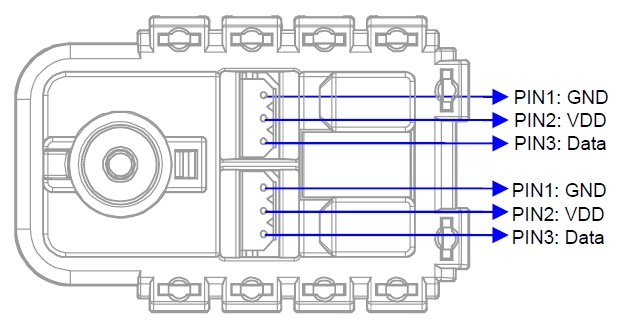
I've tried the library and 'Hello World' out on my AX12+ and I'm having some issues getting it going. It's powered up with a separate 9v supply and wired as above, however, all I'm getting is a 'click' and the LED on the back flashing once (at the same time). I've tried two different servos and on different serial pins but I'm getting the same issues on all of them.

I'll have a more detailed look myself when I get the chance, just wondering if you had any insights for a possible cause.

Joe

08 Sep 2010

Had another play with the servo earlier and found out that it is actaully moving, just very small increments with each command. Commenting out the SetGoal(240); showed that the servo is moving towards 60 degrees just very slowly, one small increment at a time. I tried a mode 1 with a speed of 1 and I get exactly the same issue. The servo is moving, just a ting amount each time it receives a signal.

Any ideas?

Joe

19 May 2011

The AX12 class is really nice - thanks so much.

However, I'm having trouble with the following code. I think my hardware is good because the attached motor is moving as directed. The problem is the reported position is always reporting 160 degrees instead of the actual position. I suspect something with the AX-12A. Maybe something needs to get initialized for position reports to work? Any ideas?

This is a brand new AX-12A that I just started using yesterday.

Thanks, Jim

#include "mbed.h"
#include "AX12.h"

DigitalOut myled(LED2);
AX12 myax12( p9, p10, 1 );

void vPrintPos( void );

int main() {
    while (1) {
        myax12.SetGoal( 150 );
        myled = 1;
        wait( 1 );
        vPrintPos();
        wait ( 1 );
        myax12.SetGoal( 130 );
        myled = 0;
        wait( 1 );
        vPrintPos();
        wait ( 1 );
    }
}

void vPrintPos( void ) {
        float fPos = myax12.GetPosition();
        printf( "Pos = %f\n", fPos );
}

Position Request

/media/uploads/jimk3038/pos_req.jpg

AX-12A Response

/media/uploads/jimk3038/pos_reply.jpg

29 May 2011

Maybe a stupid question, have you already tried to get other values GetTemp GetVolts, do they gives the right value ?

oops, when i am looking at your beautiful analyzer output, the return value=1FF > 511*300/1024=150 thats the position you send to the servo ??

31 May 2011

Sorry to say this but I've found some serious problems with this class. The AX12::read() function has problems. To prove this to yourself, try adding a bit of code to clear the whole "Status" array before actually receive characters. This should not affect anything - but it does! So, for this code to work, multiple calls must be made to AX12::read() so that previous results combine with new results in the Status array.

Also, there are lots of missing function in this class. There is no way to set the torque maximum as an example.

I started over and wrote my own source code in plane old C. I can post the source if people are interested.

Jim

31 May 2011

Hi Jim, I've got the same issue you described. The reported position is always 160 degrees, independent from the actual position the servo is at. Did you manage to find the bug? I really would be interested at your c-code. Thanks, Benny

03 Jun 2011

OK, I finally got off my butt and posted some source code. Have a look at the following link: http://ph-elec.com/content/mbed-ax-12a-servo-motor-hacking

Let me know if you have any problems.

Thanks, Jim

10 Jun 2011

Nice work Jim, any chance of wrapping this up into a new library?

10 Jun 2011

user Martin Smith wrote:

Nice work Jim, any chance of wrapping this up into a new library?

Yeah, thanks for your work Jim! I haven't been able to test your code yet, since I'm dealing with some other issues right now... When I get to it I will let you know if it works for as well, though.

Benny