Recent changes
Slingshot user guide
tag Guide, user
NFCLamp user guide
tag Guide, user
Homepage
MPL115A2
Compiler Error 42
From the mbed microcontroller Cookbook.  

wifly

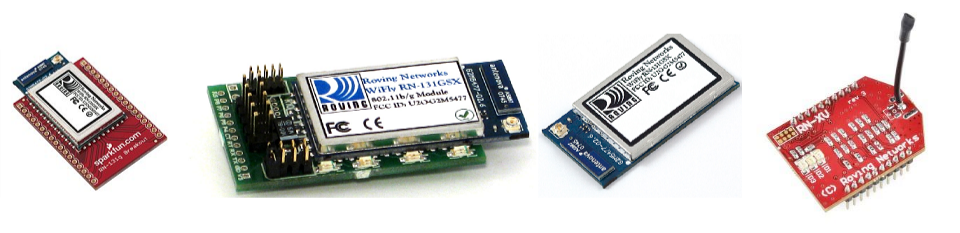
/media/uploads/Nathan/wifly_many2.png

Introduction

The WiFly is Roving Network's series of WiFi modules. Comprehensive documentation etc. can be found at Roving Network's site here. An mbed WiFly library can be found here.

The WiFly series of modules provide a reasonably simple interface to the internet over a wireless network. Standard communications are through an UART interface (GND, PWR, TX & RX), which is the minimum amount of connections needed. Configuration and use of on-board functions are done in command mode, which is enabled through UART by entering a pre-set command, default '$$$' or using TELNET. The module features its own TCP/IP stack as well as UDP etc. Please refer to the Roving Networks datasheet for pin layouts.

Breakout boards available to order, with additional SPI interface added in (although the board width may be for another single-board microcontroller and hence unwieldy).

The module is capable of functioning as both a server and a client, and can function in both infrastructure and ad-hoc modes. WEP-128, WPA-PSK (TKIP) and WPA2-PSK (AES) are all supported.

Getting started

First determine which pins of your WiFly module are power, ground, TX & RX. These should be connected to the mbed's pins accordingly. Make sure you haven't got the TX and RX mixed up. Murphy's law states this will be the case if you do not check beforehand. If you receive no response from the module, this is probably the case. For this stage I wrote a simple mbed program to pass input from a terminal on the pc to the device - program. If you are experimenting, it is advisable to have write in a few hotkeys that will execute commands you use often (HTTP GET request for example).

A basic hardware configuration (if you don't use a battery to power the module) is:

wifly pinMbed pin
3.3V RINGND
GNDGND
VDD BATTVOUT
VDD INVOUT
RXTX
TXRX
RESETany DigitalIn

Information

If everything is connected correctly, you should get the response "CMD" when you put in three consecutive dollar signs "$$$". The module is now in command mode. To return the module to this factory state, if you want to, you should enter in command mode "factory RESET\r".

Here is a configuration example:
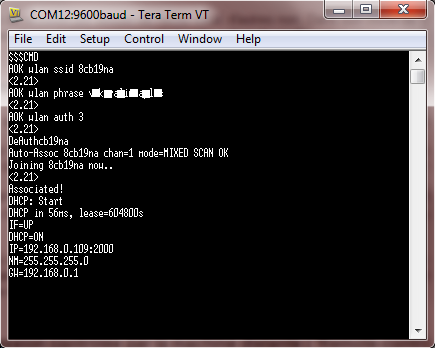
/media/uploads/samux/wifly_conf.png

There are a lot of commands to configure the wifly module. Please take a look to the user manual if you want more information on all possible commands.

Hello World!

Please be sure to read the Wifly datasheet and API of Wifly class, if you are using it, for maximum ease of use.

Code

#include "mbed.h"
#include "Wifly.h"

Serial pc(USBTX, USBRX);

/* wifly object where:
*     - p9 and p10 are for the serial communication
*     - p17 is for the reset pin
*     - "mbed" is the ssid of the network
*     - "password" is the password
*     - true means that the security of the network is WPA
*/
Wifly wifly(p9, p10, p21, "mbed", "password", true);


int main() {
    char recv[129];
    
    // join the network specified in the constructor
    while (!wifly.join()) {
        printf("cannot to join the network, will retry!\r\n");
        wifly.reset();
    }
    
    printf("network joined!\r\n");
    
    //print all received messages
    while(1)
    {
        if(wifly.readable()) {
            wifly.read(recv);
            printf("read: %s\r\n", recv);
        }
        wait(0.2);
    }
}

» Import this programWifly_HelloWorld

Hello World with a wifly module (RN 131 C/G)

The previous program tries to connect the network. If the network is joined, it will listen and print all messages received. So if we open a TCP connection, we should see *HELLO* on the client and *OPEN* from the wifly module. By default, the wifi module is listening on port 2000.

/media/uploads/samux/telnet_wifly.png /media/uploads/samux/network_joined.png

Warning

Note the WiFly code is not interchangeable with the ethernet; with the ethernet code, the TCP/IP stack is on the mbed, and with the WiFly, the stack is on the WiFly module itself.

Things to be aware of:

Stuff the WiFly can do

Libraries for the module:

Projects with this module:


calendar Page history
Last modified 01 Feb 2012, by   user Samuel Mokrani   tag Internet, wifi, WiFly | 23 comments  

23 comments on wifly:

06 Nov 2011

hi - is this hello world example out of date now? It seems that the examples in the Internet of Things and Webservers tutorials use different libraries and syntax. For example specify wifi object as:

Code

Wifly wifly(p9, p10, p20, "network", "password", true);

and join with

Code

wifly.join())

I can't get wifly to connect to my network, and it's hard to debug not knowing which syntax to use. Any help most appreciated :)

06 Nov 2011

Hi Rob,

Yes the API is join and not Join. The Hello World has been updated. To debug, you can define the symbol DEBUG in wifly.cpp to see where is the problem: #define DEBUG. I advice you to test your by following the getting started section by using the program to send and receive commands to or from the wifly module. You can try with this program (in the mbed serial port console):

  • $$$ (enter in command mode)
  • set ip dhcp 1
  • set wlan phrase your_password (if WPA)
  • set wlan key your_key (if WEP)
  • join your_network

If this doesn't work try:

  • scan (to see all networks available)

Hope this can help.

08 Nov 2011

Hi i can not detect when the client is connected ad WiFly+mbed, the wifly joined correctly to the wifi network, but when i try to read connection message response "*OPEN*" (or other message) I can not read it. Below the code I use.

Code

#include "mbed.h"
#include "Wifly.h"

DigitalOut led1(LED1);
DigitalOut led2(LED2);
Wifly wifly(p13, p14, p20, "SSID", "pass", true);
char reading[10];
bool connected=false;

int main()
{
    while(!wifly.join())  //we connect to the network
    {
        printf("Join failed!\r\n");
        wifly.reset();
    }

    printf("Network joined!\r\n");

    wait(20);
    led1=1;
    // Check the connection from client device via telnet
    while(!connected)
    {
        while(wifly.readable())
        {
            wait(0.1);
            wifly.read(reading);
            printf("%s\r\n", reading);
        }

        if(!strcmp(reading, "*OPEN*"))
        {
            printf("Connection opened!\r\n");
            connected=true;
        }
        wait(0.5);
        led1=!led1;
    }

    led2=1;
    // SEND DATA CODE ...
}
08 Nov 2011

Hi Roberto,

I think that you have passed the most difficult step: the connection to your network :)

It's normal that you don't see *OPEN* because it only appears when you open a TCP connection. You can open a connection from the mbed like this: wifly.send("open ip_of_your_pc 444\r\n" , "OPEN*"). For instance in the websocket library, I open a TCP connection to a server via:

Code

//open the connection
sprintf(cmd, "open %s %s\r\n", ip_domain.c_str(), port.c_str());
if (!wifi->send(cmd, "OPEN*")) {
    printf("Websocket::connect cannot open\r\n");
    return false;
} 

In fact, the "send" will sends "open ip port" and try to find in the response "OPEN*". If OPEN* is found, it means that a TCP connection is opened. So that you can connect a telnet client to your wifly module by: telnet mbed_ip 444.

If you pass this step, it will mean that you are able to send data over TCP between your mbed and your computer.

Hope that helps.

Samuel

09 Nov 2011

user Samuel Mokrani wrote:

Hi Roberto,

I think that you have passed the most difficult step: the connection to your network :)

It's normal that you don't see *OPEN* because it only appears when you open a TCP connection. You can open a connection from the mbed like this: wifly.send("open ip_of_your_pc 444\r\n" , "OPEN*").

Thanks for the quick response Samuel, but my problem is to estabilish a connection from the PC to mbed. I want wait until a PC (or other device) connecting, via telnet (or TCP socket connection) to the mbed+Wifly, to do this I try to read the "*OPEN*" message that normally generates wifly, when a connection was established. I used the following code, but I have not had the expected result.

Code

    // Check the connection from client device via telnet
    while(!connected)
    {
        while(wifly.readable())
        {
            wait(0.1);
            wifly.read(reading);
            printf("%s\r\n", reading);
        }

        if(!strcmp(reading, "*OPEN*"))
        {
            printf("Connection opened!\r\n");
            connected=true;
        }
        wait(0.5);
        led1=!led1;
    }

Roberto

09 Nov 2011

By default, the wifly module is listening on port 2000. So if you try, telnet mbed-ip 2000, you should be able to receive "*HELLO*" in your telnet terminal and "*OPEN*" in the local UART.

09 Nov 2011

user Samuel Mokrani wrote:

By default, the wifly module is listening on port 2000. So if you try, telnet mbed-ip 2000, you should be able to receive "*HELLO*" in your telnet terminal and "*OPEN*" in the local UART.

Yes I know, but when I try not receive de "*OPEN*" message in the local UART, I not receive any message from PC to Wifly, but I need to know for stard to send a data.

25 Nov 2011

Hi Samuel,

I am very new to this wifly module as it arrived yesterday. Today, I used your program, "wifly-configure" but I got this error.

[Auto-Assoc roving1 chan=0 mode=NONE FAILED]

/media/uploads/sjchia844z/error--0-scaled-.png

My mbed configuration is as shown below:-

/media/uploads/sjchia844z/_scaled_setup_wifly.jpg

By the way, I am using Xubuntu 11.10 Oneiric Ocelot.

Thanks.

25 Nov 2011

Hi Chia,

It's normal, the module tries automatically to connect a network called "roving1". Your mbed configuration is good. Even if you see these messages, you can enter in command mode by pressing $$$. After that you can configure your wifly module:

  • set wlan ssid your_network
    • You should see in the console AOK.
  • set wlan phrase(WPA)/key(WEP) your_password
    • You should see in the console AOK.
  • set wlan auth 3
    • You should see in the console AOK.
  • save
  • reboot

Now your wifi module will automatically try to connect the network called your_network.

Hope that helps.

Sam

28 Nov 2011

It worked! Thanks, Samuel! :)

19 Dec 2011

If you can't connect to your network and the sets of the Wifly modul (SSID + Phrase and authentic. mode) are correct, try to increas the jointmr.

For example:

if(!Send("set opt jointmr 2500\r\n", "AOK")) Timeout for connection, also for Handshake -WPAx-

{

pc.printf("join: cannot set timeout\r\n"); exit(); return false;

}

Hope this will help somebody.

02 Jan 2012

I'm getting the message: Auto-Assoc roving1 chan=0 mode=NONE FAILED

When I type $$$ nothing happens. It continues to give the above message. I do not get the CMD prompt. Any thoughts?

29 Jan 2012

Arhh Help going in circles

Quote:

I'm getting the message: Auto-Assoc roving1 chan=0 mode=NONE FAILED

When I type $$$ nothing happens. It continues to give the above message. I do not get the CMD prompt. Any thoughts?

In the same boat here have connected up the mbed to the sparkfun.com breakout board. RX TX on pins 9 & 10.

I am using the code below to try and get the wifly into command mode. But every time it just ignores me and trys to connect to its default network. I am can not see what I have done wrong. There is a typical trace from the Tera Term window below also.

Try as I might I can not get Wifly to go into command mode, it seams to ignore $$$.

Do I need to send an end line character? Is there a reason I would not get back CMD?

Code

WiFly Ver 2.23, 04-26-2011 on 131C83

MAC Addr=00:06:66:13:d5:a0

Auto-Assoc roving1 chan=0 mode=NONE FAILED

*READY*

Auto-Assoc roving1 chan=0 mode=NONE FAILED

Code

#include "mbed.h"

Serial pc(USBTX, USBRX);
Serial wifi(p9,p10);

int main() {
    
    pc.printf("Test Wifly!\r\n");

    while (1) 
    {
        if (pc.readable())
        {
            wifi.putc(pc.getc());
        }
        if (wifi.readable())
        {
            pc.putc(wifi.getc());
        }
    }
}

29 Jan 2012

Hi James,

Be sure to connect the wifly module as:

  • Vdd-In -> VOUT
  • Vdd-Batt -> VOUT
  • Gnd -> Gnd
  • 3.3V-Rin -> Gnd

You don't need to send an endline character.

Hope this helps

Sam

30 Jan 2012

user Samuel Mokrani wrote:

Hi James,

Be sure to connect the wifly module as:

  • Vdd-In -> VOUT
  • Vdd-Batt -> VOUT
  • Gnd -> Gnd
  • 3.3V-Rin -> Gnd

You don't need to send an endline character.

Hope this helps

Sam

Thanks Sam,

I have got the unit up and running, I read further in the documentation, and have got into command mode remotely. I am receiving communications from the Wifly its letting me know it is connected to the network using the serial port, but I can not get the mbed to send information to it, the wifly unit just ignores any attempts to enter command mode, its driving me potty!

07 Feb 2012

Using the function 'TCP opt password' the first package that I have to send is the TCP password. when I do a connection with a wrong TCP password, it sended to UART the message *OPEN* *CLOS*, the status of this connection is changed to closed the wifly led flashes to desconected, but it continues receiving data and if I open a new connection there will be two connection opened! I did the socket and I'm using Ubuntu 11.10.

With telnet works normaly.

Code

**Part of the socket**

ret = connect(sockfd, (const struct sockaddr *) &endWifly, sizeof(struct sockaddr_in));
   if (ret < 0){
      fprintf(stderr,"ERRO: nao foi possivel abrir conexao com o servidor\n");
      exit(0);
   }

   //sends a package with the TCP password, the problem occurs when this is not sended, the connection is closed but
   //the 'ret' inside the 'while(1)' continues to sends data
   ret = write(sockfd, "mbed", strlen("mbed"));

   while(1){     
      /*printf("Digite uma string (ate 20 caracteres):\n>>");
      fgets(string, 20, stdin);*/
      
      if(cont == 1000){
         cont = 0;
      } else{
         cont++;
      }
      sprintf(string, "%d+", cont);
   
      ret = write(sockfd, string, strlen(string));
      if (ret < 0){
         fprintf(stderr,"ERRO: envio falhou\n");
         exit(0);
      }
      printf("%s\n", string);

      sleep(4);
   }
   
   //fecha socket
   close(sockfd);
   
   return 0;
}

and this second code was added into the join() function of the wifly library

Code

if (!send("set o p mbed\r\n", "AOK")) {
#ifdef DEBUG
            printf("Wifly::join: cannot set password tcp\r\n");
#endif
            exit();
            return false;
        }

Thanks for help!

16 Feb 2012

Hey Samuel,

I just bought the WiFly RN-131C and I would like to connect it to the mbed. I did not find the datasheet very helpful in specifying exactly which pin goes to which pin, even from Wifly breakout itself doesn't make much sense to me. Would you be able to clarify this to me please?

From the Wifly breakout pin specified are: V3, GD, RX, TX, RT, CT, P4, P5, P6, P7, P8, RS I understand that pins required for connection are 3.3V, GND, VDD BATT, VDD IN, TX, RX, RST

Your help will be grateful

Adilson

1 week, 6 days ago

Does, this example code work for the LPC11U24?

1 week, 1 day ago

We bought the RN-XV WiFly from sparkfun and connected everything and the hello world provided above seems to work; however, after some modifications we found some significant problems.

First of all we are having trouble running the code reliably. The code seems to hang sometimes before displaying the "network joined" message; we added an extra printf() right after the buffer declaration to see where the code was failing. Note that the WiFly DID successfully connect to the network, thus the error message did not show, but somehow the code after that didn't execute. This occurs somewhat frequently so its becoming a very serious problem that we're not sure how to solve.

The second problem is that the read() method sometimes returns an incomplete message; in other words, it reads part of a message. We're guessing it's because that the read() method is being called before the WiFly module has finished filling the buffer with the received message; however, we don't know of a way to reliably wait for the WiFly to finish receiving data.

Also, sometimes the WiFly will write IP information to stdout, which is puzzling since it isn't in the code; it also doesn't show up very often. We do need this piece of information so we tried using CMD mode to get it. This approach gave us mixed results. Entering CMD mode was almost always successful, but sending "get ip" doesn't always returns the information as expected; sometimes the response will just be a carriage return character and nothing else. Also, we couldn't exit out of CMD mode by either calling the exit() method or sending "exit"; we confirmed with telnet that the exit command is recognized correctly by the WiFly, but we just couldn't do it with the mbed program.

We're pretty lost on this, so any help with the above is greatly appreciated.

1 week, 1 day ago

Hi All,

@Hermann: As there is only one serial port on the mbed LPC11U24, the "printfs" in the hello world program are sent to the wifly module. We do not want this so you can delete all "printfs" in this program.

@WASP: I will investigate the problem as soon as possible. Are you using the LPC11U24 or the LPC1768 ?

Sam

1 week ago

user Samuel Mokrani wrote:

Hi All,

@Hermann: As there is only one serial port on the mbed LPC11U24, the "printfs" in the hello world program are sent to the wifly module. We do not want this so you can delete all "printfs" in this program.

@WASP: I will investigate the problem as soon as possible. Are you using the LPC11U24 or the LPC1768 ?

Sam

We're using the LPC1768. Also, the second problem about read not reading the whole message is probably a fault of TCP; it doesn't guarantee messages are sent and received 1:1. We'll just have to deal with that with protocol design.

6 days, 19 hours ago

I have been able to get a connection to my router and I have even created a VB application using sockets where I can connect to my WiFly and get the *HELLO* response. I can send text from the VB form to the Wifly and see it in the TeraTerm screen. However what I want to do is establish a 2 way communication with the WiFly so I could read sensor inputs from Wifly and also send commands to Wifly to cause pins to go high or low. Its taken quite a while to get this far while I am revising for exams all the time and time for mbed and embedded electronics is hard to come by. I think my understanding of sockets, ( I'm using a VB control called winsock ) is perhaps incomplete. My Wifly is using port 2000 so I can speak to it. I've attached a word doc with screendump. Any thoughts anyone ?

6 days, 4 hours ago

user Gregory Martin wrote:

I have been able to get a connection to my router and I have even created a VB application using sockets where I can connect to my WiFly and get the *HELLO* response. I can send text from the VB form to the Wifly and see it in the TeraTerm screen. However what I want to do is establish a 2 way communication with the WiFly so I could read sensor inputs from Wifly and also send commands to Wifly to cause pins to go high or low. Its taken quite a while to get this far while I am revising for exams all the time and time for mbed and embedded electronics is hard to come by. I think my understanding of sockets, ( I'm using a VB control called winsock ) is perhaps incomplete. My Wifly is using port 2000 so I can speak to it. I've attached a word doc with screendump. Any thoughts anyone ?

We're actually doing something similar, but we're coding in C# instead ;)

We're not sure what winsock is doing, but we use the .NET class TCPClient to setup a TCP connection to the WiFly, and then call the read() and write() methods of the Stream class to send data over the link. You can't directly command the mbed this way, so you'd have to design a protocol that recognizes certain messages and call functions to do things in the coding of the mbed. For example:

Code

char recv[1024];

wifly.read(recv);   //read some data in from the wifly

//find keywords in the messages and do stuff
if (strstr(recv, "PIN_HIGH")) doPinHigh();
if (strstr(recv, "PIN_LOW")) doPinLow();

Of course, TCP connections doesn't guarantee messages to be sent 1 to 1; that is, a message sent can be received as multiple segments. You'd have to deal with this with protocol design, either by specifying the length of the message at the very beginning, or use delimiters to indicate the end of a single message.

Hope this helps in what you are doing. If you want, we have already written a .NET application that connects to a given IP and port with TCPClient, and is capable of sending and receiving messages.

Please login to post comments.