VodafoneUSBModem
The Vodafone K3770 and K3772-Z modems allow you to connect your mbed to the internet from (almost) any location in the world.
The K3770/K3772-Z modems can be purchased directly from :
Many supermarkets and independent phone stores also sell these modems.
Hardware Setup
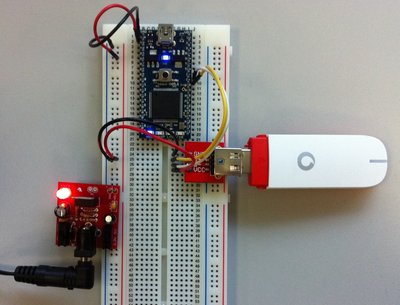 | 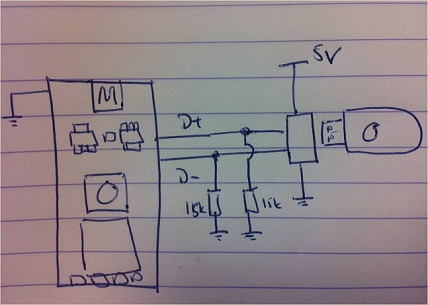 |
Because of the high current that the USB dongle requires, it is not possible to power it from the Vu pin on the mbed. In the example show, an external linear regulator board has been used to provide a high current regulated 5v supply from a 9v wall adaptor. The parts shown are :
Hello World
This example application uses the VodafoneUSBModem and the HTTPClient interface, enabling the mbed to fetch a URL over HTTP, and print the contents.
There are various other "hello world" programs that demonstrate SMS, NTP, Socket and Websocket interfaces, as well as management commands (check balance, link status, etc). See "Resources" section below.
You'll notice that this "Hello World" program is a little more complex that others, as we're using the mbed RTOS to manage the memory and processing resources/requirement of the USB Modem driver and the TCP/IP stack.
Import program
00001 #include "mbed.h"
00002 #include "VodafoneUSBModem.h"
00003 #include "HTTPClient.h"
00004
00005 void test(void const*)
00006 {
00007     VodafoneUSBModem modem;
00008     HTTPClient http;
00009     char str[512];
00010
00011     int ret = modem.connect("pp.vodafone.co.uk");
00012     if(ret)
00013     {
00014       printf("Could not connect\n");
00015       return;
00016     }
00017
00018     //GET data
00019     printf("Trying to fetch page...\n");
00020     ret = http.get("http://mbed.org/media/uploads/donatien/hello.txt", str, 128);
00021     if (!ret)
00022     {
00023       printf("Page fetched successfully - read %d characters\n", strlen(str));
00024       printf("Result: %s\n", str);
00025     }
00026     else
00027     {
00028       printf("Error - ret = %d - HTTP return code = %d\n", ret, http.getHTTPResponseCode());
00029     }
00030
00031     //POST data
00032     HTTPMap map;
00033     HTTPText text(str, 512);
00034     map.put("Hello", "World");
00035     map.put("test", "1234");
00036     printf("Trying to post data...\n");
00037     ret = http.post("http://httpbin.org/post", map, &text);
00038     if (!ret)
00039     {
00040       printf("Executed POST successfully - read %d characters\n", strlen(str));
00041       printf("Result: %s\n", str);
00042     }
00043     else
00044     {
00045       printf("Error - ret = %d - HTTP return code = %d\n", ret, http.getHTTPResponseCode());
00046     }
00047
00048     modem.disconnect();
00049
00050     while(1) {
00051     }
00052 }
00053
00054
00055 int main()
00056 {
00057   Thread testTask(test, NULL, osPriorityNormal, 1024 * 4);
00058   DigitalOut led(LED1);
00059   while(1)
00060   {
00061     led=!led;
00062     Thread::wait(1000);
00063   }
00064
00065   return 0;
00066 }
Library
Import library
Public Member Functions |
|
| VodafoneUSBModem (PinName powerGatingPin=NC, bool powerGatingOnWhenPinHigh=true) | |
|
Create Vodafone USB Modem (K3770/K3772-Z) dongle API instance.
|
|
| int | connect (const char *apn=NULL, const char *user=NULL, const char *password=NULL) |
|
Open a 3G internet connection.
|
|
| int | disconnect () |
|
Close the internet connection.
|
|
| int | sendSM (const char *number, const char *message) |
|
Send a SM.
|
|
| int | getSM (char *number, char *message, size_t maxLength) |
|
Receive a SM.
|
|
| int | getSMCount (size_t *pCount) |
|
Get the number of SMs in the incoming box.
|
|
| int | sendUSSD (const char *command, char *result, size_t maxLength) |
|
Send a USSD command & wait for its result.
|
|
| int | getLinkState (int *pRssi, LinkMonitor::REGISTRATION_STATE *pRegistrationState, LinkMonitor::BEARER *pBearer) |
|
Get link state.
|
|
| ATCommandsInterface * | getATCommandsInterface () |
|
Get the
ATCommandsInterface
instance.
|
|
| int | power (bool enable) |
|
Switch power on or off In order to use this function, a pin name must have been entered in the constructor.
|
|
| char * | getIPAddress () |
|
Get the IP address of a connected device.
|
|
Protected Member Functions |
|
| int | init () |
|
Initialise dongle.
|
|
| int | cleanup () |
|
De-initialise dongle.
|
|
Resources and references
Network APN
To connect to the internet you must establish a PPP connection. You can then use BSD Sockets or any high-level component (HTTP Client, NTP Client).
To establish this connection, one single function is used:
int ret = modem.connect("pp.vodafone.co.uk");
pp.vodafone.co.uk is the APN value for a Vodafone Pay as you Go SIM. Change it to the relevant value if your SIM is different:
| SIM Type | Contract Type | Plan | APN | User | Password |
|---|---|---|---|---|---|
| Mobile Broadband | Pay as you go | £5 for 250MB, lasting up to 30 days | smart | web | web |
| Mobile Broadband | Pay as you go | £15 for 2GB, lasting up to 30 days | ppbundle.internet | web | web |
| Mobile Broadband | Pay as you go | £15 for 1GB, lasting up to 90 days | pp.internet | web | web |
| Mobile Broadband | Pay monthly | Any | internet | web | web |
| Phone | Pay as you go | Any | pp.vodafone.co.uk | web | web |
| Phone | Pay monthly | Any | internet | web | web |
For details please check Vodafone's dedicated page.
The variable, "ret", allows you to check whether the connection was successful or not (0 on success, a negative value on error).
Please note that the "connect" command can take a few minutes to complete in worst case scenarios, as it initializes the modem and then waits for network registration.
Other Examples
Import programVodafoneUSBModemNTPClientTest
NTP Client Test with the Vodafone USB Modem library
Last commit 30 Oct 2012 by  Donatien Garnier
Click here to the programs that are using the NTPClient
Import programVodafoneUSBModemSMSTest
SMS test with the Vodafone library
Last commit 30 Oct 2012 by Donatien Garnier
Import programVodafoneUSBModemWebsocketTest
Websocket client test with Vodafone USB Modems
Last commit 30 Oct 2012 by Donatien Garnier
Click here to the programs that are using the WebsocketClient
Import programVodafoneUSBModemUSSDTest
Test of USSD commands transmission over the Vodafone network with the Vodafone library
Last commit 30 Oct 2012 by Donatien Garnier