SD Cards are widely used by loads of devices for storage; phones, mp3 players, pc's etc. That means they are a very cheap option for storing large amounts of non-volatile data (i.e. the data is not lost when the power is removed). They should be ideal for data logging and storing audio/images.
SD and MMC cards support various protocols, but common to them all is one based on SPI. This is the one used here as, whilst not being the most high performance, it uses a generic SPI interface so will be more portable.
SD Cards are block devices. That means you read/write data in multiples of the block size (usually 512-bytes); the interface is basically "read from block address n", "write to block address m". Note that a filesystem (e.g. FAT) is an abstraction on top of this, and the disk itself knows nothing about the filesystem.
Based on a SparkFun MicroSD Breakout Board, here is the wiring that will work (you can obviously use either SPI port, and any DigitalOut):
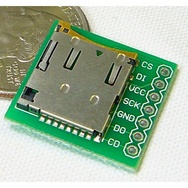
SparkFun MicroSD Breakout Board
MicroSD Breakout mbed
CS o-------------o 8 (DigitalOut cs)
DI o-------------o 5 (SPI mosi)
VCC o-------------o VOUT
SCK o-------------o 7 (SPI sclk)
GND o-------------o GND
DO o-------------o 6 (SPI miso)
CD o
Warning
Note that VCC is 3.3V from mbed's VOUT pin. Do not use 5V from mbed's VU pin. 5V power may damage the SD card.
The CD (card detect) pin is optional and not used in the example program, but it can be used to detect a card in the micro SD socket. CD connects to ground when no card is present. No connection is made once a card is inserted. It can be read using a DigitalIn pin, if the mode is set to PullUp.
Target is Fuji 2Gb from RS components 375-953 less than £10 inc vat with SD adapter works straight out of the box well done. I just checked that it was Fat 16 when delivered, it was.
I am using a cool components mbed workshop breakout board
modified your latest SDcardtest as shown for cool components mbed workshop breakout board
//SDFileSystem sd(p11, p12, p13, p27, "sd");
SDFileSystem sd(p5, p6, p7, p8, "sd"); // my cool components mbed workshop breakout board
Target is Fuji 2Gb from RS components 375-953 less than £10 inc vat with SD adapter works straight out of the box well done. I just checked that it was Fat 16 when delivered, it was.
Sorry my cut and paste does not seem to show
SDFileSystem sd(p11, p12, p13, p27, "sd"); was commented out with
and replaced with
SDFileSystem sd(p5, p6, p7, p8, "sd"); my cool components mbed workshop breakout board
Sorry my cut and paste does not seem to show
SDFileSystem sd(p11, p12, p13, p27, "sd"); was commented out with //
and replaced with
SDFileSystem sd(p5, p6, p7, p8, "sd"); my cool components mbed workshop breakout board
Worked for me using the Cool Components Breakout board and a 2GB PNY card. I continued to get the error message "No disk, or could not put SD card in to SPI idle state." UNTIL I made your change above ... works flawlessly!
Is there a way to sync file writes to the disk without closing and re-opening the file? Standard methods (fflush(), fsync(), sync() etc) are either missing or don't seem to work...
@Sares, no, not currently. It would be possible with quite a lot of extra work (a firmware image for the mbed with additional support in the mbed interface chip firmware too) but I doubt the mbed team are interested in adding this support.
I had to use this newer library to get my SanDisk 2GB micro SD card to work. I think this is the Jun 2010 version as opposed to the Dec 2009 library. I was able to write the demo file to the card.
I try to have my microSD board working with a 2Go card..
Without success :/
Any idea why the 4 leds on the mBed board are blinking ?
Is to communicate a error state ?
Regards
[EDITED] =>
Ok, it's works with #include "SDHCFileSystem.h"
Hi all,
I try to have my microSD board working with a 2Go card..
Without success :/
Any idea why the 4 leds on the mBed board are blinking ?
Is to communicate a error state ?
Regards
[EDITED] =>
Ok, it's works with #include "SDHCFileSystem.h"
Didier, it's better to post about problems on the forums. That said, the blinking LEDs sounds like Blue Lights of Death
Didier, it's better to post about problems on the forums. That said, the blinking LEDs sounds like [[http://mbed.org/handbook/Debugging|Blue Lights of Death]]
I am experiencing a weird phenomenon. I am running the SD card Hello world tutorial by Simon Ford. Using a freshly formatted 256MB SD Card the program runs smoothly with no errors. If I reset the mBed (using the reset switch) the program will run smooth again. If I repeat this process another 10 times (ish), the program then stops working and exhibits the blue lights of death. The serial out the messages back 'No disk, or could not put SD card in to SPI idle state'. This message continues to appear until the card is reformatted. Before formating I have noticed that there are some weird files saved to the SD card. I don't know where theses are coming from. I can only assume it is something to do with my hardware, perhaps interference. I am using a bread board. I intended to transfer on to strip board. I am posting this just in case someone else has seen this and can advise how I can fix this issue. Thanks.
{{/media/uploads/RandomSingh/sd_card_corrupt_files.jpg}}
Hi All,
I am experiencing a weird phenomenon. I am running the SD card Hello world tutorial by Simon Ford. Using a freshly formatted 256MB SD Card the program runs smoothly with no errors. If I reset the mBed (using the reset switch) the program will run smooth again. If I repeat this process another 10 times (ish), the program then stops working and exhibits the blue lights of death. The serial out the messages back 'No disk, or could not put SD card in to SPI idle state'. This message continues to appear until the card is reformatted. Before formating I have noticed that there are some weird files saved to the SD card. I don't know where theses are coming from. I can only assume it is something to do with my hardware, perhaps interference. I am using a bread board. I intended to transfer on to strip board. I am posting this just in case someone else has seen this and can advise how I can fix this issue. Thanks.
**UPDATE**
Have fixed the issue!!! It was interference!!!! Simply removed the huge header socket arrangement I had and now it works flawlessly!!!! :-)
WKKWKF!!!
--**--UPDATE--**--
Have fixed the issue!!! It was interference!!!! Simply removed the huge header socket arrangement I had and now it works flawlessly!!!! :-)
WKKWKF!!!
I connected mbed and SD Card Slot followed tutorial on this page,and SD Card is 64MB.I have problem with program SDFileSystem_Hello world. In Hyper terminal writing "Didn't get a response from the disk" and 4 led on mbed are blinking. Please someone to help me how can I fix this problem?
From the SDFileSystem.cpp file, I do not know how standard C buffered I/O functions such as fprintf(), fread(), fwrite() call the member functions in SDFileSystem. My questions:
a) How big is the buffer can be allocated by user? Any guide?
b) Can I use unbuffered I/O function such as read, write, seek?
I am thinking to use the library to stored large files in SD card for data logging purposes. As data logging only insert at the end, so we may be able to improve performance without the buffering abstraction.
Any idea? Thank
From the SDFileSystem.cpp file, I do not know how standard C buffered I/O functions such as fprintf(), fread(), fwrite() call the member functions in SDFileSystem. My questions:
a) How big is the buffer can be allocated by user? Any guide?
b) Can I use unbuffered I/O function such as read, write, seek?
I am thinking to use the library to stored large files in SD card for data logging purposes. As data logging only insert at the end, so we may be able to improve performance without the buffering abstraction.
Any idea? Thank
From the SDFileSystem.cpp file, I do not know how standard C buffered I/O functions such as fprintf(), fread(), fwrite() call the member functions in SDFileSystem. My questions:
a) How big is the buffer can be allocated by user? Any guide?
b) Can I use unbuffered I/O function such as read, write, seek?
I am thinking to use the library to stored large files in SD card for data logging purposes. As data logging only insert at the end, so we may be able to improve performance without the buffering abstraction.
<<quote yoonghm>>
From the SDFileSystem.cpp file, I do not know how standard C buffered I/O functions such as fprintf(), fread(), fwrite() call the member functions in SDFileSystem. My questions:
a) How big is the buffer can be allocated by user? Any guide?
b) Can I use unbuffered I/O function such as read, write, seek?
I am thinking to use the library to stored large files in SD card for data logging purposes. As data logging only insert at the end, so we may be able to improve performance without the buffering abstraction.
Any idea? Thank
<</quote>>
I found the answers and get a solution from
http://mbed.org/users/emh203/notebook/long-file-name-example-code/
Hi,
writing and reading on a SD card is fine but could someone explain why there is no date for the file creation?
It is a bit analogous to writing on the flash memory where the creation date is always the same 01/01/20008 !
Besides I have the RTC running fine (to log messages) so the problem does not seem to come from the RTC, but from the SDFileSystem library may be?
Could someone has a clue?
Hi,
writing and reading on a SD card is fine but could someone explain why there is no date for the file creation?
It is a bit analogous to writing on the flash memory where the creation date is always the same 01/01/20008 !
Besides I have the RTC running fine (to log messages) so the problem does not seem to come from the RTC, but from the SDFileSystem library may be?
Could someone has a clue?
<<quote gjurkovic>>
Is there a workaround for microSD cards larger than 2GB?
<</quote>>
dowload SDHCFileSystem library
http://mbed.org/users/xxll/programs/SDHCFileSystem/5zdtq
I now work with a 8Go sd card
I just tried the example Hello World SD File System Program.
I added the exact code in the example to a new Project.
Them I clicked "Import" on the action menu across the top.
This let me select fraom a list of libraries.
I see the "SDFileSystem" at the bottom of the list ...
I click this and then click "import" at the top of this page.
I see the the SDFileSystem folder been added.
When I attemp to compile this I get errors.
The first error is
Identifier "Namespace" is not efined in the resource FileHandle.h (error number 20)
Any ideas?
Example Program did not compile
I just tried the example Hello World SD File System Program.
I added the exact code in the example to a new Project.
Them I clicked "Import" on the action menu across the top.
This let me select fraom a list of libraries.
I see the "SDFileSystem" at the bottom of the list ...
I click this and then click "import" at the top of this page.
I see the the SDFileSystem folder been added.
When I attemp to compile this I get errors.
The first error is
Identifier "Namespace" is not efined in the resource FileHandle.h (error number 20)
Any ideas?
Thanks Erik .. all works now.
However, I am having a speed issue.
I am trying to read about 1000 bytes per sec from a GPS receiver in 4 binary messages. I write these out to the SD card one message at a time. I use the mbed rtos to create a separate thread for the write. Without the write I am able to capture the data just fine with no missed bytes.
However, the write to the SD card cannt keep up.
I am using the SD breakout board and card from Sparkfun.
Is there a faster way to write to permanent media?
How about the USB-to-flash library?
Is the SPI clock speed fixed for the SDFileSystem?
Does my throughput performance seem to make sense?
J
Thanks Erik .. all works now.
However, I am having a speed issue.
I am trying to read about 1000 bytes per sec from a GPS receiver in 4 binary messages. I write these out to the SD card one message at a time. I use the mbed rtos to create a separate thread for the write. Without the write I am able to capture the data just fine with no missed bytes.
However, the write to the SD card cannt keep up.
I am using the SD breakout board and card from Sparkfun.
Is there a faster way to write to permanent media?
How about the USB-to-flash library?
Is the SPI clock speed fixed for the SDFileSystem?
Does my throughput performance seem to make sense?
J
Hi james, I'm sorry I don't have any expertise in this area but thought this post might be something for you to watch and study?
https://mbed.org/forum/mbed/topic/4140/
Thanks Erik .. all works now.
However, I am having a speed issue.
I am trying to read about 1000 bytes per sec from a GPS receiver in 4 binary messages. I write these out to the SD card one message at a time. I use the mbed rtos to create a separate thread for the write. Without the write I am able to capture the data just fine with no missed bytes.
However, the write to the SD card cannt keep up.
I am using the SD breakout board and card from Sparkfun.
Is there a faster way to write to permanent media?
How about the USB-to-flash library?
Is the SPI clock speed fixed for the SDFileSystem?
Does my throughput performance seem to make sense?
J
The SD cards have their own controller in them and speeds depend on the chip and technology used. I find the SDHC cards are much faster than SD. An additional boost can be expected from cards with high data rates e.g. class 10 is faster than class 4.
Hope that helps. You may have to implement a larger ring buffer to hold the data while the SD card is busy.
Regards
<<quote jekain314>>
Thanks Erik .. all works now.
However, I am having a speed issue.
I am trying to read about 1000 bytes per sec from a GPS receiver in 4 binary messages. I write these out to the SD card one message at a time. I use the mbed rtos to create a separate thread for the write. Without the write I am able to capture the data just fine with no missed bytes.
However, the write to the SD card cannt keep up.
I am using the SD breakout board and card from Sparkfun.
Is there a faster way to write to permanent media?
How about the USB-to-flash library?
Is the SPI clock speed fixed for the SDFileSystem?
Does my throughput performance seem to make sense?
J
<</quote>>
The SD cards have their own controller in them and speeds depend on the chip and technology used. I find the SDHC cards are much faster than SD. An additional boost can be expected from cards with high data rates e.g. class 10 is faster than class 4.
Hope that helps. You may have to implement a larger ring buffer to hold the data while the SD card is busy.
Regards
hi,
We are going to use a SD card to write and store data while the main program is running. When we implement it with MBED RTOS, the threads stop working. A file is created and the test print was also there.
How to use SD card along with threads??
hi,
We are going to use a SD card to write and store data while the main program is running. When we implement it with MBED RTOS, the threads stop working. A file is created and the test print was also there.
How to use SD card along with threads??
I just tried the example Hello World SD File System Program.
I added the exact code in the example to a new Project.
Them I clicked "Import" on the action menu across the top.
This let me select fraom a list of libraries.
I see the "SDFileSystem" at the bottom of the list ...
I click this and then click "import" at the top of this page.
I see the the SDFileSystem folder been added.
When I attemp to compile this I get errors.
The first error is
Identifier "Namespace" is not efined in the resource FileHandle.h (error number 20)
I've got the same problem. I've added the library FatFileSystem to my project folder, but still get errors at compile time, starting with -
Identifier "namespace" is undefined
I must be missing something simple, but I don't know what it is! Can anybody help? I'm new to this. Thanks very much.
<<quote jekain314>>
Example Program did not compile
I just tried the example Hello World SD File System Program.
I added the exact code in the example to a new Project.
Them I clicked "Import" on the action menu across the top.
This let me select fraom a list of libraries.
I see the "SDFileSystem" at the bottom of the list ...
I click this and then click "import" at the top of this page.
I see the the SDFileSystem folder been added.
When I attemp to compile this I get errors.
The first error is
Identifier "Namespace" is not efined in the resource FileHandle.h (error number 20)
Any ideas?
<</quote>>
<<quote Sissors>>
Apparently the program is missing fatfilesystem (http://mbed.org/users/AdamGreen/code/FatFileSystem/), add that to the project and it compiles.
<</quote>>
I've got the same problem. I've added the library FatFileSystem to my project folder, but still get errors at compile time, starting with -
Identifier "namespace" is undefined
I must be missing something simple, but I don't know what it is! Can anybody help? I'm new to this. Thanks very much.
Let us know if you experience any problem with it.
Cheers,
Emilio
We added an officially maintained SD File System library:
<<library /users/mbed_official/code/SDFileSystem/latest>>
Let us know if you experience any problem with it.
Cheers,
Emilio
We added an officially maintained SD File System library:
I just tried the new library.
Nice to know that it now supports time stamp and long filename.
Thank you!
<<quote emilmont>>
We added an officially maintained SD File System library:
<</quote>>
I just tried the new library.\\
Nice to know that it now supports time stamp and long filename.
Thank you!
I'm having trouble to get it to work.
I use a 1G MicroSD card, but the program always stuck at mkdir("/sd/mydir", 0777);
After I pull the card out, the program seems to be able to proceed... and it didn't report error.
I'm having trouble to get it to work.
I use a 1G MicroSD card, but the program always stuck at mkdir("/sd/mydir", 0777);
After I pull the card out, the program seems to be able to proceed... and it didn't report error.
I'm having trouble to get it to work.
I use a 1G MicroSD card, but the program always stuck at mkdir("/sd/mydir", 0777);
After I pull the card out, the program seems to be able to proceed... and it didn't report error.
I got it to work. The problem was I connected VCC to VIN rahter than VOUT.
<<quote rodericus1987>>
I'm having trouble to get it to work.
I use a 1G MicroSD card, but the program always stuck at mkdir("/sd/mydir", 0777);
After I pull the card out, the program seems to be able to proceed... and it didn't report error.
<</quote>>
I got it to work. The problem was I connected VCC to VIN rahter than VOUT.
We added an officially maintained SD File System library:
I just tried the new library.
Nice to know that it now supports time stamp and long filename.
I tested the new library further.
Found it now supports FAT32, SDHC cards (more than 4GB media) and a single file can be more than 2GB.
I believe everyone would like to see these new features on the top of this page.
<<quote ym1784>>
<<quote emilmont>>
We added an officially maintained SD File System library:
<</quote>>
I just tried the new library.\\
Nice to know that it now supports time stamp and long filename.
<</quote>>
I tested the new library further.\\
Found it now supports FAT32, SDHC cards (more than 4GB media) and a single file can be more than 2GB.\\
I believe everyone would like to see these new features on the top of this page.
Please login to post comments.