Pachube
Introduction
Pachube is a platform which captures data over the internet in realtime and provides graphing, alerts and historical data access. It is ideally suited for visualising data from sensors connected to the mbed.
Pachube is based on the concept of feeds and datastreams. A feed is typically a single location (eg. a house), and datastreams are individual sensors associated with that location (eg. temperatures, power consumption).


Pachube provides two modes for data capture; a pull method (automatic feed type) where data is collected from an http server, and a push method (manual feed type) where data is written to Pachube using an http client. In addition, there are a number of formats for interacting with Pachube including xml, json and csv. The full API is described here. Note that this code uses the v1 API which is deprecated since August 2010 in favour of the v2 API. The v1 API should continue to be supported.
This wiki page describes the manual method using the http client to upload csv formatted data to Pachube.
Getting started
Information
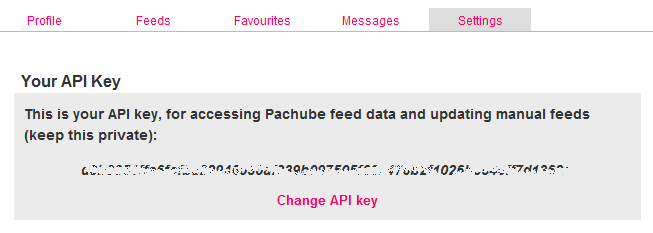
In order to use Pachube, an account should be created and it will be necessary to copy the API key from the my settings page into the code below.
Restrictions
Use of the Pachube API is rate limited; see here for details.
With a Pachube account, a new feed can be registered, with the feed type set to manual, and then one or more datastreams can be added. Whilst the feed ID is automatically allocated, it is possible to specify an ID for each datastream. The feed ID and datastream ID are then used in URLs for accessing data. For example the URL of the example graph above is http://www.pachube.com/feeds/504/datastreams/1/history.png which gives a server side generated history of the datastream with ID 1 from the feed with ID 504 (this happens to be the Pachube office).
When using the csv format to update all the datastreams of a feed in one go, one can send comma separated values in the order the datastreams appear in the feed. It is only necessary to use the feed ID.
It is also possible to update a single datastream in which case the datastream ID as well as the feed ID are required.
In the API documentation and the code below, the feed ID is referred to as the environment ID.
Updating a feed
In theory the Pachube server is expecting an HTTP PUT, but also allows a POST request (as supported by the HTTPClient class) to simulate this with a _method=put parameter in the URL. This is shown in the code snippet below.
// includes
#include "mbed.h"
#include "EthernetNetIf.h"
#include "HTTPClient.h"
    EthernetNetIf eth;
    eth.setup();

    // copy API key from settings
    string apiKey = "my API key";

    // use feed ID
    string environmentID = "my feed ID";

    // feed has two datastreams in this example, values are comma separated
    string data = "123,456";

    // for authentication, API key is set in client header
    HTTPClient client;
    client.setRequestHeader("X-PachubeApiKey", apiKey);

    // text object holds data to be posted
    HTTPText csvContent("text/csv");
    csvContent.set(data);

    // uri for post includes feed ID
    string uri = "http://api.pachube.com/v1/feeds/" + environmentID + ".csv?_method=put";

    // result should be 0 and response should be 200 for successful post
    HTTPResult result = client.post(uri.c_str(), csvContent, NULL);
    int response = client.getHTTPResponseCode();
Updating a datastream
Updating an individual datastream is done in a similar way, using the datastream ID in addition to the feed ID. In this case, only one value is being sent and therefore no comma separation required.
    EthernetNetIf eth;
    eth.setup();

    // copy API key from settings
    string apiKey = "my API key";

    // use feed ID
    string environmentID = "my feed ID";

     // use datastream ID
    string datastreamID = "my datastream ID";

    // datastream value
    string data = "789";

    // for authentication, API key is set in client header
    HTTPClient client;
    client.setRequestHeader("X-PachubeApiKey", apiKey);

    // text object holds data to be posted
    HTTPText csvContent("text/csv");
    csvContent.set(data);

    // uri for post includes feed ID and datastream ID
    string uri = "http://api.pachube.com/v1/feeds/" + environmentID +
                 "/datastreams/" + datastreamID + ".csv?_method=put";

    // result should be 0 and response should be 200 for successful post
    HTTPResult result = client.post(uri.c_str(), csvContent, NULL);
    int response = client.getHTTPResponseCode();
If your data is a floating point number, then you can replace
// datastream value
string data = "789";
with
// datastream value
sprintf (buffer, "%f",power);// create string from float, power is the float
string data = buffer;//put datastream value into string
PachubeClient class
A convenient wrapper for using Pachube with the HTTPClient is described here.