Interfacing with Java

Here is a Java library for interfacing Java programs (and hence also Processing programs) with mbed using the RPC. This could be used for:

  • Creating a GUI for mbed programs
  • Controlling actuators from and reading data into Java programs

Java is potentially a great choice for interfacing to mbed over a network as it can be run in a browser and across many different platforms. This page shows how to use the library to create Java applications using serial or HTTP. There are also demonstrations of how to use this library to create and deploy an Applet and how to use it in Processing.

Information

To use the mbedRPC library your mbed needs to be running code which can receive and execute RPC commands. Information and examples of this, can be found on the Interfacing-Using-RPC page. Compile and run the program for the type of transport mechanism you wish to use.

The mbedRPC Library

Here is the mbedRPC library as a jar file: mbedRPC.jar - (updated so RxTx no longer throws errors on Windows)

Here is an example of the code required to get started and flash some LEDs. This will run as a Java application.

mbedRPC_HelloWorld

import org.mbed.RPC.*;
public class HelloWorld implements mbedRPC{
	DigitalOut d1;
	DigitalOut d4;
	mbed mbed;
	
	public static void main(String[] args) {
		HelloWorld demo = new HelloWorld();
		demo.flash(10);
	}
	
	public HelloWorld(){	
		System.out.println("mbed RPC Hello World");
		//Create an mbed object for communication over serial
		mbed = new SerialRxTxRPC("COM5", 9600);
		//Or:   mbed = new HTTPRPC("http://192.168.2.2")
		
		//Create new Digital Outputs on the mbed
		d1 = new DigitalOut(mbed, LED1);
		d4 = new DigitalOut(mbed, LED4);
		
	}
	public void flash(int n){
		
		for(int i = 0; i< n; i++){
			//Call the DigitalOut objects' methods 
			d1.write(1);
			d4.write(0);
			wait(500);
			d1.write(0);
			d4.write(1);
			wait(500);
		}
		mbed.delete();
		System.out.println("Complete");
		
	}
	//A function to create a wait
	public static void wait (int n){
        long startTime,currentTime;
        startTime =System.currentTimeMillis();
        do{
            currentTime = System.currentTimeMillis();
        }
        while ((currentTime - startTime) < n);
	}
}

And here is this class for download: HelloWorld.java

The Code API

The aim in writing the library has been to mirror the mbed API so that programming in Java is very similar to programming for mbed.

The first thing you have to do is import the library into your program. Note that to do this you need to place the Jar in the Java library folders or if you're using an IDE then add it to the build path for that project. If you want to distribute the project you produce then you'll need to package this jar with it.

import org.mbed.RPC.*

You then need to create your class. To assist in using the mbedRPC library implement mbedRPC in the class declaration

public class HelloWorld implements mbedRPC{....

The next step is to create an mbed object which sets up the communication and knows how to execute RPC methods. You can set this up using different transport mechanisms, currently serial or HTTP.

SerialRPC mbed = new SerialRPC("COM5", 9600);
OR:
SerialRxTx mbed = new SerialRxTx("COM5", 9600);
OR:
HTTPRPC mbed = new HTTPRPC("http://192.168.2.2");

For more information on using serial in Java see below.

You can now create objects on mbed. This is done in almost the same way as if you were programming on mbed but as well as specifying the pins you must also pass in the mbed object for the mbed you want to create the object on.

DigitalOut d1 = new DigitalOut(mbed, LED2);
DigitalOut d2 = new DigitalOut(mbed, p20);
AnalogIn ain = new AnalogIn(mbed, p20);
PwmOut p1 = new PwmOut(mbed, LED3);

Alternatively you can tie to objects already created on mbed and then execute their methods.

DigitalOut d3 = new DigitalOut(mbed, "myled");

Finally you can call methods on the objects you have created or tied to. The methods are those described in the Handbook. However unlike on mbed there are no overloaded operators so you have to call the methods by name.

d1.write(1);
d2.write(0);
float i = ain.read();
p1.period(1);
p1.write(1);

Information

If you want to make an RPC call which isn't wrapped by the classes we have provided then use:

String RPCresponse = mbed.RPC(<String ObjectName>,<String MethodName>,<String[] Arguments>);

Communicating with Custom Code

The mbedRPC Java Library supports the RPC-Interface-Library. This means that as well as controlling Digital and Analog I/O you can quickly add RPC to projects using other interfaces or libraries which are not accessible over RPC. The RPC-Interface-Library page shows the mbed code to do this with a RangeFinder, a Motor and the QEI library. Here is the Java Code which would be used to interact with mbed for these examples:

//The RPCVariables need to be given a type
RPCVariable<Double> motor;
RPCVariable<Double> QEI;

RPCFunction Range;

//Tie them to the RPC variables or Functions they correspond with on mbed
motor = new RPCVariable<Double>(mbed, "MotorOutput");
QEI = new RPCVariable<Double>(mbed, "Percentage");
Range = new RPCFunction(mbed, "RangeFinder");

//You can now read and write to the Variables or run the function
System.out.println(QEI.read_float());
motor.write(f);

System.out.println(Range.run("  "));

Setting Up Serial in Java

To use Java in serial and with the mbedRPC library you need to install either the Java Sun Communications API or use RxTx depending on operating system. You can then choose to create your mbed object according to the type of communication you have installed. RxTx would be the best choice for most users.

If you're working in Processing then you already have RxTx as it is packaged with Processing.

Applet demo

As mbed can run as a server it is possible to serve a Java applet from mbed which can then use the RPC to control mbed. This offers a great way to create a web based front end for your mbed project.

Here is an example of an applet controlling mbed:

Note that to send the RPC commands the Jar needs to know the address of mbed, the address is found by using the overloaded constructor for HTTPRPC. If you have created an Applet then you can create the mbed object as:

mbed = HTTPRPC(this);

Applet Security

In general Applets are only allowed to communicate with the domain they are downloaded from. This means that if you use an applet it must be hosted on mbed.

On mbed you need a HTML file with the applet embedded in it:

<!DOCTYPE HTML PUBLIC "-//W3C//DTD HTML 4.01 Transitional//EN" "http://www.w3.org/TR/html4/loose.dtd"> 
<html>
<head>
<title>mbed Java Applet Example</title>
</head>
<body>
<h1>mbed Applet Demo</h1>
<P align = "CENTER">
<APPLET ARCHIVE="mbedapp.jar" code="HelloWorld" WIDTH="400" HEIGHT="200">
   The Applet should be here
</APPLET> 
</P>
</body>
</html>

To try this applet out download the zip from above. Save the 3 files in this zip to your mbed's drive (and make sure there arn't any bin files which will be detected as more recent). Connect your mbed to a router and then browse to http://<address of mbed>/launch.htm. The address mbed is assigned will be printed out over the serial port. You will be able to control the LEDs on the mbed by clicking in the applet. Note that this HTTP server program won't flash LED1 as I removed that so you can control all 4 LEDs over RPC, instead the program will show its alive over serial.

Applet init() start() stop() destroy()

When using an applet with the mbedRPC library it is important to think about what goes in each of the init() start() stop() and destroy() methods. These are general pointers about what to do when, though of course there are other ways of coding the applet that will work.

  • init() Create the mbed connection here and then tie to existing objects or create new objects.
  • start() If you are using a thread or timer to refresh the applet (see example below) start it here. Also start any processes on mbed which need to be running only whilst the user is interacting with the applet
  • stop() Stop any threads or timers here and leave the mbed's outputs in a suitable condition as the user has stopped interacting with them.
  • destroy() Leave the mbed in a suitable condition as the user has finished with the applet, delete any objects which this applet created to prevent a build up of objects each time someone loads the applet. Finally call the delete method on the mbed object. This isn't strictly necessary for HTTP but if this is included then it means the that the applet can be changed to use different transport mechanisms without problems (eg using serial for testing).

mbedRPC in Processing

Processing is a popular open source programming language for creating visual and interactive programs. This means it can be very quickly used to create a GUI for your projects as either an application or as an applet. Processing is just an extension of Java and so its very simple to use the mbedRPC library in a sketch:

  • First, on the menu bar, goto Sketch->Add File, and navigate to and select the mbedRPC.jar
  • You can now use the library as above with one or two exceptions.
    • To use serial you should use RxTx as it is packaged with Processing, as well as importing org.mbed.RPC.*, you should also import processing.serial.*;

PinName Arguments in Processing

As its not easy to implement an interface on a Processing sketch you cannot refer to the pins as LED1 or p20 as this requires your class to implement mbedRPC. Instead you must refer to them as mbedRPC.LED1 or mbedRPC.p20

DigitalOut led1 = new DigitalOut(mbed, mbedRPC.LED1);

Here is a small piece of example code which changes the brightness of LED1 and LED2 according to the mouse's position and whether the mouse is pressed or not.

//Processing Code
import processing.serial.*;
import org.mbed.RPC.*;

mbed mbed;
PwmOut led1;
PwmOut led2;
void setup() {
  size(480, 120);
  smooth();
  mbed = new SerialRxTxRPC("COM5", 9600);
  led1 = new PwmOut(mbed, mbedRPC.LED1);
  led2 = new PwmOut(mbed, mbedRPC.LED2);

}

void draw() {
  double Position = mouseX;
  double Brightness = (Position/480);
  if (mousePressed) {
    led1.write(Brightness);
  } else {
    led2.write(Brightness);
  }
}

Remote Sensing and Control Demo

This applet demonstrates some of the ways in which you might use an mbed on your network to allow you to view various sensors and control several outputs. The mbed is connected to temperature, pressure and light sensors. The program running on mbed contains just a few extensions to the example http server and uses several of the sensor libraries avaliable in the cook book. The java applet is hosted on mbed and uses RPC commands via the mbedRPC library to regularly update the sensor values.
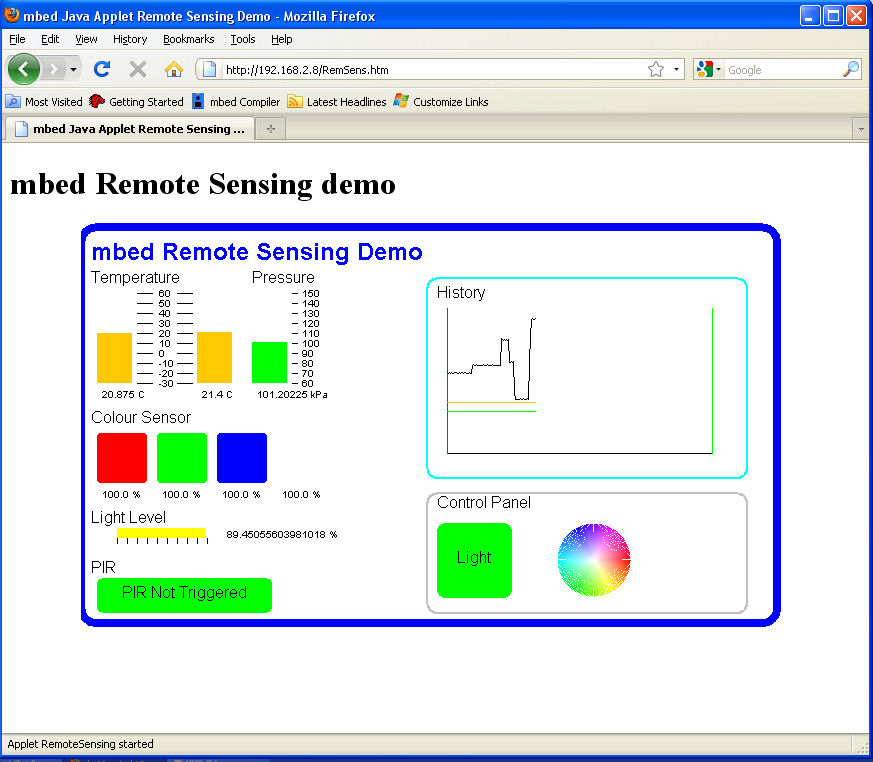
/media/uploads/MichaelW/applet.jpg

Clicking on the colour wheel sets the RGB led to that colour and clicking on the "light" button turns on a LED. The graphs update with the new values at a rate specified by a parameter passed in to the applet from the HTML page which loads it. As the applet uses a timer to refresh itself at regular intervals its important to make sure this is stopped in the stop() method and restarted in the start() method.

Sensors and Outputs connected to mbed.

  • SCP1000 Pressure Sensor p5,p6,p7,p8
  • TMP102 Temperature Sensor p9, p10
  • An RGB LED p23, p24, p25
  • A PIR sensor p21
  • An analogue light sensor p20
  • A colour sensor p28,p27, p22

The program on mbed is mainly the HTTP server. However the following RPCFunctions are added to the code to allow RPC access to the sensors which otherwise wouldn't be avaliable over RPC.

//Set up the Sensors
TMP102 Temperature(p9, p10, 0x90);
ADJDColourSensor Colour(p28,p27, p22);
SCP1000 Pressure(p5,p6,p7,p8);
DigitalIn PIR(p21, "PIR");
AnalogIn Light(p20, "Light");

//Define functions to add RPC
void getColour(char * input, char * Output);
void getTemperature(char *input, char * Output);
void getPressure(char *input, char * Output);
void getSCPTemperature(char *input, char * Output);

//Set up custom RPC
RPCFunction GetTemp(&getTemperature, "Temperature");
RPCFunction GetPressure(&getPressure, "Pressure");
RPCFunction GetSCPTemperature(&getSCPTemperature, "SCPtemperature");
RPCFunction GetColour(&getColour, "Colour");

//** Rest of the program, ie the HTTP server is here  */


//RPC Functions  - these are used to wrap the sensor libraries that other wise would not be accessible over RPC.
void getTemperature(char *input, char * Output){
    float f = Temperature.read();
    sprintf(Output, "%f", f);
}
void getPressure(char *input, char * Output){
    float f = Pressure.read();
    sprintf(Output, "%f",f);
}
void getSCPTemperature(char *input, char * Output){
    float f = Pressure.readTemperature();
    sprintf(Output, "%f", f);
}
void getColour(char *input, char * Output){
    float clear = Colour.read();
    sprintf(Output, "%f,%f,%f,%f,", clear/500, Colour.red/500, Colour.green/500, Colour.blue/500);
}

» Import this programRPC_RemoteSensing

Remote Sensing demo. This is the code that runs on mbed to interface with the Remote Sensing Applet Demo

Here is a zip of the applet, the html file and the bin file that can be extracted to mbed RemoteSensingDemo.zip


20 comments:

08 Dec 2010

do you mean Java code or C code? - you say "Here is a small piece of example code which changes the brightness of LED1 and LED2 according to the mouse's position and whether the mouse is pressed or not." but I've no idea how to compile that code, do I compile that in the mbed compiler of with the javac compiler. I'm assuming it's java, but when using the javac command I just get "package org.mbe.RPC.*;" does not exist. You've given me the mbedRPC.jar file (thanks!), but not told me what to do with it. All a tad confusing I'm afraid...

08 Dec 2010

Hi Rob

The piece of code you're referring to is actually Processing code. Processing is essentially Java but uses a set of libraries to make it easy to quickly create graphical and interactive applications. If you want to use the processing example then I suggest you download processing and follow the instructions above. This example code won't compile as Java code without a few alterations and additional libraries which are explained here http://processing.org/learning/eclipse/. To use the mbedRPC.jar file with this particular example you should: "First, on the menu bar(of Processing), goto Sketch->Add File, and navigate to and select the mbedRPC.jar"

Essentially when you use Processing the Processing IDE adds a few extra lines and pulls in a few libraries before then using the Java compiler. So to compile the mouse example above copy and paste it into the Processing environment, add the Jar file and hit run. Installing Processing will also install the serial port library for you. Processing is a very easy way to get started and allows you to create nice applications very quickly.

The other examples on the page are pure Java code and will compile with the Java compiler. In general to use the mbedRPC library then you need to treat it like any other library (such as the serial port library) and make sure that its location is on the classpath or you pass its location to the compiler. Java tutorials can be found on the web which explain how to do this. I prefer to use eclipse to handle projects in which case you can add external Jars to a project and eclipse will handle the compilation.

Finally I don't know if the spelling mistake in your post above is actually from the error message or just from your posting but you need to import org.mbed.RPC.*, the d is missing in your post.

Hope this clears things up a bit.

08 Dec 2010

Hi Michael - thanks for the quick response. Actually I'd like to get my head around things at the basic level first before moving to Processing. I'm just trying to deconstruct your example above titled 'Applet Demo'. I've downloaded the mbedApplet.zip folder and this all works fine on the mbed, but I'd like to go back a stage and compile the files for myself, to prove that I have a correct working method in place before moving on to my own project. So, I have the AppleHelloWorld.java file (thanks) and have just this minute managed to compile mbedapp.jar via the following

Create .class file from .java file (from my_JDK_path\bin directory): javac -classpath "mbedRPC" my_working_folder_path\AppleHelloWorld.java

(the above creates file AppleHelloWorld.class)

Create .jar file from .class file (from my_JDK_path\bin directory): jar cvf my_working_folder_path\mbedapp.jar my_working_folder_path\AppleHelloWorld.class

and this all seems to work fine. phew!

But I'd really like to have the raw mbed code used to compile RPC_HTTP_LPC1768 too if you could attach that please? That way I will know how everything ties together and it will give me a framework for developing my own projects.

Thanks again

Rob

08 Dec 2010

Hi

I think we were working out how to do this at the same time! - see my reply to your forum post, full code for the RPC interface programs (which are the compiled versions in the above) can be found at Interfacing Using RPC. The RPC_HTTP program is quite far down the page, its almost entirly the HTTP server about which more can be found at HTTP Server with a few lines added to register classes for RPC.

19 Dec 2010

Hello Michael, i try the applet demo. I put the 3 filet from the zip to my mbed. I get a IP address, but I get a "File not found" if i go to this address.

??

Peter

15 Feb 2011

Hi,

Would it be possible to post your Java code. I'd like to try to port it to Android.

Thanks,

Zainul.

28 Mar 2011

Hello your tutorial here is quite excellent!

I am new to mbed programming so I had an odd question: I saw the "Prototype Internet of Things" Project here, which is sending a tweet when the mbed is used to read RFID tag with a reader. This was all programmed in C++.

Now my question, can I create a similar program using Java and make the mbed to control the RFID reader and read the RFID tag to send a tweet? Please know that I am not asking for the codes ( I can code that for sure), only want to know if it is practically possible to do the same?

This would require that the mbed the java application be stored on it directly? How to do that? Or somehow automatically access the program and execute the same? Its exactly the same project except with Java, is it possible? Thanks in advance I would be much obliged with your help.

28 Mar 2011

My project doing what you looking for.

28 Mar 2011

Thank you so much Michael! I have been so silly, I assumed that the mbed could run after being disconnected from the computer. Is that possible at all?

Ok so I have the ID12 RFID reader, how do I connect it with mbed so I can see the RFID string read out. I can do the technical coding (string read, output etc.) but How do I program the mbed to connect to the ID12 (I assume physically it will be the same connection as "Prototyping The iNternet of Things" Project, ie. ask mbed to read the input from the ID12 so I can display it on console. Would it be the same as the RPC_Remote sensing code, except switch stuff for the ID12? Or make the RPC Custom Code for the function?

I am extremely sorry, this all seems a little confusing at the moment as I have not done much hardware before. I have done some basic "class lab" programing of a PIC18F452. But nothing much more than that. So I am very grateful for your help!

28 Mar 2011

Hello Anastasios, Thanks for your info too! I will go through you project as soon as I get some time again! Hopefully I can learn all mbed stuff soon.

17 Apr 2011

Hi Michael, Sorry I keep bothering you guys again and again. So I tried the Processing code, and initially it was giving me the error of "NullPointer Exeception". I fixed that putting a null check on the mbed object. But then when the code ran a window popped up and (I had already connected my mbed) the lights didn't change at all.

I connect my mbed using the USB which are not really com1 ports. Is that the problem? how can I fix that? Do you guys use the RS232 to Usb converter and then communicate with your mbed or is there a simpler way? I have a windows XP.

Thanks again in advance guys...

10 May 2011

Michael I am struggling to build your Applet example ( I want to use it as a starting point for my own applet) . I can get the download .zip to work fine on MBED, but when I try and build the source and JAR's using Eclipse and including the mbedrpc1.jar jar file although it compiles my jar file sizes are either 3k or 12 k but never 39 k that yours is. Clearly I must be doing something wrong driving Eclipse and / or building the jar.

Is there any guidance about how to build the applet from the java source, once I have that process sorted I should be able to move forward. I am using Eclipse Helios Version: 3.6.2, Windows XP and have simply included the mbedrpc1.jar as an external library. Any help would be gratefully received.

Regards Steve

10 May 2011

Hi Steve

There are two ways to go about this (for applications not applets).

1. Package the mbedRPC library in with your code. Which is what I did so that it was all contained within one file. To do this, in eclipse use "export" -> "runnable jar" and select "Package Required Libraries into generated jar" (or "Extract Required Libraries into generated jar")

2. Just compile your code in to a Jar and then also put the mbedRPC.jar on to mbed. If you do this then you need to make sure that the manifest file is set up correctly with the class path to the mbedRPC jar.

This forum post by me shows how to do this using the Java compiler at the command line. In Theory, you can also do this in eclipse. Again use "export" -> runnable jar but this time select "Copy required Libraries into sub folder next to the generated jar". If you then explore your jar you'll find that in the META_INF folder the manifest file will have been set up to include a classpath to the mbedrpc.jar Note that when you transfer these file around you would need to keep this folder structure (ie mbedrpc.jar in subdirectory) and mbed local filesystem doesn't support sub directories, so I don't think this method will work for you.

Note that you cannot create a runable jar for an applet easily as it doesn't have a main function.

So you can either do option 1 in eclipse or option 2 at the command line by not putting mbedrpc.jar into a subdirectory. I don't know of a way to make eclipse do option 2 without putting the libraries in a subdirectory (I suppose you could extract the jar and manually edit the manifest).

In general there are lots of Java sites that will give you information on compiling jars using external libraries.

Pulkit Ub Sonic

If you're connecting the mbed via USB have you installed the windows serial driver, so that the mbed does appear as a com port. Make sure you have this working with a terminal before using processing. That null pointer exception means you hadn't made a connection to mbed and so it failed; handling it allowed your program to continue but without an mbed to communicate with and hence the lights didn't change.

Hope this helps.

Michael

10 May 2011

Michael

Many thanks, I tried option 1 but am currently stuck on the dialogue that asks for a 'Launch Configuration' so I am now trying to look though help system to understand what that is.

Reghards Steve

10 May 2011

Hi

I know what the issue is. The instructions I gave above, for using Eclipse will only work for runable Jars, ie not applets. The launch configuration goes into the manifest file to tell the launcher which class, contains the "main" to start the program with. Applets don't have a main function so this doesn't work.

I think your best option (if using Eclipse) is to use export jar (not runnable) and then edit the manifest file which sets up the class path. so that it looks closer to this:

Manifest-Version: 1.0
Created-By: you
Main-Class: AppletHelloWorld
Class-path: mbedRPC_1.jar

You can do this using a any zip tool that will let you edit it without unpackaging, just open the manifest file as a text file.

The command line instructions on here , or in this comment above will work for an applet.

Then deploy both of the jars to the mbed. Sorry for the confusion there.

Michael

10 May 2011

Hi

You can also set the manifest from within eclipse when you publish the jar(not runnable). In about the 3rd screen on the jar publish dialog you can choose to use the existing manifest in the workspace.

However its a bit awkward to make work. The first time you export it choose to save the jar description and the manifest file to the work place. This first export won't produce a working jar.

Then edit the manifest file which will now be in the project to include the class path like this

Manifest-Version: 1.0
Class-path: mbedRPC_1.jar
Created-By: you
Main-Class: AppletHelloWorld

The go to export your project again. When you get to the "Jar Manifest Specification" screen. Select "Use existing manifest from workspace". This should then export the jar, with the class path set correctly so that when you put both jars on mbed it will work.

Once you've set the manifest up you won't have to change it on each compile or edit it within the manifest. This was a little awkward to make work for some reason, so there may be a step I've missed out. I'd check that the manifest in the jar has set to what you expect to before deplying it to mbed and testing.

Michael

12 May 2011

Michael

Thanks I seem to have succeeded (despite my best efforts ...)

I used a batch file cmd file as follows :-

path C:\Program Files\Java\jdk1.6.0_25\bin;%path% javac -cp mbedRPC.jar AppletHelloWorld.java jar cfm mbedapp.jar manifest.mf AppletHelloWorld.class

this still created a small jar file but i copied both this and the mbedRPC.jar files to the mbed directory and it worked. Not sure if this is robust or maybe I just got lucky but at least I can move forward. Thanks for all your help Steve

13 May 2011

Hi I have used your mbedRPC.jar with Applet.jar application for web server and control read/write I/O. Thanks for your library mbedRPC.jar and example.

Q: If I want to build a prototype bare metal LPC1768 with SD memory card support, how can I implement your RPC library? Since I can upload firmware bin file to LPC1768 and I can create file system at SD card then put htm and applet.jar file in SD. Can I simply put mbedRPC.jar in SD or any other location ?

Thanks in advance

07 Nov 2011

Hi, the mbed server crashes if two browsers attempt to access the Java Applet at the same time - I desperately need a fix for this, any ideas? Thanks, Rob.

17 Mar 2013

the first I'm sorry for my english level is not good when I using a Java library for interfacing Java programs with mbed using the RPC and when I run program the error

192.168.1.169/rpc/DigitalOut/new%20LED2

Malformed URL Exception

Malformed URL Exception

DigitalOut Received Name: error

192.168.1.169/rpc/error/write%201

I don't know why anyone can help me thanks