Recent changes
Slingshot user guide
tag Guide, user
NFCLamp user guide
tag Guide, user
Homepage
MPL115A2
Compiler Error 42
From the mbed microcontroller Cookbook.  

4D SGC TFT Screen

Presentation

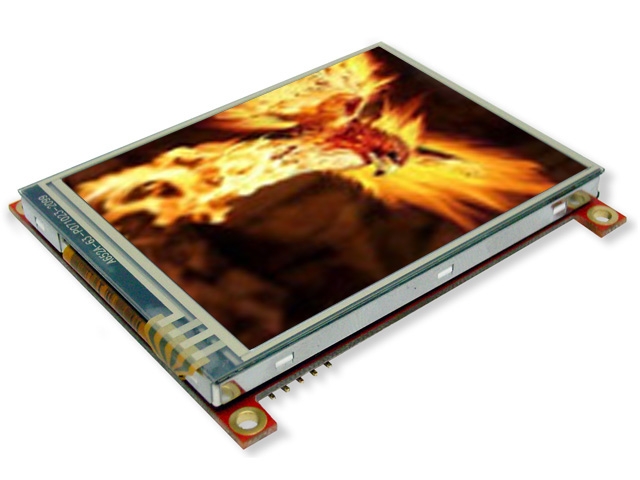
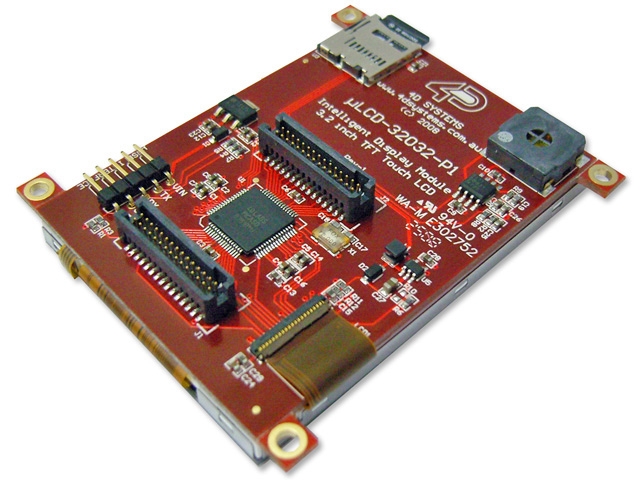
This page presents a library to use a 3,2" touch screen from 4D Systems (http://www.4dsystems.com.au/) in Australia. The screen details are :

/media/uploads/Kerpower/p1254239816.jpg /media/uploads/Kerpower/p1254239844.jpg

Connecting the screen

4D SGC Library

You can import the 4D SGC library from here :

» Import this library into a program4DGL

This is a library for 4DGL screens from 4D Systems in Autralia (http://www.4dsystems.com.au). Most graphic, touch and text functions are supported

To use it, you just have to insert the header file TFT_4DGL.h in your main.cpp and create an object using the TFT_4DGL class.

Code

#include "mbed.h"
#include "TFT_4DGL.h"

TFT_4DGL my_screen (p9, p10, p11); // serial tx, serial rx, reset pin;

Demo

Even simpler, you can import this demo :

» Import this program4DGLtest

Work in progress

Notes

There is a modified version of this library available which corrects the following assert "*** assertion failed: 0, file serial_api.c, line 115". It can be found here:

» Import this library into a program4DGL

Fixed a few minor issues in 4DGL library Moved pc serial port object used for debug output into 4DGL object itself. Previously it was a global object but its constructor wasn't getting run before the global constructor for the 4DGL object itself which led to an assert in the serial code. I also fixed a few potential buffer overruns that I saw in the code as well.

Forum thread discussing issue can be found here


calendar Page history
Last modified 08 Jul 2011, by   user Adam Green   tag 4D SGC, color, screen, touch | 15 comments  

15 comments on 4D SGC TFT Screen:

11 Nov 2010

Dear Stephane,

Thank you for your program and library, it allowed me to evaluate the effectiveness of mbed with a 4D TFT touch display. There are however a couple of minor points about the documentation.

It seems that you have written a wrapper around the SGC commands, where the mbed is the host microcontroller. This is in contrast to GFX, which creates a standalone module out of the display, and 4DGL is a programming language for GFX-based displays. Please find the definitions of SGC (Serial) and GFX (4DGL) platforms below, which has come from 4D Systems:

"(SGC) Serial Platform: The (SGC) Serial-Platform modules are based on the PICASO-SGC Serial Graphics Controller chip. In this mode, the PICASO-SGC becomes the slave device controlled by an external host controller. This allows you to develop your graphics applications using the host controller’s development platform and software tools. The PICASO-SGC chip has a rich set of serial commands built inside the chip and the commands are sent from the host controller via the serial (UART) interface. All it takes is a few bytes of serial data from the host controller and you can quickly and easily draw lines, circles, text and even display Images as well as play Video clips.

(GFX) 4DGL Platform: The (GFX) 4DGL-Platform modules are based on the PICASO-GFX2 Graphics Controller chip. In this mode, the PICASO-GFX2 becomes a standalone device and all application code is written in 4DGL (4D Graphics Language). Don't let the name scare you off, 4DGL is an easy to learn but a powerful high level language. It allows the developer to write applications in a high level syntax similar to popular languages such as BASIC, C and Pascal and run it directly on the PICASO-GFX2 processor. The (GFX) modules are stand alone devices. It allows the user to take complete control of all available resources on the module such as the Serial Port, the graphics display and the  micro-SD memory card. It provides the user complete control over the display module allowing them to offload a lot of overhead from the host processor by creating the 'work horse' objects within the display module itself.

NOTE: There is only a single PICASO chip on the module. The chip can be configured to be either a PICASO-SGC or a PICASO-GFX2 by programming the appropriate PmmC configuration file (Personality module micro Code) in to the chip. Think of it as a soft silicon where the silicon can be reconfigured via the PmmC file."

Would it be possible to please change the references from 4DGL to 4D SGC in your documentation, to avoid confusion for other users?

Thanks and regards, Anna.

16 Nov 2010

Done. I will change the lib name and demo software later. Cheers !

02 Dec 2010

Stephane,

Will you please let me know what is status variable doing in "status = ecran.touch_status();" I see it returns sometimes 1 , sometimes 2 or 3 . I am unable to understand. pl. help.

Thanks antony

03 Dec 2010

awesome

03 Dec 2010

Could you post a video please :-) very interesting library

06 Dec 2010

user joby antony wrote:

Stephane,

Will you please let me know what is status variable doing in "status = ecran.touch_status();" I see it returns sometimes 1 , sometimes 2 or 3 . I am unable to understand. pl. help.

Thanks antony

Coming from the screen manual (p44) :

0 : No Touch Activity 1 : Touch Press 2 : Touch Release 3 : Touch Moving

The library supports all values.

So you get a 1 when you press the screen, a 2 when you remove your finger and a 3 if you move your finger while pressing the screen.

I need to spend some time to write the documentation.

Cheers,

06 Dec 2010

user Daniel Garden wrote:

Could you post a video please :-) very interesting library

I will, I hope to find some time this week.

29 Dec 2010

Stephane, Thanks for above information. I have used your library for some touch panel buttons. It is useful.

But I have been facing a problem which is quite ununderstantable to me. I am using P9,p10 and p11(for reset) in this display. It works fine.

But whenever I put off the working display overnight and next day when I resume My work , the display doesn’t come on. Then I need to ON/OFF Vin power (+5 V SMPS Separate) many many times, then after trying many times, one time it may come on.

The time it comes “ON” is never predictable. Sometimes many many ON/OFF only makes it ON. Just after it is OFF , there is no surety it will come ON. Once it is ON , then no issues ,it gets reset from mbed button.

Also I noted that evenif I reset the mbed button during the problem times, then also it doesn’t come on for first time. Once it comes ON , then it behaves normal.

Is it any reset issue or my display has developed some problems. I don’t have a spare.

Thanks Antony

01 Jan 2011

Stephane, sorry for above query. it looks like it is a faulty display as it resets while pressing the pc board

01 Jan 2011

Hello, sorry to hear that. Are you sure of the 5V and current value of your external power source ? I had screen erratic behaviour because there was not enough current to power it correctly.

Cheers

22 Feb 2011

Hello Stephane, Thanks for your lib: this is a nice first step for my new mbed. I am in trouble with the delays in writeBYTE (1ms) and in the write command ( while (!_cmd.readable()) wait_ms(TEMPO);). The technical documenation of 4D is pretty clear: theses delays are not needed. I tried to remove the delays ... without success. Why ? I do not know.
Then I wrote my own programs...without any delay.(not yet published but running )
When you check the ACK/NAK you have to abort or reset the display if the answer is different from ACK! This is needed because the wohle comunication is disturbed.
Cheers Robert

01 Apr 2011

wow, respect..very nice work :) can you show us some example programms? would be nice :)

Cheers Stefan

18 Sep 2011

Hey I recently bought a new GREAT serial LCD board for development, like the LCD mentioned here, it just need TX and RX, and it have a plus, could be mounted on a standard breadboard to easy connect our mbeds! and the format it use is FAT(windows), 4D need strange formatting(I have test it), VERY EASY!

Check out also the videos!!!

Check out more here: http://mbed.org/cookbook/SMARTGPU

18 Dec 2011

The lib seems not to work on a OLED 160 SGC Display from 4DGL... has anybody worked with those smaller displays?

12 Mar 2012

Sorry, this library is compatible with this LCD? http://shop.4dsystems.com.au/serial-display-modules/302-0004.html thanks

Please login to post comments.