4 Phase Step Motor

I there, this is my first contribution for mbed platform.

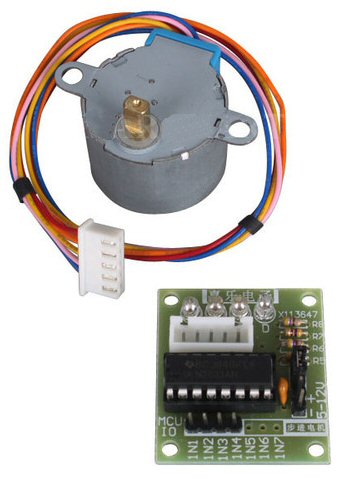
Both program and library where made for working with a 4 Phase stepper motor like 28BYJ-48 that you can get on ebay for $5

Firsts thing first,

The motor:

/media/uploads/XtaticO/stepper01.jpg

as you can see the motor comes with an ULN2003 (like H-Bridge) control board...it's very helpful for setting things up.

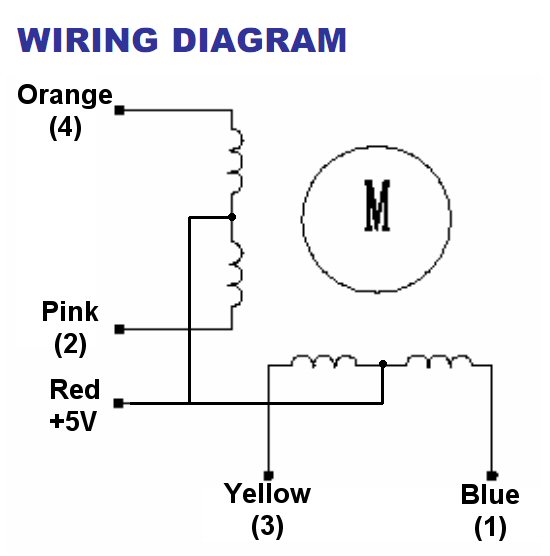
How it works

/media/uploads/XtaticO/28byj48_01.jpg

2 sets of 2 serial coils , when activated in a determinate sequence they make the motor turn.

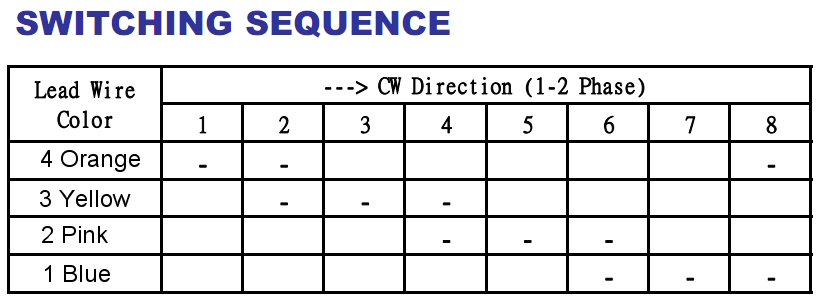
Table of Sequences

/media/uploads/XtaticO/28byj48_02.jpg

As you can see in the table, you just have to activate the coils in binary order.

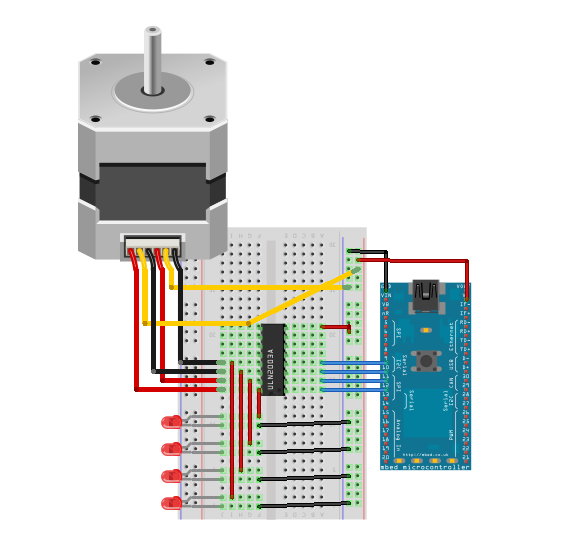
Schematic

/media/uploads/XtaticO/4phase_schem.png

Program and Library

Program here

» Import this programStepper_4

Working with a 4 Phase Step Motor like 28BYJ-45 or others

Library

» Import this library into a programsMotor

Library for 4 Phase Step Motor like 28BYJ-48

This program makes the motor turn 360º/180º clockwise/anticlockwise It also allows to change the motor speed...

Here's the test code:

» Import this program

00001 /*
00002 ############################################
00003 ##           sMotor v0.1 Test Program     ##
00004 ##          created by Samuel Matildes    ##
00005 ############################################
00006         ---- sam.naeec@gmail.com -----
00007 This library was made for 4-Phase Stepper Motors
00008 I don't take any resposability for the damage caused to your equipment.
00009 
00010 */
00011 
00012 #include "mbed.h"
00013 #include "sMotor.h"
00014 
00015 
00016 Serial pc(USBTX, USBRX);
00017 sMotor motor(p9, p10, p11, p12); // creates new stepper motor: IN1, IN2, IN3, IN4
00018 
00019 int step_speed = 1200 ; // set default motor speed
00020 int numstep = 512 ; // defines full turn of 360 degree
00021 //you might want to calibrate this value according to your motor
00022 
00023 
00024 int main() {
00025 
00026     //Credits
00027     printf("4 Phase Stepper Motor v0.1 - Test Program\r\n");
00028     printf("developed by Samuel Matildes\r\n");
00029     printf("\n\r");
00030 
00031     // Screen Menu
00032     printf("Default Speed: %d\n\r",step_speed);
00033     printf("1- 360 degree clockwise step\n\r");
00034     printf("2- 360 degree anticlockwise step\n\r");
00035     printf("3- 180 degree clockwise step\n\r");
00036     printf("4- 180 degree anticlockwise step\n\r");
00037     printf("5- Change Speed\n\r");
00038 
00039     while (1) {
00040 
00041         if (pc.readable()) { // checks for serial
00042 
00043             if (pc.getc()=='1')
00044                 motor.step(numstep,0,step_speed); // number of steps, direction, speed
00045 
00046             if (pc.getc()=='2')
00047                 motor.step(numstep,1,step_speed);
00048 
00049             if (pc.getc()=='3')
00050                 motor.step(numstep/2,0,step_speed);
00051 
00052             if (pc.getc()=='4')
00053                 motor.step(numstep/2,1,step_speed);
00054 
00055             if (pc.getc()=='5') {
00056                 printf("Current Speed: %d\n\r", step_speed);
00057                 printf("New speed: \n\r");
00058                 pc.scanf("%d",&step_speed); // sets new speed
00059             }
00060         }
00061     }
00062 }

I Hope it's useful for the community ;)


10 comments:

14 Jun 2012

Would it be better to have the stepper accelerate to speed and then decelerate to 0? Thanks. Fury

14 Jun 2012

user John Christ wrote:

Would it be better to have the stepper accelerate to speed and then decelerate to 0? Thanks. Fury

the purpose of stepper is to step into a determinate position. The speed var (acceleration) only defines how quick the motor jumps from step to step

14 Jun 2012

I'm probably missing something, but I see the connector has 5 pins, but you have six wires going to the stepper. Thanks. Fury

14 Jun 2012

user John Christ wrote:

I'm probably missing something, but I see the connector has 5 pins, but you have six wires going to the stepper. Thanks. Fury

assuming fritzing stepper motor as 6 pins i've connected the 6th to GND

07 Jul 2012

user John Christ wrote:

I'm probably missing something, but I see the connector has 5 pins, but you have six wires going to the stepper. Thanks. Fury

1 pin is VDD, 1 pin GND, the other 4 to connect uln2003 to "drive" motor. It depends from your ULN2003 (like H-Bridge) control board, some you buy brings 6 pins others brings 5 (cause VDD isn't together with others)

07 Jul 2012

What package did you use to create the plug - board drawing?

It looks superb !!!

Ceri

07 Jul 2012

The graphic of the protoboard is very nice. However, there seem to be some errors in the wiring.

  • It makes sense to assume that the two yellow wires on the steppermotor are centertaps that should both be connected to Vcc.
  • The four LEDs need series resistors to Vcc. Direct connection to Vcc as shown will destroy them because of the high current.
  • Most protoboards dont connect all islands on the righthandside. The Vcc and GND rails need to be daisychained.
07 Jul 2012

user ceri clatworthy wrote:

What package did you use to create the plug - board drawing?

It looks superb !!!

Ceri

fritzing ;)

user Wim Huiskamp wrote:

The graphic of the protoboard is very nice. However, there seem to be some errors in the wiring.

  • It makes sense to assume that the two yellow wires on the steppermotor are centertaps that should both be connected to Vcc.
  • The four LEDs need series resistors to Vcc. Direct connection to Vcc as shown will destroy them because of the high current.
  • Most protoboards dont connect all islands on the righthandside. The Vcc and GND rails need to be daisychained.

well i'm making an update version, tks for noticing

09 Jul 2012

Forgot to mention, both the yellow wires need to go to 5-12 Volt rail,

Please dont connect your stepper motor to MBED power O/P, unless it is a tiny Stepper motor.

Just as a point to save confusion later, the wire connecting the Gnd. of motor driver & MBED should be BLACK, not red, because Red is almost always 5V0 supply (standard PC Color coding) or more latly 3V3 or the primary (electronics) supply voltage

Cheers

Ceri

09 Jul 2012

user ceri clatworthy wrote:

Forgot to mention, both the yellow wires need to go to 5-12 Volt rail,

Please dont connect your stepper motor to MBED power O/P, unless it is a tiny Stepper motor.

Just as a point to save confusion later, the wire connecting the Gnd. of motor driver & MBED should be BLACK, not red, because Red is almost always 5V0 supply (standard PC Color coding) or more latly 3V3 or the primary (electronics) supply voltage

Cheers

Ceri

i really have to review that circuit on breadboard, with the motor driver that comes with the stepper you don't connect the motor's power supply directly to mbed... the vendor says that the motor runs on [3 - 5] VDC...with the driver ;)

Posting comments for this page has been disabled