Galileo7 LPC1769 マイコンボードでmbedのプログラムを動かす
Page last updated 16 Feb 2012, by  Suga koubou.
3
replies
Suga koubou.
3
replies
Suga koubou.
3
replies
Galileo7 LPC1769 マイコンボードでmbedのプログラムを動かす

underconstruction
Specification - 主な仕様
- NXP LPC1769 (Max 120MHz)
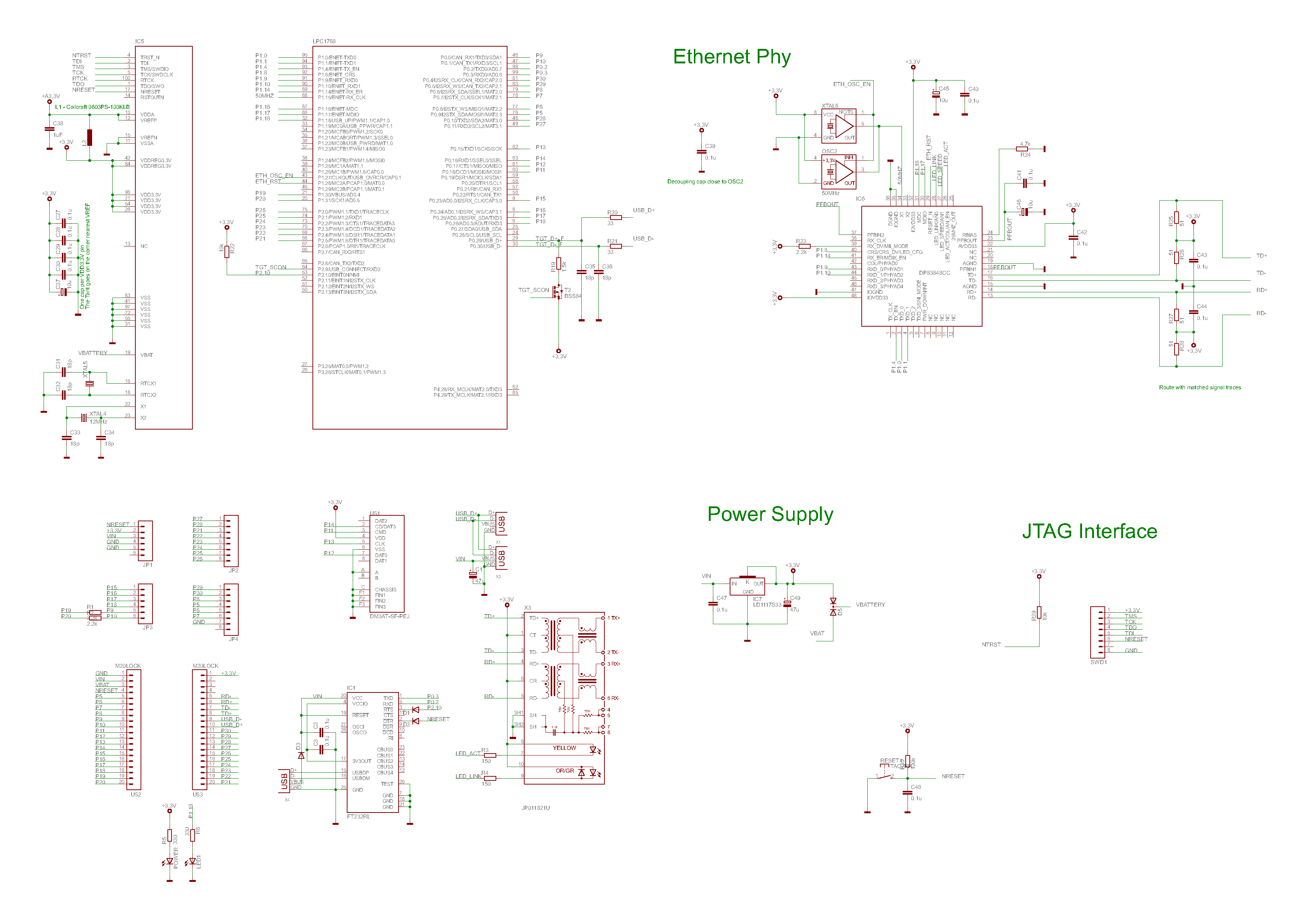
- Ethernet PHY DP83848
- 組立キット(主要ICは実装済み)
- mbed型のソケット配列(ピン幅は異なる)
- Arduino型のソケット配列(シールド搭載可能)
- USB=シリアル書き込み(FT232R搭載)
- SWD接続可能(LPCXpresso の LPC-Linkと接続可能)
- micro SD ソケット
I/O
- LED1 の定義はそのまま使える。(基板上のLED)
- LED2~4 は実装されていない。
- USBTX(P0[2])、USBRX(P0[3])はシリアル書き込み用のFT232が接続されている。
- FT232のRTSはP2[10]へ、DTRはRESETへ接続されているため、Flash書込みツールのブートローダーモードへの自動切り替えに対応する。
Pin assign - ピンアサイン
20Pのソケット2つは、mbedと同じ配列です。
Arduinoと同じ配列の部分は以下の通り。
Arduinoシールドを重ねた時、イーサーネットのコネクタの高さが干渉する場合は、別途、連結ソケットで延長してください。
Digital
| Shield pin | 0 | 1 | 2 | 3 | 4 | 5 | 6 | 7 | 8 | 9 | 10 | 11 | 12 | 13 |
|---|---|---|---|---|---|---|---|---|---|---|---|---|---|---|
| mbed P_ | 27 | 28 | 21 | 22 | 23 | 24 | 25 | 26 | 29 | 30 | 8 | 5 | 6 | 7 |
Analog
| Shield pin | 0 | 1 | 2 | 3 | 4 | 5 |
|---|---|---|---|---|---|---|
| mbed P_ | 15 | 16 | 17 | 18 | 9 19 | 10 20 |
- P_19・P_20 をAnalogInとして使うとき、アナログソースのインピーダンスが高い場合は、P_9・P_10 を DigitalIn と定義しmodeをOpenDrainと指定する。
- P_9・P_10 をI2Cの SDA・SCL として使う場合、P_19・P_20 を DigitalOut と定義し1を出力(Highレベル)することにより、I2Cラインのプルアップとして使用できる。
micro SD
| micro SD | 1 | 2 | 3 | 4 | 5 | 6 | 7 | 8 |
|---|---|---|---|---|---|---|---|---|
| mbed P_ | 14 | 11 | 3.3V | 13 | GND | 12 |
Download - ダウンロード
Distribution - 販売
Ethernet
このボードは MACアドレスを持っていないため、ソフトウェアでMACアドレスを指定する。
extern "C"
void mbed_mac_address(char *s) {
    char mac[6] = {0x00, 0x11, 0x22, 0x33, 0x44, 0x55};
    memcpy(s, mac, 6);
}
ローカルエリア内であれば、他の機器とアドレスがかぶらない限り問題は発生しない。
Flash(ROM)書込み
- パソコンのUSBポートと、基板上「PROG」と書かれたミニUSBを接続する。
- (初回のみ)FT232ドライバをインストールする。
lpc21isp
bin ファイルをそのまま書き込む。
Windows
lpc21isp.exe -control com1 -bin filename.bin 57600 12000
UNIX
lpc21isp -control /dev/ttys0 -bin filename.bin 57600 12000
http://sourceforge.net/projects/lpc21isp/
Flash Magic
bin ファイルを hex へ変換してから書き込む。
ファイル変換には LPCXpresso や Sourcery G++ Lite などに含まれている arm-none-eabi-objcopy コマンドを使う。
bin->hex
arm-none-eabi-objcopy -I binary -O ihex filename.bin filename.hex
- Device: LPC1769
- Baud Rate: 57600 (bps)
- Interface: None(ISP)
- Oscillator: 12 (MHz)
http://www.flashmagictool.com/
SWD接続
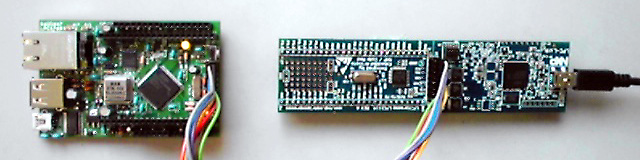
LPCXpresso基板のLPC-Link部とCPU部をつなぐ配線を中央で切り離し、SWD信号を引き出して接続することにより、LPCXpresso開発環境を利用することができます。
http://lpcxpresso.code-red-tech.com/
3 comments on Galileo7 LPC1769 マイコンボードでmbedのプログラムを動かす:


Please log in to post comments.
Galileo7 LPC1769 マイコンボードでmbedのプログラムを動かす
Page owner: Suga koubou
Created 24 Dec 2011.
Last updated 16 Feb 2012
It is very cool. There are 2 type of pin row. The inside row is compatible 40 pins assigned with Mbed (only width that different). The outer row is compatible with Arduino shield. When is it will be available from web store?