SmartBoard Baseboard
Information
Updated December 2018 - I just completed another small build. Once again I have several blank PCBs for SmartBoard v1.01 that I will not need. When I am about out, I then usually order 10 to 20 more. I can make these available rather inexpensively. See this Kit information. Send me a private email to see what's on hand.
Information
See also WattVision for power monitoring.
Design Objectives
The design objectives for this baseboard were to create a general purpose baseboard that can be used for educational use, or just as effectively designed into an embedded solution and forgotten. Whether for education, hobby, or commercial usage, a reliable design reduces doubt, development and rework.
While experimenting, headers and shorting blocks permit easy alteration for flexible access to various IO configurations. For permanent installations, soldered-in jumpers could be used instead. |
Virtual Board
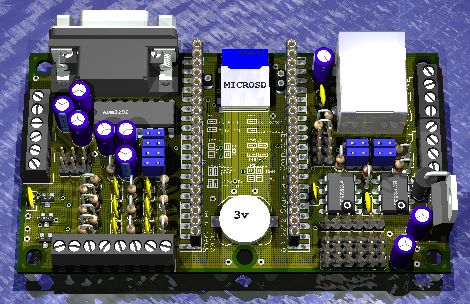
Note: This 3D rendering approximates the finished board.
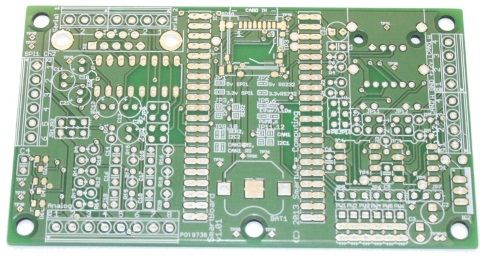
Blank PCBs
Physical Build
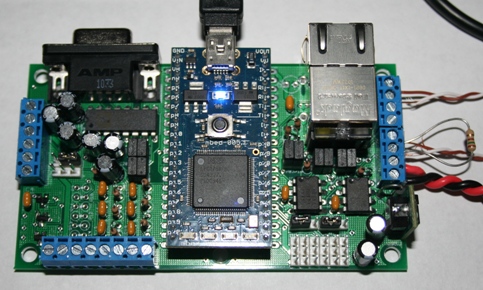
Note: Actual unit in a nearly completed configuration.
Key Features
- Through-hole parts [where practical] to keep it easy for educational, hobbyist, or professional to work with
- Embeddable using screw terminals for most of the interface signals
- Varying populations of parts and jumpers support combinations of:
- 2 x CAN
- 2 x RS232 (1 DB-9, or 2 Screw Terminal)
- 2 x SPI Port
- I2C
- Ethernet w/LEDs
- USB-A Host
- USB Slave on the mbed itself
- PWM outputs pinned for Servo Motors
- 6 Analog Inputs (with optional surface mount protection diodes)
- 1 Analog Output (in place of 1 of the Analog Inputs)
- Micro-SD card (surface mount part)
- Battery backup for RTC (hole in PCB can be used to lock battery it in
place)
- External Power Input using one of two regulators for different needs.
- Low dropout linear for lower voltage projects
- Switching regulator suitable for a wider voltage range
2nd Generation
v1.01 Documentation
The BOM cost (excluding PCB and mbed itself) is about $47 in single quantity for a typical build.
All documentation is believed to be completely accurate, however it is in your best interest to review and verify. Please report any errors or unclear information you may find.
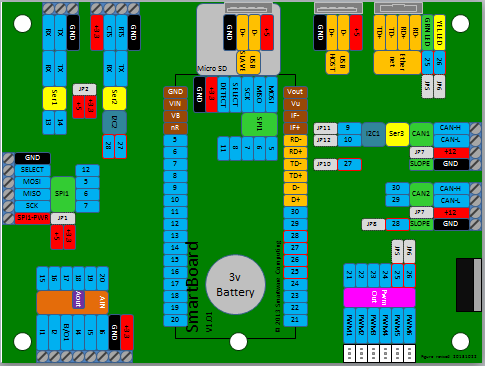
Pinout Diagram
Project Ideas
- SmartBoard WiFly - Wireless sensor/control node using WiFly Bridge board.
- HDMI CEC Interface to interact with your TV and other HDMI gear.
- Display Controller to be combined with other projects.
- Security monitor - With the complement of inputs, this could
monitor doors, windows, temperature, light, and signal a change with a controlled output signal, or perhaps an email to your phone.
- Car interface using the CAN port(s) - Most modern cars have CAN networks, and this could be the bridge between that and your PC.
- AV Receiver controller - There were a few years there where high end AV
Receivers had serial ports, but not Ethernet. Put a [web] server in mbed, which
interfaces to the AV Receiver on the back-end using RS-232. Control it from anywhere.
- Servo Controller - with 6 channels of PWM, there are some
possibilities there.
- But the best idea is the one that you're thinking of...
Reference
v0.05 Documentation
This is the original version that was built.
Hi David,
I like it. Like you, I have been looking for a good baseboard for a while now, and haven't found one that I really like - yours is the closest, particularly as it has two CAN transceivers.
A couple of comments/suggestions that I think may improve it:
1. I'd really like to use I2C also. The most obvious way to do this would be via pins 27/28. If you could add another couple of jumpers (or maybe better some DIP switches) to allow the RS232 transceiver to be bypassed, then that would allow access to I2C or TTL serial on pins 27/28 as an alternative to RS232.
2. An option (perhaps also via DIP switches) to select I2C instead of the CAN transceiver on pins 9/10 would also be useful.
3. Likewise, a way to use the second SPI port on pins 11/12/13 at the same time as the SD card could be useful.
I like the way you've chosen all through hole components, and have an extra row of holes for each mbed pin (although not shown on the rendered image above, I see the extra rows on your PCB layout), so none of the changes above would really be a show-stopper for me, as it wouldn't be too hard to make hand soldered modifications anyway.
I'd be interested if you decide to get some pcbs made.
Andrew
#
28 Oct 2010 . Edited: 28 Nov 2010
Hi Andrew,
Great feedback. I updated the design to v0.03 - incorporating your feedback as best I could. I didn't go with the DIP switches because they take a lot of space (increases PCB cost), and in an industrialized use they are not generally as reliable as I would like. You'll also see that a few of the jumpers can now be cross-point wired, which would have taken more DIP switches. And of course, bare wire can be used to permanently set an implementation.
I haven't yet done much of a "power" study - what can the mbed source to the USB, or if the single TO-220 regulator, without much of a heatsink, can support much in the way of loads.
Please look this over and let me know what you think.
Hi David,
I can't see your v0.03 schematic or PCB. The links seem to be broken, for me at least
#
28 Oct 2010 . Edited: 29 Oct 2010
Fixed - sorry about that. I'm not sure if it is the wiki software or me. I think when I upload the documents it converts spaces to underscores, but when I create the links, it doesn't. I was racing a bit too fast this morning.
What program are you using to make the 3D rendering?
Lerche
#
29 Oct 2010 . Edited: 29 Oct 2010
Hi Lerche,
The Schematic and PCB are designed with Eagle. It was then rendered in Eagle3D (not from Cadsoft), which I came across just a few days ago. Perhaps interestingly, while seeking out a faster way to make new parts, I came across EagleUp, which I haven't yet tried. And just seconds ago - while searching for the EagleUp URL, I came across this hybrid of the two. These technologies are sufficiently cool that I had to remind myself of my original objective - so I refrained from starting a 3D project to create the mbed component.
Common to both is an integration to Eagle with the ULP (User Language Programs) that can basically read your PCB information and translate that into something compatible with the external rendering tools.
#
14 Nov 2010 . Edited: 14 Nov 2010
I just updated with version 0.04 design. Some part changes allowed me to reduce the PCB size a little bit, which saves space and money. I was trying to find a way to get power over the ethernet cable, but that wasn't possible with the available connector that has RJ45 and USB-A. My current goal is to send this design out for PCB manufacture about mid-December 2010.
David, you could easily add non-IEEE-compliant PoE if you only need it to work on your own, controlled networks. Just use the two spare pairs as positive and negative, and perhaps add a SimpleSwitcher or similar to your board (you really ought to be using high-ish DC voltages (perhaps 18, 24 or 36 V) otherwise the copper losses are atrocious. With such high DC voltages, a linear regulator or LDO is going to get *very* hot running an mbed).
For example, these pre-assembled adapters use 4/5 for DC+ and 7/8 for DC-.
http://www.solwise.co.uk/wireless-poe-injector-diy.htm
SimpleSwitcher:
http://www.sparkfun.com/commerce/product_info.php?products_id=9654
Hugo, thanks for the quick feedback. I was looking for an RJ45 that would let me tap in - similar to what I have on an old Ethernut board. But this connector is a combo RJ45 and USB, and in my search to date, I couldn't find one that grants me access to the "ether-side". If you happen to know of a part, that might be the reason for v0.05. The SimpleSwitcher looks like quite a nice part - few external parts. As the rest of the BOM is about $30 and that adds $19, I'll have to do a bit more research on that part - perhaps see how much board space is required.
Oh I see, you can't do that because you're using a connector with integrated magnetics. Your best bet is probably a plain, passive connector and separate magnetics (it'll be cheaper too, but will take up more space).
Regarding the SimpleSwitcher, other devices in that series go down to around $11 in one-off quantity, but a discrete DC/DC would be a lot cheaper - I like the SimpleSwitchers for their extreme simplicity and integration, and because you don't need to find a suitable inductor (which can be tricky). Another simple, cheap but larger solution might be something like Digikey 811-2196-5-ND or similar (there are many thousands of DC/DC modules on Digikey...).
Hello David,
really nice board.
I think you will need a large CAP ( at least 100 uf) at the regulated 3V3 supply side because if you connect, for example a MAXStream zigbee module, strange things can happen during transmitting. You power everything via mbeds 3V3 regulator and a larger CAP can support the Voltage regulator when a lot of current is needed for a very short periode.
best regards
Franz
... Another simple, cheap but larger solution might be something like Digikey 811-2196-5-ND or similar (there are many thousands of DC/DC modules on Digikey...).
That part looks quite interesting, and if I check the footprint, it appears to be a simple bom substitution. Thanks.
I think you will need a large CAP ( at least 100 uf) at the regulated 3V3 supply side ...
I'll see if I can fit in this cap. From the mbed schematic, it appears the 3V3 is only for external circuitry. I didn't see it go anywhere but to the external pin.
#
15 Nov 2010 . Edited: 17 Nov 2010
Hi David,
you have GND on top and bottom side, right, using a GND-polygon? Maybe its an idea placing some more extra vias (name the vias to "GND") to get better GND connections between the two layers. This saves a lot of gnd-routing-work, too :-) See my attached example:

#
17 Nov 2010 . Edited: 29 Nov 2010
Franz - Thanks - I'll incorporate the extra ground vias before I go to manufacture.
#
06 Dec 2010 . Edited: 21 Dec 2010
Baseboard v0.05 posted - Schematic, PCB, 3-D representation, BOM, and design notes. I also released files for PCB manufacture and ordered parts. The next phase of fun will start soon.
David,
What are your plans for the finished design? I own a LPKF board plotter and would like to build somthing like this for personal use. If you are interested in selling a non-commercial license for the Eagle layout I'd be interested in buying one.
23 comments on SmartBoard Baseboard:
I'm interested in 4 immediately
I ordered 2 from batch-pcb and today, four arrived. Very nice quality for such a low price.
This is the first time I have used the service, so if anyone knows why I got extra boards please let me know.
Thanks!
I get the impression that receiving double orders from batch-pcb is not uncommon - the same happened with my original order from there.
Great board! Exactly what I need for my project. I need to communicate to 2 different canbus devices and then talk bluetooth to an android device.
Got the parts ordered, but there were a couple BOM issues I noticed:
- ADM3202ANZ, IC TXRX DUAL RS232 3.3V 16DIP, I only found one on the board, there are 2 on the BOM
- 3-644456-3, CONN HEADER VERT 3POS .100 TIN, I only found 12 on the board, there are 14 on the BOM
- SFH11-PBPC-D10-ST-BK, CONN HEADR FMALE 20POS .1" DL AU, I cannot locate this. I think this was meant to be a D20. The ones I got will not fit end to end and are unuseable for IC1.
Also, I figured I'll mention here, Batch PCB isn't a fast service, and can take up to 4 weeks while they wait to fill a panel. I didn't know this and after 10 days, started to wonder about my order and found more info in their FAQ. Just for those ordering, it's not going to come in the mail within a week.
Hi Travis, Great feedback on the BOM. Sorry about the errors in there. I updated the BOM linked above to a rev 'b' based on your notes.
And for Batch PCB, I agree on the speed of their delivery - I had one project's boards arrive in just over 2 weeks, but I think the 3 to 4 weeks is much more typical.
Great work on this board BTW David. Meets 90% of my needs (I only added an RN-42-SM http://www.rovingnetworks.com/products/RN_42_SM). Thanks for fixing the BOM.
WRT the boards, I got a note yesterday from BatchPCB saying the order shipped. Right at 2 weeks actually. Just making sure people knew that it might not be 2-3 days like we're used to for the parts.
Should be building this next week, will let you know how it goes.
C22 is missing from the BOM, it's a 10uF cap same as C2 and C3. Also, the - silkscreen on C2, C3 and C22 is under the pad, so you can't tell. The Square is positive for those putting it together.
Thanks again Travis. The library I used for those caps also had a rather subtle minus sign next to the round pad. As you know, some parts like to label the negative terminal and others the positive... I updated the BOM to rev c, and I'll also take note of the silkscreen issues, so some future PCB layout will fix those items.
Everything works so far, going to test Canbus this weekend (hopefully my OBD cable and serial LCD from sparkfun arrives). The SD card, USB, LED's and serial all work well.
In future updates, maybe keep the jumpers away from large parts. The jumpers near the ethernet/USB device are a bit hard to fit my fingers onto. I think you mentioned the clearance for the high power part already, but I just made the leads longer on the cap and kind-of bent it over.
It went together very easily though, and I always double checked via the PCB pdf to make sure I got the right locations and parts. Built 2 boards in one evening in 2hrs. Great documentation and the test code works great, thanks for putting it all together.
Got back to the Smartboard last week and started working with CANbus. I'm using a Bluetooth-OBD2 dongle to connect via bluetooth to the smartboard CANbus. Essentially I want to create a little ECU for use in my own projects (PID smoker, Electric motorcycle, etc). I use a program called Torque which is meant to run on an Android device and can display many different graphs, gauges, etc, as well as log other info like GPS, accelerometer data, timestamp.... which is fairly useful as a portable display. Got the Torque app to talk to the dongle and I'm seeing the OBD PID requests come through on CANbus, and I send them to the LCD (and pc serial port). So far so good. I've got two of the smartboards, one is in the middle, one is at the end, and the BT-OBD dongle is at the other end. This board makes it super simple to work with Canbus, TTL and RS232 serial, USB, SD and ethernet.
Just a couple things for the wishlist:
- It would be really nice to have a jumper to select using the termination resistor or not. I know you can wire one into the terminals, but I've lost a couple 120ohm resistors... but never run out of jumpers.
- I realize size is an issue, but I wouldn't mind a slightly bigger board that includes the silkscreen designations. Right now they're under the connectors, so I always find myself re-referencing the PCB layout and Schematic.
Thanks for the positive feedback Travis. And it sounds like you're putting the SmartBoard to work in some interesting ways.
With respect to your wishlist - I added your suggestions to my list. I actually tried to put in jumpers for the termination resistors, but couldn't find the space (and I didn't want to make the PCB bigger). So, I'll struggle with this request for sure. I also thought about leaving off some of the flexibility (the space for which could then be reclaimed for things like this), but here too, I've actually used nearly every circuit that I designed in for one project or experiment or another.
No worries, I'm an engineer, so I value feedback and I hope you do as well. It's the only way we make things better!
It's a great board IMHO, and I think it's one of the best ones out there as far as features go.
Is there a reason you had to make it as small as you did?
Neither the A_CANAdapter or A_SmartBoard_HWTester are working anymore... they have a bunch of compile errors. Looks like the latest update took them down.
Software update - sorry for the delay - other projects had priority. I just rebuilt A_CANAdapter and A_SmartBoard_HWTester and both are working now. I guess with the mbed library updating several times a few tweaks were in order. If you find any issues, please let me know.
No worries, I was just messing around with em and figured I'd let you know. Thanks for updating them. I'll test em out for you as soon as I can.
Hi David, will there be an option to purchase the fully populated version of this board, as in ready-to-use? The twin-CAN makes it of particular interest to me :)
Hi Jason,
Well, I hope I don't dissappoint you too much - I looked at a couple of options along this line, but haven't done anything yet. From basic component pricing, there is good price scaling by buying enough parts for 20 to 50 of these at a time, but I think that is really far short of what it would take to affordably engage a manufacturing house.
That's why I designed it with through-hole components as much as possible - so a hobbyist could successfully build it, and I would certainly encourage that! If you haven't done any soldering before, about $11 at a Radio Shack (or elsewhere online) would get you the tools to get started. Is there something like a Radio Shack in your part of the world? And for a bit more money you could buy a small kit or two to practice on. And there are lots of online soldering tutorials as well.
Thanks David!
On smartboard_v1.01_pinout.pdf and smartboard_v1.01.sch.pdf, Ser2 X5-4 is listed as +3.3V, but on the smartboard_v1.01.brd.pdf the Serial 2 X5-4 is listed as +12V.
And the AIN0-AIN5 on smartboard_v1.01.sch.pdf doesn't match the AIN I1-I6 on smartboard_v1.01.brd.pdf and smartboard_v1.01_pinout.pdf
Also, the image above isn't updatd with smartboard_v1.01_pinout.pdf
Thanks for revising everything. I use the smartboard all the time (more lately).
Have you considered an SMT version? Contact me offline (you have my email).
Hi Travis,
I think I fixed everything - the errors were in the documentation not the schematic or PCB. But I'm not sure what you meant by "image above"?
Thru-hole v. SMD
I went with easy to work thru-hole for hand-working since I didn't know how many cuts and jumper I might require (turns out - none) to keep it flexible. I originally planned for surface mount, but when I looked at the connectors and jumpers and such, it would still have ended up about 3/4 the current size, so surface mount wasn't as important - ease of working on it was. If I needed to build dozens of identical units, I'd forgo many of the circuits and then go SMT and it would be a lot smaller.
Concepts
I have no concrete plans for the next revision, but have been tossing some ideas about:
- Power over Ethernet (split the USB and Ethernet connector, external magnetics, then can tap the pins to feed a small PoE module)
- Jettison the mbed module and put the bare chip down (LPC1768/9) and have access to more IO.
- Resize to fit into an available package (nothing specific drove the size of this version)
- Get all the connectors to one or two sides, not all four.
- Scale the design to build a few dozen, rather than a few at a time (substantial cost reduction).
What kind of things would you like to see?
David,
I just meant the embedded image on this page. It got updated though. Might've needed a refresh. Figured I'd let you know about them, you've documented this thing really really well, and I thank you for that!
I remember you saying that about the SMT. I was just thinking it might interest more people if it was pre-built, It's got a LOT of things on it. More so than some other boards. It would be nice if it was a little larger actually. Working with jumpers and removing the SD card is pretty tight sometimes.
Concepts:
- The POE is a nice option. Makes it easy to wire to without having a power supply. Power injectors are cheap (for the powering end). Having a barrel connector on it might be nice, so you could use a 12V wall wart on the bench.
- Having just the bare chip on board would be awesome and really really shrink things! I hear they're opening up the source code for things a bit, so people can do that and retain the mbed compiler, bootloader, etc.
- Fitting into an existing package is a great idea... reminds me of my project (Chatted about it months ago, see link below)
- Connectors on one side or so would be nice.... see below
- building more at a time sounds like a good idea. Sounds like we're on similar trains of thought....haha.
Take a look at my notebook page, just tossing some ideas around right now:
https://mbed.org/users/tgintz/notebook/mbed-vehicle-control-unit-project/
Comment on what you think about the hardware side of things. Software is more forthcoming. Maybe some collaboration, who knows.
David,
I am interested in purchasing a SmartBoard Baseboard Bare Kit A (v1.01). Do you have any available?
Regards,
Tom Doyle
To see if I have an PCB remaining, send me a private email.
Please log in to post comments.
 David Smart.
23
replies
baseboard,
CAN,
canbus,
ethernet,
micro SD,
pwm,
rs232,
screw terminals,
USB
David Smart.
23
replies
baseboard,
CAN,
canbus,
ethernet,
micro SD,
pwm,
rs232,
screw terminals,
USB


Hi David,
I like it. Like you, I have been looking for a good baseboard for a while now, and haven't found one that I really like - yours is the closest, particularly as it has two CAN transceivers.
A couple of comments/suggestions that I think may improve it:
1. I'd really like to use I2C also. The most obvious way to do this would be via pins 27/28. If you could add another couple of jumpers (or maybe better some DIP switches) to allow the RS232 transceiver to be bypassed, then that would allow access to I2C or TTL serial on pins 27/28 as an alternative to RS232.
2. An option (perhaps also via DIP switches) to select I2C instead of the CAN transceiver on pins 9/10 would also be useful.
3. Likewise, a way to use the second SPI port on pins 11/12/13 at the same time as the SD card could be useful.
I like the way you've chosen all through hole components, and have an extra row of holes for each mbed pin (although not shown on the rendered image above, I see the extra rows on your PCB layout), so none of the changes above would really be a show-stopper for me, as it wouldn't be too hard to make hand soldered modifications anyway.
I'd be interested if you decide to get some pcbs made.
Andrew