mbed Compiler
This content relates to a deprecated development tool
The Mbed Online Compiler is now deprecated and we encourage you to switch over to our latest online IDE: Keil Studio Cloud.
Try Keil Studio Cloud, our new browser IDE for Mbed and CMSIS
For the best development experience use Keil Studio Cloud, a free browser-based IDE for Mbed OS application and library development. Keil Studio Cloud gives you a powerful modern editor, debugger and integrated source control management, helping you prototype Mbed applications quickly and easily.
Instant access to your lightweight C/C++ microcontroller development environment
The Mbed Compiler provides a lightweight online C/C++ IDE that is pre-configured to let you quickly write programs, compile and download them to run on your Arm-based microcontroller. In fact, you don't have to install or set up anything to get running with Mbed. Because it is a web app, you can log in from anywhere and carry on where you left off, and you are free to work on Windows, Mac, iOS, Android, Linux, or all of them.
It is online and lightweight, but it is also powerful.
The compiler uses the professional Arm Compiler engine, so it produces efficient code that can be used free-of-charge, even in commercial applications. The IDE includes workspace version control, code formatting and auto-generation of documentation for published libraries. The Mbed tools are focused on prototyping and are designed for fast experimentation, and complement other professional production-level tools; you can even export directly to other toolchains if you choose, as you progress to productise your design.
You can publish projects directly from your Compiler workspace to the mbed.com website to share code with others, and pull existing libraries in to your workspace to get a head start.
Feature Highlights
Online Compiler IDE
Every Mbed user account gets their own private Compiler workspace which contains their programs. This is private to you, and available wherever you login to Mbed.
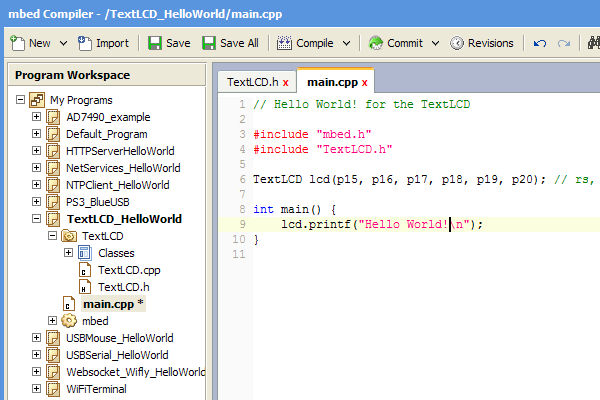
The IDE includes a full code editor including syntax highlighting, standard editor keyboard shortcuts, undo/redo, cut/copy/paste, tabs, block/line comment, and even a code auto-formatter. This is where you work on your personal workspace, with multiple files, folders, programs, including a drag and drop folder interface:
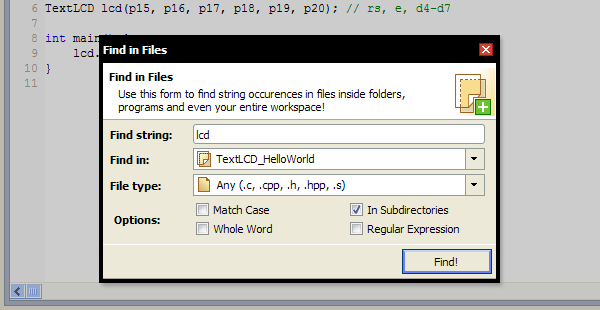
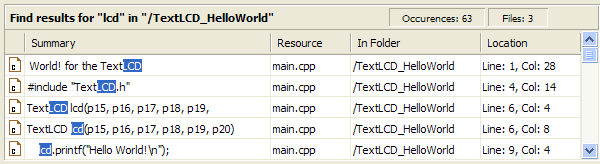
The editor also includes features like find and searching across multiple files and filetypes; for example, searching across your whole program. When you search, the results will appear as a list in the compiler output window where you can jump to any of them with a click:
Integrated Version Control
You can use the built-in version control features to let you version, branch and merge code, with a nice representation of the state of your project history:
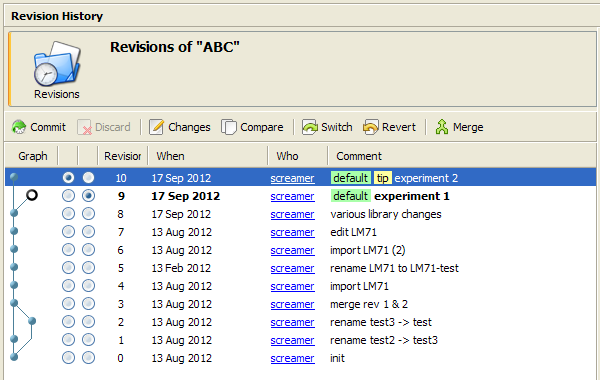
The approach should be familiar to those of you with experience of distributed version control models (as used by mercurial/git); each program has its own local repository, so you can commit and perform actions on it within your own workspace (such as updating, branching and showing changes).
The main things you can do include:
- Commit a version of your project, and view the revision history
- View changes a version made, and compare changes between versions
- Update or revert to a different version
- Branch and merge
- See also Version Control
Importing Libraries or Example Programs
The Import Wizard allows you to import programs and libraries published by Mbed users. This is useful for importing code that has been packaged as a reusable library component (e.g. a class for a peripheral), so you can quickly pull in the building blocks for your project.
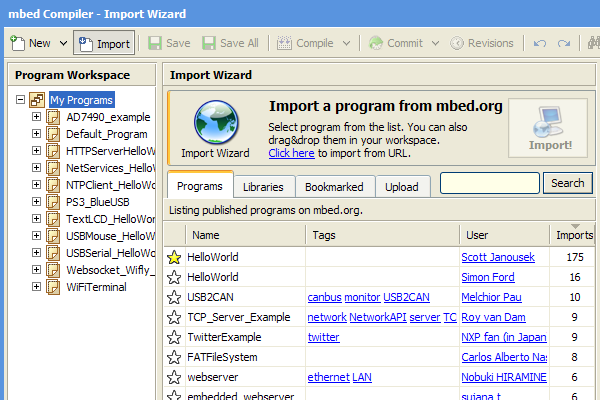
- See also Importing code
Compilation
To perform the actual compilation the Mbed Compiler uses the industry standard Arm Compiler (versions 4, 5 and 6 depending on the version of Mbed), in the default configuration, to give excellent code size and performance. There are no limitations on code size (apart from the limits of the device itself), and the generated code can be used freely for commercial and non-commercial use.
When you compile a program, you'll get a display of the memory usage. This shows the size of program code and any constant (const) variables that will end up in FLASH, and size of data variables that end up in main RAM.
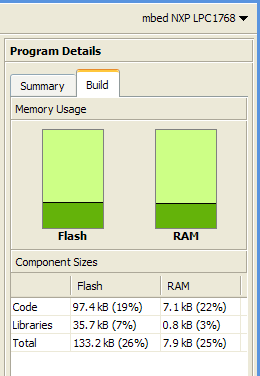
Note, this doesn't include the runtime allocated variables (i.e. the heap and stack), which live in any remaining RAM.
- See also the Mbed Memory Model
Export to Offline Toolchains
The Mbed C/C++ SDK used with the Mbed Online Compiler is also compatible with a number of other popular ARM microcontroller toolchains, so we've also built in the ability to export directly to these toolchains! For example, if you'd like to migrate to a different toolchain as your project develops past prototype, you can choose to export an Mbed project by right-clicking on it:
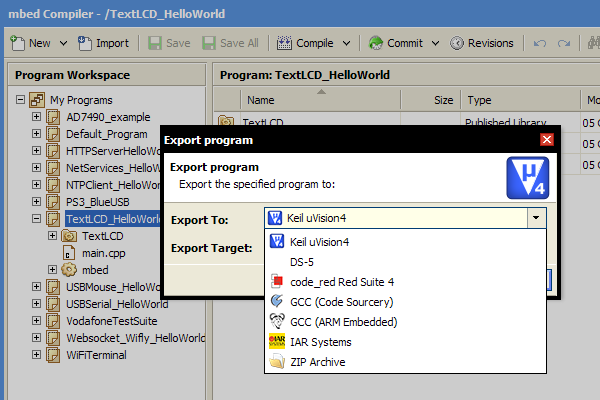
- See also the /handbook/mbed-SDK and Exporting to offline toolchains
Feature Overview
Code IDE
- All the core features you expect from a code editor including syntax highlighting, standard editor keyboard shortcuts, copy/paste, etc
- Personal workspace with multiple files, folders, programs, including drag and drop folder interface
- Code auto-formatter, print-friendly code preview
Compile Engine
- Pre-configured compile engine that "just works", delivering .bin binary file to save to Mbed microcontroller
- Switch between different Mbed targets with a drop-down selector
- Output of compile-time messages, including click to go to error and error message wiki
- Build information including graphical display of code size and RAM usage
Built-in Version Control and Collaboration tools
- Built-in version control (DVCS)
- Publish, fork, push and pull code in collaboration-enabled environment
- View graphs, diffs, change sets
Importing and Exporting
- Import programs from online catalogue of published programs
- Publish your code directly from the Mbed Compiler to the Mbed website
- Import from and export to local source files and zip archives
- Export directly to other popular ARM toolchains
Accessibility
- Access the Mbed Online Compiler on all major browsers, on all modern operating systems
- Develop and prototype right on your tablet device (Android, iOS) with the integrated touch support
- Backward compatible up to Internet Explorer 6