I2C

The I2C interface provides I2C Master functionality.

This interface can be used for communication with a I2C devices, such as serial memories, sensors and other modules or integrated circuits.

Hello World!

» Import this program

#include "mbed.h"
 
// Read temperature from LM75BD

I2C i2c(p28, p27);

const int addr = 0x90;

int main() {
    char cmd[2];
    while (1) {
        cmd[0] = 0x01;
        cmd[1] = 0x00;
        i2c.write(addr, cmd, 2);
 
        wait(0.5);
 
        cmd[0] = 0x00;
        i2c.write(addr, cmd, 1);
        i2c.read(addr, cmd, 2);
 
        float tmp = (float((cmd[0]<<8)|cmd[1]) / 256.0);
        printf("Temp = %.2f\n", tmp);
    }
}

Warning

Remember, you will need a pull-up resistor on sda and scl.

All drivers on the I2C bus are required to be open collector, and so it is necessary for pull up resistors to be used on the two signals. A typical value for the pullup resistors is around 2.2k ohms, connected between the pin and 3v3.

API

» Import latest build into a program

Public Member Functions

  I2C (PinName sda, PinName scl)
  Create an I2C Master interface, connected to the specified pins.
void  frequency (int hz)
  Set the frequency of the I2C interface.
int  read (int address, char *data, int length, bool repeated=false)
  Read from an I2C slave.
int  read (int ack)
  Read a single byte from the I2C bus.
int  write (int address, const char *data, int length, bool repeated=false)
  Write to an I2C slave.
int  write (int data)
  Write single byte out on the I2C bus.
void  start (void)
  Creates a start condition on the I2C bus.
void  stop (void)
  Creates a stop condition on the I2C bus.

Interface

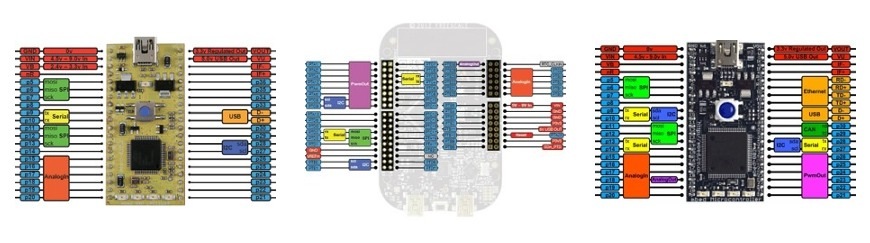
/media/uploads/chris/pinout-thumbnails.jpg
See the Pinout page for more details

The default frequency of the I2C interface is 100KHz.

I2C is a two wire serial protocol that allows an I2C Master exchange data with an I2C Slave. The I2C protocol support upto 127 devices per bus. The I2C interface can be used for writing data words out of the I2C port, returning the data recieved back from I2C slave. The I2C clock frequency can be configured.

References


1 related question:

40 comments:

27 Oct 2010

Thanks for adding default freq Simon Lerche

11 Nov 2010

Could you, please, explain what the arguments in the i2c.write and i2c.read commands mean. What is the general structure of the read and write commands for the I2C interface?

Thanks LL

11 Nov 2010

As a follow-up to my previous question, what would the code look like in order to put characters in an I2C display such as the EA T123-I2C?

13 Dec 2010

I posted a comment a couple of days ago, including an image of a diagram giving the complete sequence of pulses on the SDA and SCL lines for a data transfer. Is it still waiting for approval, is it unsuitable, or did it not get through? Please let me know, thanks. I am harryweston@btinernet.com

13 Dec 2010

Well, that one appeared instantly so the problem was mine not understanding the system. I apologise for the unnecessary posting.

Here is a diagram I devised for myself when I was programming a PIC to read the bearing from a CMP03, in two formats, both binary numbers, one a single byte in the range 0-255 for 0-360 degrees and the other a two byte value giving the angle in tenths of a degree as 0-2599. It is reading the latter from the CMP03 that is shown here.

There are two lines, SDA which carries the data, and SCL which is a clock. SDA can only be changed while SCL is low, and SDA is read on the rising edge of SCL. This allows the extra codes for START and STOP shown at the left. Note that any device can hold either line low to gain time for processing when SCL is held low for this purpose it is known as 'clock stretching' as in the centre of the sketch. I hope this helps and I will answer any queries.

/media/uploads/ColonelPewter/i2c_001004.gif

15 Jun 2011

Sorry but the "SRF05 Ultrasonic Range Finder" haven't i²C bus. May be it's about the SRF08... please be careful...

28 Oct 2011

Are there no internal Pullups available? Maybe by using DigitalInput at the same Pin?

09 Dec 2011

How does one send the Slave address and a specific Register address for read and write? The IC I'm using requires both.

09 Dec 2011

The way to select a specific register for reading and writing is usually as follows: First send a start condition, then send the device slave address with the 'write' bit set, followed by the register address. The register has then been selected internally in the device. When you want to write a value to this register, just continue and send the data to be written. Normally the register addresses will automatically increment. You can continue writing databytes, they will be written to sequential register addresses (or memory addresses when the device is an EEPROM or RAM). When you are done writing, send a Stop condition. The selected slave device should acknowledge each byte as it is written.

When you wish to read a register, proceed as follows: First sends a start condition, then send the device slave address with the 'write' bit set, followed by the register address. The register has then been selected internally in the device. Then send a Stop condition. Now start a new I2C transaction to read from the selected register. First sends a start condition, then send the device slave address with the 'read' bit set. The previously selected register is still selected internally in the device. Now read the value from the device. The register addresses will again auto increment. You can continue reading until you are done. Then send a Stop condition. The master should acknowledge each byte as it is received.

You can use the mbed I2C lib to achieve this:

i2c.write(slave_address, data, nr_bytes) The first byte in array data should be the registeraddress, remaining bytes are the register contents.

i2c.write(slave_address, data, 1) The first byte in array data should be the registeraddress you want to select. i2c.read(slave_address, data, nr_bytes) Read nr_bytes starting from the selected register

09 Dec 2011

Hello RT and Wim Huiskamp. Wim's comments all correct, but I think that the master should also send a "Nack" at the end to signal the end of the data transmission. All this is on the chart I posted a year ago, 10th December 2010, it is at five comments earlier than this one in the set I got when I typed I2C in the "Search wikis" box. A very good slide show giving the sequence for an EEP rom, among other things is at "http://ww1.microchip.com/downloads/en/devicedoc/i2c.pdf"

11 Dec 2011

Hey wim and harry,

I tried implementing this and I haven't been able to read yet, I think I need to go over my circuit and values for errors, although I don't see any at the moment. But in case I have a coding problem, I was hoping you guys could take a quick look.

#include "mbed.h"

I2C i2c(p9, p10); // sda, scl
Serial pc(USBTX, USBRX);

int main() 
    {
    const int iDACadd = 0x98; // define the DAC I2C Address
    int iI2Cfreq = 100000; // bus frequency in Hz
    i2c.frequency (iI2Cfreq); //set I2C frequency
    char cWdata [7] = {0}; // 7 bytes of write data
    char cRdata [7] = {0}; // 7 bytes of read data
    char cRegisterAdd [1] = {0x90}; //first byte is register address
    printf("\nHELLO\n");
    printf ("\nINIT\nStarting Register Address %X\nRegister 16 %X\nRegister 17 %X\nRegister 18 %X\nRegister 19 %X\nRegister 20 %X\nRegister 21 %X\nRegister 22 %X\n" , cRegisterAdd [0], cRdata[0], cRdata[1], cRdata[2], cRdata[3], cRdata[4], cRdata[5], cRdata[6]);
    i2c.write(iDACadd, cRegisterAdd, 1);
    i2c.read(iDACadd, cRdata, 7);
    wait(0.75);//wait for read data
    printf ("\nREAD\nStarting Register Address %X\nRegister 16 %X\nRegister 17 %X\nRegister 18 %X\nRegister 19 %X\nRegister 20 %X\nRegister 21 %X\nRegister 22 %X\n" , cRegisterAdd [0], cRdata[0], cRdata[1], cRdata[2], cRdata[3], cRdata[4], cRdata[5], cRdata[6]);
    //i2c.write(iDACadd, cWdata, 2); // Send write command
    //printf ("\nWrite\nRegister 16 %X\nRegister 17 %X\nRegister 18 %X\nRegister 19 %X\nRegister 20 %X\nRegister 21 %X\nRegister 22 %X\n" , cRdata [0], cRdata[1], cRdata[2], cRdata[3], cRdata[4], cRdata[5], cRdata[6]);
    }

I have the detailed read and write operations from the data sheet, Harry is right in that the end of the Read operation requires a NACK then a stop command from the master. I'm not sure if the Mbed lib does this. I suppose I may have to get more in depth on the code and set those conditions, as I don't fully understand exactly what is happening with the i2c commands.

I've heard that sometimes the given slave address is wrong so I will try the debug program tomorrow.

Thanks Ryan,

PS. The IC is the DSD1793 if you need to check the data sheet.

11 Dec 2011

Hey I had a few more minutes and tried this.

#include "mbed.h"

I2C i2c(p9, p10); // sda, scl
Serial pc(USBTX, USBRX);

int main() 
    {
    const int iDACadd = 0x98; // define the DAC I2C Address
    int iI2Cfreq = 100000; // bus frequency in Hz
    i2c.frequency (iI2Cfreq); //set I2C frequency
    //char cWdata [7] = {0}; // 7 bytes of write data
    //char cRdata [7] = {0}; // 7 bytes of read data
    //char cRegisterAdd [1] = {0x90}; //first byte is register address
    int iRegisterAdd = 0x90;
    int iData[6] = {0};
    printf("\nHELLO\n");
    printf("\nINIT\nData1 %X\nData2 %X\nData3 %X\n", iData[0], iData[1], iData[2]);  
    i2c.start();
    i2c.write(0x98);
    i2c.write(iRegisterAdd);
    i2c.start();
    i2c.write(0x99);
    iData[0]=i2c.read(1);
    iData[1]=i2c.read(1);
    iData[2]=i2c.read(0);
    i2c.stop();
    printf("\nData1 %X\nData2 %X\nData3 %X\n", iData[0], iData[1], iData[2]);  
    }

Result:

HELLO

INIT
Data1 0
Data2 0
Data3 0

Data1 FF
Data2 FF
Data3 FF

The first two register values are correct, the third is not the correct default value... hmmm. Some progress at least! Unless I made some code error that will always make it FF.

Ryan.

12 Dec 2011

Ok, some comments:

  • Yes, the I2C master (mbed) needs to NAck when he has received the last byte and wants to stop. I left that out as a simplification since there is no need to do that yourself when you use the mbed libs for reading multiple bytes. That is done by the lib. However, you do need to take care of that Nack when you use the atomic lib functions for start, read, stop.
  • I assume your DSD1793 has ADR0 and ADR1 pins connected to 'logic 0'. That would result in a I2C slave address of 0x98. This is used in your code.
  • The DSD1793 datasheet is a bit confusing. Tables 4 and the other tables that show the register definitions use 16 bits. That makes no sense for I2C. All transactions are 8 bit. Anyhow, the significant bits for the registers are bit0-7. The bits 8-15 are hardcoded in the tables. I assume that bit0-7 is what you get or set using I2C communications.
  • The DSD1793 is also confusing wrt to the valid register addresses. Table 4 mentions registers 16-22. Page 21 mentions that valid register indexes are between 0x10 and 0x1F. This leads to the conclusion that the values 16-22 are in fact hexadecimal numbers 0x10 - 0x16. In your code I find that you use 0x90 as the initial address. That would not work. You will get random values in return, probably 0xFF. Any value outside the range 0x10-0x16 will be undefined.

Try this:

#include "mbed.h"

I2C i2c(p9, p10); // sda, scl
Serial pc(USBTX, USBRX);

int main() 
    {
    const int iDACadd = 0x98; // define the DAC I2C Address
    int iI2Cfreq = 100000; // bus frequency in Hz
    i2c.frequency (iI2Cfreq); //set I2C frequency
    char cWdata [7] = {0}; // 7 bytes of write data
    char cRdata [7] = {0}; // 7 bytes of read data
    char cRegisterAdd [1] = {0x10}; //first byte is register address
    printf("\nHELLO\n");
    printf ("\nINIT\nStarting Register Address %X\nRegister 0x10 %X\nRegister 0x11 %X\nRegister 0x12 %X\nRegister 0x13 %X\nRegister 0x14 %X\nRegister 0x15 %X\nRegister 0x16 %X\n" , cRegisterAdd [0], cRdata[0], cRdata[1], cRdata[2], cRdata[3], cRdata[4], cRdata[5], cRdata[6]);
    i2c.write(iDACadd, cRegisterAdd, 1);
    i2c.read(iDACadd, cRdata, 7);
    wait(0.75);//wait for read data
    printf ("\nREAD\nStarting Register Address %X\nRegister 0x10 %X\nRegister 0x11 %X\nRegister 0x12 %X\nRegister 0x13 %X\nRegister 0x14 %X\nRegister 0x15 %X\nRegister 0x16 %X\n" , cRegisterAdd [0], cRdata[0], cRdata[1], cRdata[2], cRdata[3], cRdata[4], cRdata[5], cRdata[6]);
    //i2c.write(iDACadd, cWdata, 2); // Send write command
    //printf ("\nWrite\nRegister 16 %X\nRegister 17 %X\nRegister 18 %X\nRegister 19 %X\nRegister 20 %X\nRegister 21 %X\nRegister 22 %X\n" , cRdata [0], cRdata[1], cRdata[2], cRdata[3], cRdata[4], cRdata[5], cRdata[6]);
    }
13 Dec 2011

Hey wim,

I got it working today, sorry I didn't get to this sooner. After using the real term debug program I found that the device wasn't responding at all yet.

After re reading the 56 page data sheet again (for the nth time)I found that if SCK isn't receiving a proper clock signal the device isn't operational and you can't read/write to it. SO after applying that, I can read it fine with the first bit of code I posted above. The second code wasn't functional.

That datasheet is pretty confusing huh! When it mentions 0x10 - 0x1F, it's referring to the write address and not the read address, so 0x90 is correct for read.

Thanks for all your help.

23 Jan 2012

Is there any way to register a function to be called when data is received?

03 Feb 2012

Hi,

Anyone know the maximum frequency i can set. I have an i/o expander, MCP23017, which claims to work up to 1.7MHz.

03 Feb 2012

I think the max frequency for I2C is 400kHz

03 Feb 2012

Try going higher, see what happens :D Nothing bad should happen. Notice: SHOULD, I can't be sure, but I would just tell it to go to max :D

Lerche

03 Feb 2012

Hi, I intended to ask what the maximum speed the mbed can run the i2c clock rather than the maximum frequency defined by the i2c bus standard. I have tried increasing it, the i/o expander chip continues to respond up until 700kHz. This is what prompted me to ask the question. The i/o expander datasheet says it has a high speed i2c bus which works up to 1.7MHz. If the mbed is capable of this then i must assume the input expander datasheet is wrong. If someone happened to know that the mbed was not capable of this speed then i would know it is a limitation of the mbed device. Thanks for the replies

03 Feb 2012

I can't see why the expander shouldn't be able to do it. It must be mbed...

Lerche

03 Feb 2012

Check the LPC1768 datasheet (chapter 19). The I2C engine on I2C ports 1 and 2 run in fast mode (max 400Kz) and standard mode (100 kHz). The I2C port 0 is a Fastmode Plus port and can go upto 1 MHz. However that port is not available through the mbed pins. Not sure what the mbed libs do, they might limit the bitrate to 400KHz. The actual bitrates you can achieve depend on bus wiring and capacitive load.

27 Feb 2012

Please note before you use the i2c.write(byte_here) to send a byte out the I2C port, you MUST create a start condition with the i2c.start() function. If you do not include this statement prior to a byte-write operation, the I2C port will show nothing. This information should appear with the API reference material. Remember, too, that the byte you send must use the least-significant bit to indicate a write (0) or read (1) operation. The i2c.write(byte_here) function simply puts the 8 bits you provide out on the SDA pin. Just because it is a write operation, it does not set the write bit for an I2C command.

29 Feb 2012

Why does I2C.write need the command to be a "const char *"? I would use "uint8_t *". A type of "char *" only makes sense if all your commands are 7 bits or less. A type of "const char *" further requires that you hardcode all your commands, so there's no way you can write a modular interface around it.

17 Mar 2012

I am not sure but there is something wrong with the M0 I2C frequency... I tried the same code from my 1768 and it only works if the I2C frequency is set to 200kHz. I did not have time to scope it but the code works flawlessly on the 1768 @ 400kHz but on the M0 it only works @ 200kHz. I will scope the clock and see if there is something wrong...

16 Apr 2012

What happens, if I2C freezed? Is there any reset mechanism?

17 Apr 2012

What happens, if I2C freezed? Is there any reset mechanism?

This could happen if a slave stops receiving, for instance if it is unplugged or disconnected, and is a classic case for a watchdog timer (WDT). Give it a delay long enough for all legitimate operations to complete. Reset the timer at each clock pulse, and then, if the slave does not respond, the master will eventually stop sending clock pulses and the WDT will time out and give an interrupt, so that the situation can be reported or resolved.

Now a confession. I have not tried or used this myself, but see http://mbed.org/cookbook/WatchDog-Timer

17 Apr 2012

The I2C bus has a mechanism to detect that a slave does not respond to a write operation. The protocol uses an acknowledge bit for that purpose and the master can stop the operation. Unplugged or disconnected slaves can be detected that way. The most serious problem is a device that pulls the data and/or clockline low and does not release it. That may be detected by using a timeout, but you can not fix it unless you disconnect the device or reset it. Some newer (slave) devices have an external reset option. There are also I2C bus multiplexers that can be used to physically disconnect misbehaving devices.

20 Apr 2012

Hi,

How can I use both i2c ports P9-P10 and P28-P29 pin simultaneously. Means;

I2C i2c(p9,p10);

I2C i2can(p28,p27);

.....

char data [3];

char esra [3];

....

i2c.read(0x51, data, 2);

sonuc = (data[0]*256)+data[1];

offset = offset + sonuc;

i2can.read(0x51, esra, 2);

sonuc1 = (esra[0]*256)+esra[1];

offset1 = offset1 + sonuc1;

.....

In this program I can read the first I2C channel (which is declared as i2c) however the second channel (declared as i2can) reads only 0 every time.. Where am I mistaken?

20 Apr 2012

user Özgür Kolay wrote:

How can I use both i2c ports P9-P10 and P28-P29 pin simultaneously. M

.....

In this program I can read the first I2C channel (which is declared as i2c) however the second channel (declared as i2can) reads only 0 every time.. Where am I mistaken?

Your code looks OK. How is i2can connected to the slave device. Do you have the pullup resistors, is the gnd ok, have you mixed up SDA and SCL at the slave. Reading a 0 probably means the slave is not responding. The return value of i2c.read should tell you how many bytes were actually read. I noticed you have the same slaveaddress 0x51 on both busses. Do you have the same type of slave device. Perhaps try and swap them between i2c and i2can to see if the slaves are OK.

02 May 2012

Hi, is there a modification, that is using buffered IO with I2C? I2C is also quite slow at higher frequencies, and you could use the performance of an ARM Cortex better, then only waiting. You cold fill an TX Buffer to poll e.g. sensor data, compute something and then reading the current sensor value from RX Buffer. The TRX could be done using ISR. Instead of Polling, waiting the most time, reading and then computing.

26 May 2012

Thanx guys.. I forgot to write but already solved the problem 3 weeks ago! The problem was the pullup resistors that on the first channel of I2C they were exist while on the second channel NOT! Thanx again...

09 Jul 2012

I'm a bit confused with some timing issues, can somebody help me out?

    pc.printf("t1=%d\r\n", t.read_ms());
    i2c.start();
    pc.printf("t2=%d\r\n", t.read_ms());
    i2c.write(0x70, 0x00, 1);
    pc.printf("t3=%d\r\n", t.read_ms());
    i2c.stop();
    pc.printf("t4=%d\r\n", t.read_ms());

    i2c.start();
    pc.printf("t5=%d\r\n", t.read_ms());
    i2c.write(0x71);
    for (int i=0x00; i<0x1F; i++)
        touchdata_buffer[i] = i2c.read(1);
    i2c.stop();
    pc.printf("t6=%d\r\n", t.read_ms());

yields this output:

t1=15
t2=49
t3=83
t4=83
t5=84
t6=85

This is within an interrupt that is happening every 17 ms. So the first t1=15 makes sense, but what is going on with the others? Also I'm running the serial output at 115200 so keep it from slowing things down. The I2C is working, I'm getting good data back from the device, but I can't read all the data coming out of it at one point every 17 ms if the first i2c.start() takes >30 ms.

09 Jul 2012

I mainly wonder why you are making it so hard on yourself? Why manually send start and stop conditions, when the functions do that automatically?

Next the I2C write function requires as second argument a pointer to the data it needs to send. You supplied it wit a NULL pointer. Since I think you need to send zero to it, I guess it does do something, but not really what you want normally. Also your printf statements should be the limitting factor in the end if I2C works correctly.

Anyway the easy way to do this would be simply:

char data=0;
pc.printf("t1=%d\r\n", t.read_ms());
i2c.write(0x70, &data, 1, true);      //True to transmit a restart condition, can be removed if you dont want that.
pc.printf("t2=%d\r\n", t.read_ms());
i2c.read(0x70, touchdata_buffer, 31); //read function will set LSB of your address automatically
pc.printf("t3=%d\r\n", t.read_ms());

Honestly I am surprised you get good data back, tells you mainly that most devices don't really care alot what you send them. When you write your address you send two start and two stop conditions (one of both manually, and the write function does it also). Normally when going from write to read you dont send a stop condition, but you transmit a restart. And I believe the official way wants you to NACK the last byte you receive.

But I have done recently quite some timing tests with the I2C library (to compare it to my own interrupt based/buffered I2C library), and there the overhead of start/stop conditions was really negligible.

10 Jul 2012

Thanks Erik, I didn't understand before how much those functions were taking care of things for me. Yet another way the mbed saves me time getting prototypes together. I dropped your code in and now it works perfectly.

05 Sep 2012

Is the I2C class thread safe, or do I need to derive a class with a Mutex.Lock() / Unlock() wrapper functions ?

05 Sep 2012

Hi Neal,

If you have two threads trying to access via the same (physical) I2C interface, then you'll need to provide your own arbitration, yes. Else one transaction may start in the middle of another.

The I2C library currently knows nothing of the presence of an RTOS. It may be something that now we have a standard RTOS, could be automated; may be worth thinking about whether this is a good path.

Simon

11 Dec 2012

can't seem to get the I2C write command to compile. Compiler outputs ErrNo 304, "no instance of overloaded function "mbed::I2C::write" matches the argument list". any help welcome

#include "mbed.h"

//Global Variables
char Line1[17];
char Line2[17];
int sent;

//Constants
const float Start = 0.5; //Start Delay
const float i2cDelay = 0.01; //LCD I2C Delay

//   I2C Data and LCD commands
const unsigned int LCD = 0xC6;
const unsigned char L1P1[3] = {254,128,255};
const unsigned char L2P1[3] = {254,192,255};

//    Rows of Character Table    000 001 002 003 004 005 006 007 008 009 010 011 012 013 014 015 255
//                               016 017 018 019 020 021 022 023 024 025 026 027 028 029 030 031 255  // 
const unsigned char Row02[17] = { 32, 33, 34, 35, 36, 37, 38, 39, 40, 41, 42, 43, 44, 45, 46, 47,255};// 01
const unsigned char Row03[17] = { 48, 49, 50, 51, 52, 53, 54, 55, 56, 57, 58, 59, 60, 61, 62, 63,255};// 02
const unsigned char Row04[17] = { 64, 65, 66, 67, 68, 69, 70, 71, 72, 73, 74, 75, 76, 77, 78, 79,255};// 03
const unsigned char Row05[17] = { 80, 81, 82, 83, 84, 85, 86, 87, 88, 89, 90, 91, 92, 93, 94, 95,255};// 04
const unsigned char Row06[17] = { 96, 97, 98, 99,100,101,102,103,104,105,106,107,108,109,110,111,255};// 05
const unsigned char Row07[17] = {112,113,114,115,116,117,118,119,120,121,122,123,124,125,126,127,255};// 06
//                  Row08        128                                                             255  // 
//                  Row09        144                                                             255  // 
const unsigned char Row10[17] = {160,161,162,163,164,165,166,167,168,169,170,171,172,173,174,175,255};// 07
const unsigned char Row11[17] = {176,177,178,179,180,181,182,183,184,185,186,187,188,189,190,191,255};// 08
const unsigned char Row12[17] = {192,193,194,195,196,197,198,199,200,201,202,203,204,205,206,207,255};// 09
const unsigned char Row13[17] = {208,209,210,211,212,213,214,215,216,217,218,219,220,221,222,223,255};// 10
const unsigned char Row14[17] = {224,225,226,227,228,229,230,231,232,233,234,235,236,237,238,239,255};// 11
const unsigned char Row15[17] = {240,241,242,243,244,245,246,247,248,249,250,251,252,253,254,255,255};// 12

I2C Bus(p28, p27);
AnalogIn RowSet(p19);

int main(){
    Bus.frequency(10000);
    wait(Start);
    float Sixth = 1/6;
    while(1){
        if(RowSet<Sixth){
        wait(i2cDelay);
        Bus.write(LCD,&L1P1,3);
        wait(i2cDelay);
        Bus.write(LCD,&Row02,17);
        wait(i2cDelay);
        Bus.write(LCD,&L2P1,3);
        wait(i2cDelay);
        Bus.write(LCD,&Row03,17);
        }
    }
}
11 Dec 2012

Thomas, it's probably the qualifier "const unsigned" that you use for the address and the data array. The i2c.write() expects int and char. Try removing that or do typecast.

Note that your i2c bitrate is only 10kbit/s instead of the defaults 100kbit/s. Maybe a typo?

11 Dec 2012

Hey,

Two problems. First of all is that apparently it doesnt like unsigned chars as argument. Don't ask me why it has issues with that, especially since chars are treated as unsigned anyway by the compiler, but since that is the case you may just remove the unsigned keywords.

Second one is that now I read it, is maybe not really clear in the documentation. You shouldnt apply a pointer to the array, but a pointer to the first byte in the array. And an array is exactly that: L1P1 = &L1P1[0], and that is what the function expects to get. However you supply it with &L1P1 = &&L1P1[0], which it doesnt like. So in the write functions remove the '&' signs, and remove unsigned from the definitions, and it should work.

12 Dec 2012

Thanks Eric.

The bitrate is correct, I'm adressing a slow slave, in final application I'll bypasss the slave and address the LCD straight through a parallel interface.

Posting comments for this page has been disabled