Exporting to CodeSourcery

Support

Please note, changing the compiler toolchain introduces many degrees of freedom in the system; these differences include the translation of C/C++ code to assembly code, the link time optimizations, differences because of the implementations of the C standard libraries, and differences based on compile and link options. It also makes it a lot harder to share code and questions with other developers, as the context needs to be shared too!

Whilst we support exporting your project and the libraries to an alternate toolchain, we cannot guarantee the same consistency as using the mbed Online Compiler. We will do our best to maintain the exported libraries, project file and makefiles, but please understand we can not cover all cases, combinations or provide support for use of these alternate tools themselves!

CodeSourcery is one of the external offline toolchains supported by the mbed platform.

For a complete overview of the "export" feature, please refer to our general: Exporting to offline toolchains.

To export your mbed program for use in CodeSourcery, right-click the program in your program workspace. From the dialog, you can select the "Export To" as "GCC (Code Sourcery)", and the target microcontroller you wish to export for.
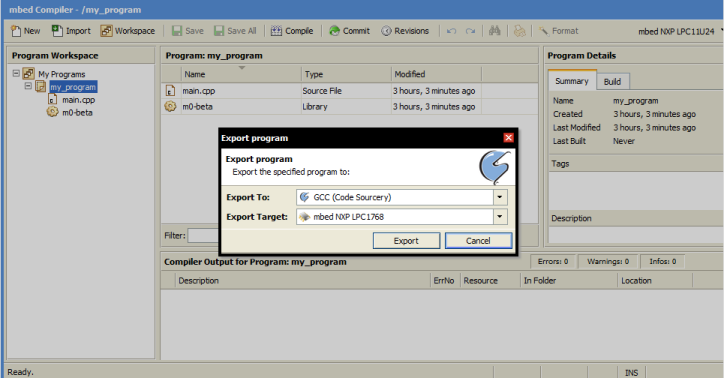
/media/uploads/emilmont/codesourcery_1.png

When you choose export, a zip file containing all the files you need for CodeSourcery will be generated. Unzip it and you are ready to launch make:

CodeSourcery

my_program$ ls
main.cpp  Makefile  mbed  mbed.lib

my_program$ make
arm-none-eabi-g++ -c -Os -fno-common -fmessage-length=0 -Wall -fno-exceptions -mcpu=cortex-m3 -mthumb -ffunction-sections -fdata-sections  -DTARGET_LPC1768 -DTOOLCHAIN_GCC_CS -DNDEBUG -std=gnu++98 -I./mbed -I./mbed/LPC1768 -I./mbed/LPC1768/GCC_CS  -o main.o main.cpp
arm-none-eabi-gcc -mcpu=cortex-m3 -mthumb -Wl,--gc-sections -Tmbed/LPC1768/GCC_CS/LPC1768.ld -L./mbed -L./mbed/LPC1768 -L./mbed/LPC1768/GCC_CS  -o my_program.elf main.o mbed/LPC1768/GCC_CS/startup_LPC17xx.o mbed/LPC1768/GCC_CS/sys.o mbed/LPC1768/GCC_CS/cmsis_nvic.o mbed/LPC1768/GCC_CS/core_cm3.o mbed/LPC1768/GCC_CS/system_LPC17xx.o -lmbed -lcapi -lstdc++ -lsupc++ -lm -lc -lgcc -lmbed -lcapi -lstdc++ -lsupc++ -lm -lc -lgcc
arm-none-eabi-objcopy -O binary my_program.elf my_program.bin

my_program$ ls
main.cpp  main.o  Makefile  mbed  mbed.lib  my_program.bin  my_program.elf

The binary file (".bin") is ready to be flashed on the mbed.


30 comments:

29 Nov 2011

I exported a rather big application , with nearly no problem. But one error is very stupid: the debug messages to the console are cryptic ! Something is displayed on the console, at the normal sped, but this is not readable.

This is a sample program (my first use of Mbed, months ago) - compiles and executes correctly with cloud compiler( normal mbed lib or m0-beta). - when exported to codesoursery, does not print correctly to the console The PC uses Ubuntu, the console is Gtkterm (/dev/ttyACM0/115200,8,N,1 ), codesourcery 2010.09 Robert -----the test program

  1. include "mbed.h"

/* test printf helloworld

-> test serial printf debugging

  • /

DigitalOut myled(LED1);

DigitalOut myled2(LED2);

Serial pc(USBTX, USBRX); tx, rx

int main() {

pc.baud(115200);

wait(5);

printf ("Hello Led\n");

myled2 =1;

while (1) {

myled = 1;

printf (" Led1\n");

wait(2);

myled = 0;

wait(2);

}

}

30 Nov 2011

I reply to myself: the bug is found. The sentence from the handbook The C stdin, stdout and stderr file handles are also defaulted to the PC serial connection is not true with the Gcc/codesourcery implementation.
The simple program above runs correctly if I replace printf with pc.printf

30 Nov 2011

Hi Robert,

user Robert Spilleboudt wrote:

- when exported to codesoursery, does not print correctly to the console The PC uses Ubuntu, the console is Gtkterm (/dev/ttyACM0/115200,8,N,1 ), codesourcery 2010.09

The sentence from the handbook The C stdin, stdout and stderr file handles are also defaulted to the PC serial connection is not true with the Gcc/codesourcery implementation.

You are right, that was not the intended behaviour.

The gcc retargeting of stdio was reseting the uart baud to the default 9600.

I have fixed it now. I will update you when we will release a build with this new fix.

Cheers, Emilio

30 Nov 2011

Hi Emilio,
Thank you for such a fast answer
I have found two details:
1) the CMSIS macro disable_irq()/enable_irq() are not available (not important for me)
2) the tip of Igor Skochinsky to use memory above 32K was like this:
static char buf1[0x2000] attribute((section("AHBSRAM1"))) for the cloud compiler;
With GCC I replace AHBSRAM1 with .usb_ram and it is ok
(I did not find a Ethernet ram i the linker file , not exactly the same section but enough for me, do not use the Ethernet and Usb ram)
Thank you for this wonderful off-line compiler: now I have a folding editor !
Cheers

Robert

30 Nov 2011

The fix for the gcc stdio/uart is available in the beta library: http://mbed.org/projects/libraries-testing/svn/beta

20 Jan 2012

Hi,

first, thanks for all things in this site, this help me to learn and use mbed. It is my first post.

I have tried various projects with both online and offline compilers, and works well.

I am actually trying MSCUsbHost project from http://mbed.org/users/igorsk/programs/MSCUsbHost/5yfq4 , it is ok with online compiler. But with gcc version 4.5.2 (Sourcery G++ Lite 2011.03-42) offline compiler, I got the errors below :

$ make clean; make all

rm -f MSCUsbHost.bin MSCUsbHost.elf MSCFileSystem.o main.o USBHostLite/usbhost_lpc17xx.o USBHostLite/usbhost_ms.o

arm-none-eabi-g++ -c -Os -fno-common -fmessage-length=0 -Wall -fno-exceptions -mcpu=cortex-m3 -mthumb -ffunction-sections -fdata-sections -DTARGET_LPC1768 -DTOOLCHAIN_GCC_CS -DNDEBUG -std=gnu++98 -I./USBHostLite -I./FATFileSystem -I./FATFileSystem/LPC1768 -I./m0-beta -I./m0-beta/LPC1768 -I./m0-beta/LPC1768/GCC_CS -I./USBHostLite -I./FATFileSystem -I./FATFileSystem/LPC1768 -I./FATFileSystem/LPC2368 -o MSCFileSystem.o MSCFileSystem.cpp

In file included from ./USBHostLite/usbhost_inc.h:30:0,

from MSCFileSystem.cpp:14:

./USBHostLite/usbhost_lpc17xx.h:200:39: error: expected initializer before 'irq'

MSCFileSystem.cpp: In member function 'int MSCFileSystem::initialise_msc()':

MSCFileSystem.cpp:77:55: error: invalid conversion from 'uint32_t*' to 'USB_INT32U*'

MSCFileSystem.cpp:77:55: error: initializing argument 1 of 'USB_INT32S MS_Init(USB_INT32U*, USB_INT32U*, USB_INT08U*)'

MSCFileSystem.cpp:77:55: error: invalid conversion from 'uint32_t*' to 'USB_INT32U*'

MSCFileSystem.cpp:77:55: error: initializing argument 2 of 'USB_INT32S MS_Init(USB_INT32U*, USB_INT32U*, USB_INT08U*)'

MSCFileSystem.cpp:83:105: warning: format '%d' expects type 'int', but argument 2 has type 'uint32_t'

MSCFileSystem.cpp:83:105: warning: format '%d' expects type 'int', but argument 3 has type 'uint32_t'

MSCFileSystem.cpp:83:105: warning: format '%d' expects type 'int', but argument 2 has type 'uint32_t'

MSCFileSystem.cpp:83:105: warning: format '%d' expects type 'int', but argument 3 has type 'uint32_t'

make: * [MSCFileSystem.o] Erreur 1

$

I think I can solve the first error by editing usbhost_lpc17xx.h file, but why don't append with online compiler ?

I would be glad to understand and and solve the other compile errors too ....

Thanks for your help,

Gilles (sorry for my bad english...)

20 Jan 2012

Hi Gilles,

user Gilles Veillon wrote:

I am actually trying MSCUsbHost project from http://mbed.org/users/igorsk/programs/MSCUsbHost/5yfq4 , it is ok with online compiler. But with gcc version 4.5.2 (Sourcery G++ Lite 2011.03-42) offline compiler, I got the errors below :

error: expected initializer before '__irq'

I think I can solve the first error by editing usbhost_lpc17xx.h file, but why don't append with online compiler ? I would be glad to understand and and solve the other compile errors too ....

Our online compiler is the "ARM C/C++ Compiler, 4.1", not the GCC patched by CodeSourcery, they both support different syntax extensions. In particular the library that you are trying to import is using the following ARMCC keyword:

You will probably face many other small differences between the two compilers. After a quick look at the library I can see that you will have to add some explicit type casting and you will have to rename the extension of the C++ files from ".c" to ".cpp".

HTH, Emilio

21 Jan 2012

Hi Emilio,

thanks for your fast reply, i will explore these way.

Cheers,

Gilles.

31 Jan 2012

Hello,

I am trying to export a simple ethernet program and want to copile it offline. But I am not able to export the code. When I do export it come up with 4 options. I choose ARM(code sourcery) then it pops up a message "Sorry, this version of the mbed libraries include this program doesn't support doesn't support the selected toolchin. Please refer to.......". I have setup the ARM-GCC toolchain, and exported "Hello world" program. I am able to compile and run on the Mbed. But I couldn't progress it with ethernet program.

Please help me to progress on this.

Cheers, Vinod

31 Jan 2012

Hi Vinod,

user Quadriga Worldwide wrote:

I am trying to export a simple ethernet program

Could you please specify the URL of the published program that you are trying to export?

My first guess is that the program is including an old version of the mbed libraries that were not supporting multiple toolchains.

If this is the case, your problem could be fixed simply updating the mbed libraries to the latest version.

Cheers, Emilio

31 Jan 2012

Hi Emilio,

Thank you for the quick responce. The following is link.

http://mbed.org/users/no2chem/programs/EthernetTester/6095m?action=download&format=zip

Cheers, Vinod

31 Jan 2012

Yes, you just need to update the mbed libraries to the latest version and you will be able to export the project.

Cheers, Emilio

01 Feb 2012

Hi Emilio,

Can you guide me how to and where to update these libraries? Cheers, Vinod

01 Feb 2012

First step: delete the current library "mbed" in your project
Second step: import a new library mbed from this URL:
The production library http://mbed.org/projects/libraries/svn/mbed/trunk/
(The beta library http://mbed.org/projects/libraries-testing/svn/beta)

Robert

01 Feb 2012

Hi Robert,

I could move one step forward. After updating the libraries, I am able to export the code. But when I compile, I am getting following errors.

With the new library, I am not even able to compile it online. Getting following errors.

identifier "device_address" is undefined identifier "device_init" is undefined identifier "device_poll" is undefined identifier "device_poll" is undefined

Am I missing anything? Please guide me.

Cheers, Vinod

01 Feb 2012

[root@VinodLinuxPc EthernetTester]# make /home/Vinod/Projects/Mbed_tool/arm-none-eabi-gcc-4_6/bin/arm-none-eabi-g++ -c -Os -fno-common -fmessage-length=0 -Wall -fno-exceptions -mcpu=cortex-m3 -mthumb -ffunction-sections -fdata-sections -DTARGET_LPC1768 -DTOOLCHAIN_GCC_CS -DNDEBUG -std=gnu++98 -I./lwip -I./lwip/HTTPClient -I./lwip/Core -I./lwip/Core/arch -I./lwip/Core/lwIP -I./lwip/Core/lwIP/netif -I./lwip/Core/lwIP/core -I./lwip/Core/lwIP/core/ipv4 -I./lwip/Core/lwIP/core/snmp -I./lwip/Core/lwIP/include -I./lwip/Core/lwIP/include/ipv4 -I./lwip/Core/lwIP/include/ipv4/lwip -I./lwip/Core/lwIP/include/netif -I./lwip/Core/lwIP/include/lwip -I./lwip/HTTPServer -I./mbed -I./mbed/LPC1768 -I./mbed/LPC1768/GCC_CS -I./lwip -I./lwip/HTTPClient -I./lwip/Core -I./lwip/HTTPServer -I./lwip/Core/arch -I./lwip/Core/lwIP -I./lwip/Core/lwIP/netif -I./lwip/Core/lwIP/core -I./lwip/Core/lwIP/include -I./lwip/Core/lwIP/core/ipv4 -I./lwip/Core/lwIP/core/snmp -I./lwip/Core/lwIP/include/ipv4 -I./lwip/Core/lwIP/include/netif -I./lwip/Core/lwIP/include/lwip -I./lwip/Core/lwIP/include/ipv4/lwip -o main.o main.cpp In file included from ./lwip/Core/lwIP/include/lwip/netif.h:41:0, from ./lwip/Core/lwIP/include/lwip/udp.h:40, from main.cpp:6: ./lwip/Core/lwIP/include/ipv4/lwip/ip_addr.h:46:1: error: 'packed' does not name a type ./lwip/Core/lwIP/include/ipv4/lwip/ip_addr.h:62:1: error: 'packed' does not name a type In file included from ./lwip/Core/lwIP/include/lwip/udp.h:40:0, from main.cpp:6: ./lwip/Core/lwIP/include/lwip/netif.h:93:18: error: field 'ip_addr' has incomplete type ./lwip/Core/lwIP/include/lwip/netif.h:94:18: error: field 'netmask' has incomplete type ./lwip/Core/lwIP/include/lwip/netif.h:95:18: error: field 'gw' has incomplete type In file included from ./lwip/Core/lwIP/include/lwip/udp.h:42:0, from main.cpp:6: ./lwip/Core/lwIP/include/ipv4/lwip/ip.h:90:3: error: field 'local_ip' has incomplete type ./lwip/Core/lwIP/include/ipv4/lwip/ip.h:90:3: error: field 'remote_ip' has incomplete type ./lwip/Core/lwIP/include/ipv4/lwip/ip.h:111:1: error: 'packed' does not name a type In file included from main.cpp:6:0: ./lwip/Core/lwIP/include/lwip/udp.h:54:1: error: 'packed' does not name a type ./lwip/Core/lwIP/include/lwip/udp.h:72:3: error: field 'local_ip' has incomplete type ./lwip/Core/lwIP/include/lwip/udp.h:72:3: error: field 'remote_ip' has incomplete type In file included from ./lwip/Core/lwIP/include/lwip/tcp.h:43:0,

01 Feb 2012

user Quadriga Worldwide wrote:

With the new library, I am not even able to compile it online.

There is a conflict between this old program and the new mbed library: they both contain a "device.h" header file.

mbed introduced this header file to specify the set of peripherals existing in a given mbed (LPC2368, LPC1768, LPC11U24): http://mbed.org/projects/libraries/svn/mbed/trunk/device.h

user Quadriga Worldwide wrote:

Getting following errors:

identifier "device_address" is undefined

identifier "device_init" is undefined

identifier "device_poll" is undefined

identifier "device_poll" is undefined

The above symbols are defined in the program "device.h", but not in the mbed "device.h". The mbed "device.h" get included first.

NOTE: in general, when you export a project to an external toolchain you have to expect having to change the code in different places. We do not have control on user code and we can not grantee that it will be compatible with external toolchains.

If you are looking for an "out of the box" experience you can use the online IDE. As you have noticed, a program specifies the specific revision of the mbed libraries (and libraries in general) that are required. Using the online IDE you will not run in any library version incompatibility.

Cheers, Emilio

23 Feb 2012

Hello,

I am trying to export a program to the CodeSourcery toolchain and I keep on getting an error regarding "the version of the mbed libraries included with this program does not support the selected toolchain".

I have updated the mbed libraries to the latest version (v42 as of writing this) and I am still getting the error. The error persists using the code_red Red Suite 4 target. The GCC target is not listed as an option either.

Is there a specific mbed library revision that I must link to or do I need to use the beta lib or is there currently an error with the online compiler suite?

Thanks, Shaun.

24 Feb 2012

user Shaun Cosgrove wrote:

I am trying to export a program to the CodeSourcery toolchain and I keep on getting an error regarding "the version of the mbed libraries included with this program does not support the selected toolchain".

We decided to split up the mbed libraries build in two releases:

Therefore, if you want to export a project, you need first to delete the "default" mbed library and then import the "export" version of it. Instructions on how to do this can be found at:

Cheers, Emilio

26 Feb 2012

Hi Emilio,

That worked perfectly, thank for the information.

Regards, Shaun.

02 Mar 2012

I exported my project to CodeSourcery. The project compiles and links just fine with the online compiler. The project contains ".c" files which contain ANSI C functions. Code Sourcery compiles these .c files just fine but when I link, the linker cant find the functions that are contained in the ".c" files.

I think it has something to do with the fact that the project is exported as C++ and these are ".c" files.

Can anyone help with this?

02 Mar 2012

Hi Kevin,

user Kevin LeCroy wrote:

I exported my project to CodeSourcery. The project compiles and links just fine with the online compiler. The project contains ".c" files which contain ANSI C functions. Code Sourcery compiles these .c files just fine but when I link, the linker cant find the functions that are contained in the ".c" files.

I think it has something to do with the fact that the project is exported as C++ and these are ".c" files.

I should see your code, but my first guess is that you are not declaring your C functions in an "extern C" block:

#ifdef __cplusplus
extern "C" {
#endif

/* Declare here the prototypes of your functions */

#ifdef __cplusplus
}
#endif 

HTH, Emilio

02 Mar 2012

user Emilio Monti wrote:

I should see your code, but my first guess is that you are not declaring your C functions in an "extern C" block:

emilmont, Yes, this was the issue. Thanks. Below is the code that fixed it. The questions still remains as to why the online compiler environment compiled and linked the exact same code and files fine without "extern"?? And more importantly, why didn't the the export include everything that was needed to build the project in CodeSourcery?

// do this so that C files can be called from C++
extern "C" 
{
    #include "functions.h"
}
02 Mar 2012

user Kevin LeCroy wrote:

The questions still remains as to why the online compiler environment compiled and linked the exact same code and files fine without "extern"??

The online build system is compiling every file as a C++ file.

03 Mar 2012

Why not have the makefile created by the Code Sourcery exporter treat C files as C++ like the online build system?

03 Mar 2012

user Adam Green wrote:

Why not have the makefile created by the Code Sourcery exporter treat C files as C++ like the online build system?

You are right, we will probably change it.

The reasons why we decided to build ".c" files as C and ".cpp" files as C++ are the following:

  • This is the behaviour of the offline build system (the one used to build the mbed libraries) and we are aiming at unifying it with the online build system. Therefore, in a near future, the behaviour of the online build system will change for new projects (old projects will keep the current convention).
  • All the IDE build systems default to building ".c" files as C and ".cpp" files as C++ (uVision, CodeRed, CodeSourcery CodeBench). At the moment for the CodeSourcery toolchain we are providing a Makefile, but if we want to provide a well integrated CodeSourcery CodeBench project file, the behaviour will match the current one.
26 Sep 2012

I'm having trouble compiling off line with CodeSourcery. Project uses the SDFile & FATFile Systems for SD Card. It compiles and works fine with the online compiler. Code that I exported: /media/uploads/numerical7/sdfilesystem_test_25sept2012_gcc_lpc1768.zip

Errors:

C:\Users\Kevin\Documents\My Code\mbed\SDFileSystem_Test_25Sept2012_gcc_lpc1768\SDFileSystem_Test_25Sept2012>cs-make
arm-none-eabi-g++ -c -Os -fno-common -fmessage-length=0 -Wall -fno-exceptions -mcpu=cortex-m3 -mthumb -ffunction-sections -fdata-sections  -
DTARGET_LPC1768 -DTOOLCHAIN_GCC_CS -DNDEBUG -std=gnu++98 -I. -I./FatFileSystem -I./mbed -I./mbed/LPC1768 -I./mbed/LPC1768/GCC_CS  -o SDFileS
ystem.o SDFileSystem.cpp
SDFileSystem.cpp: In member function 'virtual int SDFileSystem::disk_initialize()':
SDFileSystem.cpp:199:9: warning: unused variable 'i' [-Wunused-variable]
arm-none-eabi-g++ -c -Os -fno-common -fmessage-length=0 -Wall -fno-exceptions -mcpu=cortex-m3 -mthumb -ffunction-sections -fdata-sections  -
DTARGET_LPC1768 -DTOOLCHAIN_GCC_CS -DNDEBUG -std=gnu++98 -I. -I./FatFileSystem -I./mbed -I./mbed/LPC1768 -I./mbed/LPC1768/GCC_CS  -o main.o
main.cpp
arm-none-eabi-gcc -mcpu=cortex-m3 -mthumb -Wl,--gc-sections -T./mbed/LPC1768/GCC_CS/LPC1768.ld -L./mbed/LPC1768/GCC_CS  -o SDFileSystem_Test
_25Sept2012.elf SDFileSystem.o main.o mbed/LPC1768/GCC_CS/sys.o mbed/LPC1768/GCC_CS/cmsis_nvic.o mbed/LPC1768/GCC_CS/system_LPC17xx.o mbed/L
PC1768/GCC_CS/core_cm3.o mbed/LPC1768/GCC_CS/startup_LPC17xx.o -lmbed -lcapi  -lstdc++ -lsupc++ -lm -lc -lgcc -lmbed -lcapi  -lstdc++ -lsupc
++ -lm -lc -lgcc
SDFileSystem.o: In function `SDFileSystem::~SDFileSystem()':
SDFileSystem.cpp:(.text._ZN12SDFileSystemD2Ev[_ZN12SDFileSystemD5Ev]+0x1a): undefined reference to `mbed::FATFileSystem::~FATFileSystem()'
SDFileSystem.o: In function `SDFileSystem::SDFileSystem(PinName, PinName, PinName, PinName, char const*)':
SDFileSystem.cpp:(.text._ZN12SDFileSystemC2E7PinNameS0_S0_S0_PKc+0xe): undefined reference to `mbed::FATFileSystem::FATFileSystem(char const
*)'
SDFileSystem.o:(.rodata._ZTV12SDFileSystem+0x18): undefined reference to `mbed::FATFileSystem::open(char const*, int)'
SDFileSystem.o:(.rodata._ZTV12SDFileSystem+0x1c): undefined reference to `mbed::FATFileSystem::remove(char const*)'
SDFileSystem.o:(.rodata._ZTV12SDFileSystem+0x24): undefined reference to `mbed::FATFileSystem::opendir(char const*)'
SDFileSystem.o:(.rodata._ZTV12SDFileSystem+0x28): undefined reference to `mbed::FATFileSystem::mkdir(char const*, unsigned int)'
SDFileSystem.o:(.rodata._ZTV12SDFileSystem+0x2c): undefined reference to `mbed::FATFileSystem::format()'
SDFileSystem.o:(.rodata._ZTI12SDFileSystem+0x8): undefined reference to `typeinfo for mbed::FATFileSystem'
collect2: ld returned 1 exit status
cs-make: *** [SDFileSystem_Test_25Sept2012.elf] Error 1

C:\Users\Kevin\Documents\My Code\mbed\SDFileSystem_Test_25Sept2012_gcc_lpc1768\SDFileSystem_Test_25Sept2012>
26 Sep 2012

The above post had to be shortened due to the 3000 character limit.... So the project compiles great online but gets all of those errors when I compile it offline with Code Sourcery. I've had much success with other projects compiling fine offline. If someone could help me fix this I would greatly appreciate it.

Thanks in advance.

26 Sep 2012

anyone?

18 Oct 2012

@Kevin LeCroy - the linker can't find a reference to a set of SDFileSystem routines... why is the reference "mbed::FATFileSystem::open" and not just "FATFileSystem::open" ? is that right? That means the mbed library (-lmbed) contains these?

If it makes you feel better, I was able to compile an SDFileSystem library (possibly different than yours) offline with CodeSourcery.

Posting comments for this page has been disabled