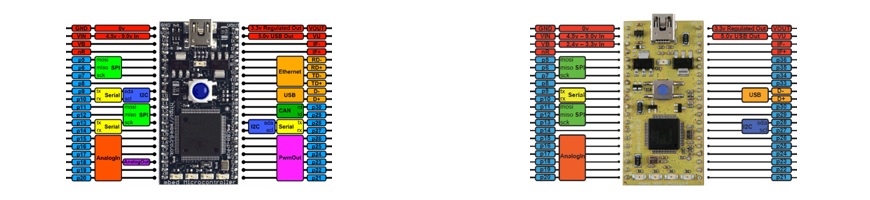
The Ethernet peripheral is of little use without an IP networking stack on top of it.
You could be interested in the Ethernet Interface library.
The Ethernet Interface allows the mbed Microcontroller to connect and communicate with an Ethernet network. This can therefore be used to talk to other devices on a network, including communication with other computers such as web and email servers on the internet, or act as a webserver.
All of the required passive termination circuits are implemented on the mbed Microcontoller, allowing direct connection to the ethernet network.
The Ethernet library sets the MAC address by calling a weak function extern "C" void mbed_mac_address(char * mac); to copy in a 6 character MAC address. This in turn performs a semihosting request to the mbed interface to get the serial number, which contains a MAC address unique to every mbed device. If you are using this library on your own board (i.e. not an mbed board), you should implement your own extern "C" void mbed_mac_address(char * mac); function, to overwrite the existing one and avoid a call to the interface.
It will be easier to make the connections if you have a baseboard ([[http://mbed.org/cookbook|see baseboard section in Cookbook]]) or a [[http://mbed.org/cookbook/Breakout-Boards|breakout board]] with an Ethernet connector.
I tried that program but I allways had connection problems.
My computer tries to get a network address but it allways fails.
The computer sends data but no data comes back from the mbed.
Maybe there is a problem with my physical setup. I tried it in two
ways:
1) using a Stewart MagJack connector type SI-60002-F (like it is described in the cookbook)
2) using a patchcabel which I cut in half, using the wire ends directly -
Is this schematic correct? I thought it should be crossed out.
connector / mbed
rx- <> td-
rx+ <> td+
tx- <> rd-
tx+ <> rd+
I tried it directly and crossed out but nothing seems to work.
Because of the good results without magnetics (regarding to the cookbook) I tried it directly with
the cable. It is a EIA/TIA 568B cable.
In the cookbook the connections are crossed out, but also here I am not sure if the schematic is correct,
here I have seen this connection:
connector/mbed
tx+ <> rd+
tx- <> td-
rx+ <> td- !
rx- <> td+ !
What is the correct hardware setup or is it a software problem?
Has anybody tried the same with success or not?
Please help me!
Can somebody give me a hand?
I tried that program but I allways had connection problems.
My computer tries to get a network address but it allways fails.
The computer sends data but no data comes back from the mbed.
Maybe there is a problem with my physical setup. I tried it in two
ways:
1) using a Stewart MagJack connector type SI-60002-F (like it is described in the cookbook)
2) using a patchcabel which I cut in half, using the wire ends directly -
Is this schematic correct? I thought it should be crossed out.
connector / mbed
rx- <> td-
rx+ <> td+
tx- <> rd-
tx+ <> rd+
I tried it directly and crossed out but nothing seems to work.
Because of the good results without magnetics (regarding to the cookbook) I tried it directly with
the cable. It is a EIA/TIA 568B cable.
In the cookbook the connections are crossed out, but also here I am not sure if the schematic is correct,
here I have seen this connection:
connector/mbed
tx+ <> rd+
tx- <> td-
rx+ <> td- !
rx- <> td+ !
What is the correct hardware setup or is it a software problem?
Has anybody tried the same with success or not?
Please help me!
Are you working on a router with DHCP or is the mbed connected directly to your computer?
Hi Stefan,
I tried yesterday with the ethernet test prog at this site:
http://mbed.org/forum/mbed/topic/1239/?page=1#comment-6091
and it works fine.
Are you working on a router with DHCP or is the mbed connected directly to your computer?
OK, with my Asus Router configured as a wireless access point the test programm runs very well :)
I will do further tests and post the result afterwards.
Why is a direct connection: mbed to my computer not possible???
The computer has a Marvell Yukon Gigabit Ethernet Interface.
OK, with my Asus Router configured as a wireless access point the test programm runs very well :)
I will do further tests and post the result afterwards.
Why is a direct connection: mbed to my computer not possible???
The computer has a Marvell Yukon Gigabit Ethernet Interface.
Maybe, because the router has a DHCP server running, which delivers an IP-address to the mbed. When you work without the router, you have to give fix IP-Addresses to mbed and your computer, which belongs to the same net.
Hi Stefan,
Maybe, because the router has a DHCP server running, which delivers an IP-address to the mbed. When you work without the router, you have to give fix IP-Addresses to mbed and your computer, which belongs to the same net.
Now everything works fine:)
Thank you Michel!!!!
Conclusion:
1) For the correct physical connections I recommend this link:
http://mbed.org/users/rolf/notebook/ethernet/
2) I can also recommend this testprogram:
http://mbed.org/forum/mbed/topic/1239/?page=1#comment-6091
3) DHCP works with a Router, for a direct connection mbed <> PC
a fix IP address is needed, therefore it is necessary to setup:
IP Address, Network Mask, Gateway and DNS on both sides (mbed and PC - TCP/IP settings)
http://mbed.org/cookbook/Ethernet
I hope this conclusion will help other users :)
Some-where, i saw a code snippet to drive the LED's on the MagJack,
10/100 & connection,
I have searched, but cannot find it,
Does any one know how to do this ?
Ceri
Some-where, i saw a code snippet to drive the LED's on the MagJack,
10/100 & connection,
I have searched, but cannot find it,
Does any one know how to do this ?
Ceri
Is there a way to read back or query the mbed Ethernet interface parameters like speed and half/full duplex? I want to confirm settings on the mbed. E.g. if using 'auto negotiate' with the 'set_link()' method or taking the default settings for the Ethernet class, is there a method to determine what link parameters have been established?
I tried to send a max length packet through the Ethernet.
But below code return -1.
Ethernet mEthernet;
status = mEthernet.write( buff, 1500 );
And below code return 750.
status = mEthernet.write( buff, 750);
I think Max length of Ethernet packet is 1500.
Why cannot I send a packet over 750 bytes?
Please somebody give me a comment.
I tried to send a max length packet through the Ethernet.
But below code return -1.
Ethernet mEthernet;
status = mEthernet.write( buff, 1500 );
And below code return 750.
status = mEthernet.write( buff, 750);
I think Max length of Ethernet packet is 1500.
Why cannot I send a packet over 750 bytes?
The ethernet MAC certainly supports 1500 byte frames. The software on the mbed could have a smaller MTU (maximum transfer unit), most likely for memory reasons (i.e. the scatter/gatter buffer implementation may consume a full buffer slot per packet, even for small ones, I'm not sure this is the case here).
The (somewhat poor) comments on Ethernet.h however has examples with buffers having 1536 bytes, so I don't know what's going on here.
The ethernet MAC certainly supports 1500 byte frames. The software on the mbed could have a smaller MTU (maximum transfer unit), most likely for memory reasons (i.e. the scatter/gatter buffer implementation may consume a full buffer slot per packet, even for small ones, I'm not sure this is the case here).
The (somewhat poor) comments on Ethernet.h however has examples with buffers having 1536 bytes, so I don't know what's going on here.
Yes, this problem is not importance.
But, it has misgivings that the length of the maximum data of the TCP/IP packet is limited to 750.
I am using TCP/IP packets of over 1024 bytes usually.
And these packets must not fragment.
Thank you, for your comment, Mr.Nunes.
Yes, this problem is not importance.
But, it has misgivings that the length of the maximum data of the TCP/IP packet is limited to 750.
I am using TCP/IP packets of over 1024 bytes usually.
And these packets must not fragment.
According to my lwipopts.h, the maximum segment size for TCP is 536:
#define TCP_MSS 536//1024//536//0x276
According to RFC 879, this is correct:
HOSTS MUST NOT SEND DATAGRAMS LARGER THAN 576 OCTETS UNLESS THEY
HAVE SPECIFIC KNOWLEDGE THAT THE DESTINATION HOST IS PREPARED TO
ACCEPT LARGER DATAGRAMS.
...
THE TCP MAXIMUM SEGMENT SIZE IS THE IP MAXIMUM DATAGRAM SIZE MINUS
FORTY.
The default IP Maximum Datagram Size is 576.
The default TCP Maximum Segment Size is 536.
Sending larger packets would make the code more complex, since then MTU detection would need to take place. For me it also implies that when packets larger then 536 bytes occur the receiver must be able to handle fragmentation.
According to my lwipopts.h, the maximum segment size for TCP is 536:
<<code>>
#define TCP_MSS 536//1024//536//0x276
<</code>>
According to RFC 879, this is correct:
{{{
HOSTS MUST NOT SEND DATAGRAMS LARGER THAN 576 OCTETS UNLESS THEY
HAVE SPECIFIC KNOWLEDGE THAT THE DESTINATION HOST IS PREPARED TO
ACCEPT LARGER DATAGRAMS.
...
THE TCP MAXIMUM SEGMENT SIZE IS THE IP MAXIMUM DATAGRAM SIZE MINUS
FORTY.
The default IP Maximum Datagram Size is 576.
The default TCP Maximum Segment Size is 536.
}}}
Sending larger packets would make the code more complex, since then MTU detection would need to take place. For me it also implies that when packets larger then 536 bytes occur the receiver must be able to handle fragmentation.
I was able to be understood why the maximum data length of the Ethernet packet was limited to 750 bytes. orz.
When I use TCP/IP connection with mbed, I will note the fragmentation.
Thanks.
Thank you, for your comment. Mr.Hendrik.
I was able to be understood why the maximum data length of the Ethernet packet was limited to 750 bytes. orz.
When I use TCP/IP connection with mbed, I will note the fragmentation.
Thanks.
Home Depot sells an RJ45 Ethernet connector for $1.90 US. They also have boxes and plates that the connector snaps into.
Just put a wire on pins 1, 2, 3, 6 and close the cover tight (use ethernet wire or similar gauge). The cover press fits the wires in place with insulation displacement connections. No soldering necessary and you can be up an running in less than 5 minutes.
Home Depot sells an RJ45 Ethernet connector for $1.90 US. They also have boxes and plates that the connector snaps into.
Just put a wire on pins 1, 2, 3, 6 and close the cover tight (use ethernet wire or similar gauge). The cover press fits the wires in place with insulation displacement connections. No soldering necessary and you can be up an running in less than 5 minutes.
How do I change the number of buffers allocated for receive messages? I can only get the Ethernet class to buffer 3 packets before losing them. I only have need for UDP messages with static IPs so I want to use my simple implementation. Does 3 receive buffers sound correct or I am missing something?
Thanks,
How do I change the number of buffers allocated for receive messages? I can only get the Ethernet class to buffer 3 packets before losing them. I only have need for UDP messages with static IPs so I want to use my simple implementation. Does 3 receive buffers sound correct or I am missing something?
Thanks,
Please login to post comments.