CMSIS RTOS
This content relates to a deprecated version of Mbed
Mbed 2 is now deprecated. For the latest version please see the Mbed OS documentation.
The CMSIS-RTOS is a common API for Real-Time operating systems. It provides a standardized programming interface that is portable to many RTOS and enables therefore software templates, middleware, libraries, and other components that can work across supported the RTOS systems.
CMSIS-RTOS is the fundation of the offical mbed RTOS:
Import librarymbed-rtos
Official mbed Real Time Operating System based on the RTX implementation of the CMSIS-RTOS API open standard.
Last commit 04 Jul 2017 by  mbed official
Thread
The Thread Management function group allow defining, creating, and controlling thread functions in the system. The function main is a special thread function that is started at system initialization and has the initial priority osPriorityNormal.
Import program
00001 #include "mbed.h"
00002 #include "cmsis_os.h"
00003
00004 DigitalOut led1(LED1);
00005 DigitalOut led2(LED2);
00006
00007 void led2_thread(void const *args) {
00008     while (true) {
00009         led2 = !led2;
00010         osDelay(1000);
00011     }
00012 }
00013 osThreadDef(led2_thread, osPriorityNormal, DEFAULT_STACK_SIZE);
00014
00015 int main() {
00016     osThreadCreate(osThread(led2_thread), NULL);
00017
00018     while (true) {
00019         led1 = !led1;
00020         osDelay(500);
00021     }
00022 }
main
The main function is already the first thread scheduled by the rtos.
[Repository '/users/mbed_official/code/rtx/docs/tip/structos__thread__def.html' not found]
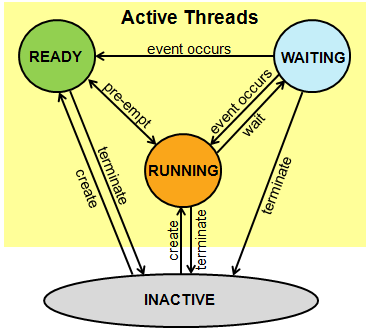
A Thread can be in the following states:
- RUNNING: The thread that is currently running is in the RUNNING state. Only one thread at a time can be in this state.
- READY: Threads which are ready to run are in the READY state. Once the RUNNING thread has terminated or is WAITING the next READY thread with the highest priority becomes the RUNNING thread.
- WAITING: Threads that are waiting for an event to occur are in the WAITING state.
- INACTIVE: Threads that are not created or terminated are in the INACTIVE state. These threads typically consume no system resources.
osDelay
A call to osDelay will put the calling thread in the WAITING state for the specified amount of milliseconds. During this time, the RTOS scheduler will run other threads in the READY state.
Mutex
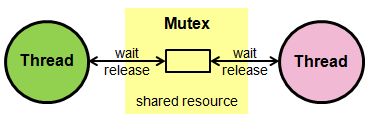
The Mutex Management function group is used to synchronize the execution of threads. This is for example used to protect access to a shared resource, for example a shared memory image.
ISR
Mutex Management functions cannot be called from interrupt service routines (ISR).
Import program
00001 #include "mbed.h"
00002 #include "cmsis_os.h"
00003
00004 osMutexId stdio_mutex;
00005 osMutexDef(stdio_mutex);
00006
00007 void notify(const char* name, int state) {
00008     osMutexWait(stdio_mutex, osWaitForever);
00009     printf("%s: %d\n\r", name, state);
00010     osMutexRelease(stdio_mutex);
00011 }
00012
00013 void test_thread(void const *args) {
00014     while (true) {
00015         notify((const char*)args, 0); osDelay(1000);
00016         notify((const char*)args, 1); osDelay(1000);
00017     }
00018 }
00019
00020 void t2(void const *argument) {test_thread("Th 2");}
00021 osThreadDef(t2, osPriorityNormal, DEFAULT_STACK_SIZE);
00022
00023 void t3(void const *argument) {test_thread("Th 3");}
00024 osThreadDef(t3, osPriorityNormal, DEFAULT_STACK_SIZE);
00025
00026 int main() {
00027     stdio_mutex = osMutexCreate(osMutex(stdio_mutex));
00028
00029     osThreadCreate(osThread(t2), NULL);
00030     osThreadCreate(osThread(t3), NULL);
00031
00032     test_thread((void *)"Th 1");
00033 }
C standard library mutexes
The ARM C standard library has already mutexes in place to protect the access to stdio, therefore on the M3 mbed the above example is not necessary. On the contrary, ARM microlib (used on the M0 mbed) does not provide default stdio mutexes making the above example a necessity.
printf in ISR
Because of the mutexes in the ARM C standard library you can not use printf in ISR!
Semaphore
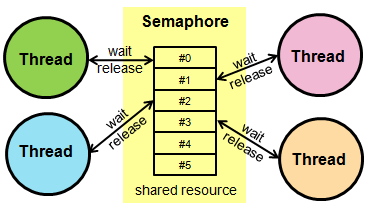
The Semaphore Management function group is used to manage and protect access to shared resources. For example, with a Semaphore the access to a group of identical peripherals can be managed. The number of available resources is specified as parameter of the osSemaphoreCreate function.
Import program
00001 #include "mbed.h"
00002 #include "cmsis_os.h"
00003
00004 osSemaphoreId two_slots;
00005 osSemaphoreDef(two_slots);
00006
00007 void test_thread(void const *name) {
00008     while (true) {
00009         osSemaphoreWait(two_slots, osWaitForever);
00010         printf("%s\n\r", (const char*)name);
00011         osDelay(1000);
00012         osSemaphoreRelease(two_slots);
00013     }
00014 }
00015
00016 void t2(void const *argument) {test_thread("Th 2");}
00017 osThreadDef(t2, osPriorityNormal, DEFAULT_STACK_SIZE);
00018
00019 void t3(void const *argument) {test_thread("Th 3");}
00020 osThreadDef(t3, osPriorityNormal, DEFAULT_STACK_SIZE);
00021
00022 int main (void) {
00023     two_slots = osSemaphoreCreate(osSemaphore(two_slots), 2);
00024
00025     osThreadCreate(osThread(t2), NULL);
00026     osThreadCreate(osThread(t3), NULL);
00027
00028     test_thread((void *)"Th 1");
00029 }
Signals
The Signal Management function group allow to control or wait signal flags. Each thread has assigned signal flags.
Import program
00001 #include "mbed.h"
00002 #include "cmsis_os.h"
00003
00004 DigitalOut led(LED1);
00005
00006 void led_thread(void const *args) {
00007     while (true) {
00008         // Signal flags that are reported as event are automatically cleared.
00009         osSignalWait(0x1, osWaitForever);
00010         led = !led;
00011     }
00012 }
00013 osThreadDef(led_thread, osPriorityNormal, DEFAULT_STACK_SIZE);
00014
00015 int main (void) {
00016     osThreadId tid = osThreadCreate(osThread(led_thread), NULL);
00017
00018     while (true) {
00019         osDelay(1000);
00020         osSignalSet(tid, 0x1);
00021     }
00022 }
Message Queue
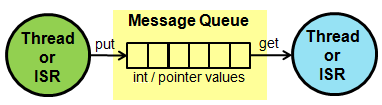
The Message Queue Management function group allow to control, send, receive, or wait for messages. A message can be a integer or pointer value that is send to a thread or interrupt service routine.
[Repository '/users/mbed_official/code/rtx/docs/tip/structos__messageQ__def.html' not found]
Memory Pool
Import program
00001 #include "mbed.h"
00002 #include "cmsis_os.h"
00003
00004 typedef struct {
00005     float    voltage;   /* AD result of measured voltage */
00006     float    current;   /* AD result of measured current */
00007     uint32_t counter;   /* A counter value               */
00008 } message_t;
00009
00010 osPoolDef(mpool, 16, message_t);
00011 osPoolId  mpool;
00012
00013 osMessageQDef(queue, 16, message_t);
00014 osMessageQId  queue;
00015
00016 void send_thread (void const *args) {
00017     uint32_t i = 0;
00018     while (true) {
00019         i++; // fake data update
00020         message_t *message = (message_t*)osPoolAlloc(mpool);
00021         message->voltage = (i * 0.1) * 33;
00022         message->current = (i * 0.1) * 11;
00023         message->counter = i;
00024         osMessagePut(queue, (uint32_t)message, osWaitForever);
00025         osDelay(1000);
00026     }
00027 }
00028
00029 osThreadDef(send_thread, osPriorityNormal, DEFAULT_STACK_SIZE);
00030
00031 int main (void) {
00032     mpool = osPoolCreate(osPool(mpool));
00033     queue = osMessageCreate(osMessageQ(queue), NULL);
00034
00035     osThreadCreate(osThread(send_thread), NULL);
00036
00037     while (true) {
00038         osEvent evt = osMessageGet(queue, osWaitForever);
00039         if (evt.status == osEventMessage) {
00040             message_t *message = (message_t*)evt.value.p;
00041             printf("\nVoltage: %.2f V\n\r"   , message->voltage);
00042             printf("Current: %.2f A\n\r"     , message->current);
00043             printf("Number of cycles: %u\n\r", message->counter);
00044
00045             osPoolFree(mpool, message);
00046         }
00047     }
00048 }
[Repository '/users/mbed_official/code/rtx/docs/tip/structos__pool__def.html' not found]
Mail Queue
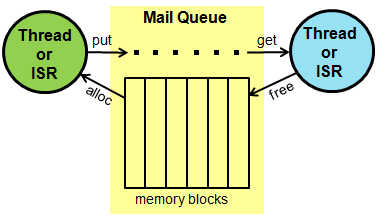
The Mail Queue Management function group allow to control, send, receive, or wait for mail. A mail is a memory block that is send to a thread or interrupt service routine.
Import program
00001 #include "mbed.h"
00002 #include "cmsis_os.h"
00003
00004 typedef struct {
00005   float    voltage; /* AD result of measured voltage */
00006   float    current; /* AD result of measured current */
00007   uint32_t counter; /* A counter value               */
00008 } mail_t;
00009
00010 osMailQDef(mail_box, 16, mail_t);
00011 osMailQId  mail_box;
00012
00013 void send_thread (void const *args) {
00014     uint32_t i = 0;
00015     while (true) {
00016         i++; // fake data update
00017         mail_t *mail = (mail_t*)osMailAlloc(mail_box, osWaitForever);
00018         mail->voltage = (i * 0.1) * 33;
00019         mail->current = (i * 0.1) * 11;
00020         mail->counter = i;
00021         osMailPut(mail_box, mail);
00022         osDelay(1000);
00023     }
00024 }
00025
00026 osThreadDef(send_thread, osPriorityNormal, DEFAULT_STACK_SIZE);
00027
00028 int main (void) {
00029     mail_box = osMailCreate(osMailQ(mail_box), NULL);
00030     osThreadCreate(osThread(send_thread), NULL);
00031
00032     while (true) {
00033         osEvent evt = osMailGet(mail_box, osWaitForever);
00034         if (evt.status == osEventMail) {
00035             mail_t *mail = (mail_t*)evt.value.p;
00036             printf("\nVoltage: %.2f V\n\r"   , mail->voltage);
00037             printf("Current: %.2f A\n\r"     , mail->current);
00038             printf("Number of cycles: %u\n\r", mail->counter);
00039
00040             osMailFree(mail_box, mail);
00041         }
00042     }
00043 }
[Repository '/users/mbed_official/code/rtx/docs/tip/structos__mailQ__def.html' not found]
Timer
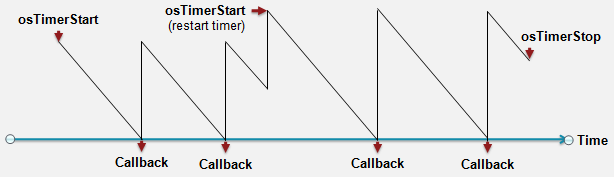
The Timer Management function group allow creating and and controlling of timer functions in the system. A timer function is called when a time period expires whereby both on-shot and periodic timers are possible. A timer can be started, restarted, or stopped.
Timers are handled in the thread osTimerThread. Callback functions run under control of this thread and may use CMSIS-RTOS API calls.
Import program
00001 #include "mbed.h"
00002 #include "cmsis_os.h"
00003
00004 DigitalOut LEDs[4] = {
00005     DigitalOut(LED1), DigitalOut(LED2), DigitalOut(LED3), DigitalOut(LED4)
00006 };
00007
00008 void blink(void const *n) {
00009     LEDs[(int)n] = !LEDs[(int)n];
00010 }
00011
00012 osTimerDef(blink_0, blink);
00013 osTimerDef(blink_1, blink);
00014 osTimerDef(blink_2, blink);
00015 osTimerDef(blink_3, blink);
00016
00017 int main(void) {
00018     osTimerId timer_0 = osTimerCreate(osTimer(blink_0), osTimerPeriodic, (void *)0);
00019     osTimerId timer_1 = osTimerCreate(osTimer(blink_1), osTimerPeriodic, (void *)1);
00020     osTimerId timer_2 = osTimerCreate(osTimer(blink_2), osTimerPeriodic, (void *)2);
00021     osTimerId timer_3 = osTimerCreate(osTimer(blink_3), osTimerPeriodic, (void *)3);
00022
00023     osTimerStart(timer_0, 2000);
00024     osTimerStart(timer_1, 1000);
00025     osTimerStart(timer_2,  500);
00026     osTimerStart(timer_3,  250);
00027
00028     osDelay(osWaitForever);
00029 }
Interrupt Service Routines
The same CMSIS-RTOS can be used in ISR. The only two warnings are:
- Mutexes can not be used.
- Wait in ISR is not allowed: all the timeouts in method parameters have to be set to 0 (no wait).
Import program
00001 #include "mbed.h"
00002 #include "cmsis_os.h"
00003
00004 osMessageQDef(queue, 5, message_t);
00005 osMessageQId  queue;
00006
00007 DigitalOut myled(LED1);
00008
00009 void queue_isr() {
00010     osMessagePut(queue, (uint32_t)2, 0);
00011
00012     myled = !myled;
00013 }
00014
00015 void queue_thread(void const *args) {
00016     while (true) {
00017        osMessagePut(queue, 1, 0);
00018        osDelay(1000);
00019     }
00020 }
00021
00022 osThreadDef(queue_thread, osPriorityNormal, DEFAULT_STACK_SIZE);
00023
00024 int main (void) {
00025      queue = osMessageCreate(osMessageQ(queue), NULL);
00026
00027     osThreadCreate(osThread(queue_thread), NULL);
00028
00029     Ticker ticker;
00030     ticker.attach(queue_isr, 1.0);
00031
00032     while (true) {
00033         osEvent evt = osMessageGet(queue, osWaitForever);
00034         if (evt.status != osEventMessage) {
00035             printf("queue->get() returned %02x status\n\r", evt.status);
00036         } else {
00037             printf("queue->get() returned %d\n\r", evt.value.v);
00038         }
00039     }
00040 }
No wait in ISR
When calling an rtos object method in an ISR all the timeout parameters have to be set to 0 (no wait): waiting in ISR is not allowed.
Status and Error Codes
The Status and Error Codes section lists all the return values that the CMSIS-RTOS functions will return:
osOK: function completed; no event occurred.osEventSignal: function completed; signal event occurred.osEventMessage: function completed; message event occurred.osEventMail: function completed; mail event occurred.osEventTimeout: function completed; timeout occurred.osErrorParameter: parameter error: a mandatory parameter was missing or specified an incorrect object.osErrorResource: resource not available: a specified resource was not available.osErrorTimeoutResource: resource not available within given time: a specified resource was not available within the timeout period.osErrorISR: not allowed in ISR context: the function cannot be called from interrupt service routines.osErrorISRRecursive: function called multiple times from ISR with same object.osErrorPriority: system cannot determine priority or thread has illegal priority.osErrorNoMemory: system is out of memory: it was impossible to allocate or reserve memory for the operation.osErrorValue: value of a parameter is out of range.osErrorOS: unspecified RTOS error: run-time error but no other error message fits.
osEvent
The osEvent data structure is returned by get methods of Queue and Mail objects.
This data structure contains both an error code and a pointer to the actual data:
[Repository '/users/mbed_official/code/rtx/docs/tip/structosEvent.html' not found]