BusOut

The BusOut interface is used to create a number of DigitalOut pins that can be written as one value.

Hello World!

» Import this program

#include "mbed.h"
 
BusOut myleds(LED1, LED2, LED3, LED4);
 
int main() {
    while(1) {
        for(int i=0; i<16; i++) {
            myleds = i;
            wait(0.25);
        }
    }
}

API

API summary

» Import latest build into a program

Public Member Functions

  BusOut (PinName p0, PinName p1=NC, PinName p2=NC, PinName p3=NC, PinName p4=NC, PinName p5=NC, PinName p6=NC, PinName p7=NC, PinName p8=NC, PinName p9=NC, PinName p10=NC, PinName p11=NC, PinName p12=NC, PinName p13=NC, PinName p14=NC, PinName p15=NC)
  Create an BusOut , connected to the specified pins.
void  write (int value)
  Write the value to the output bus.
int  read ()
  Read the value currently output on the bus.
BusOut operator= (int v)
  A shorthand for write()
  operator int ()
  A shorthand for read()

Interface

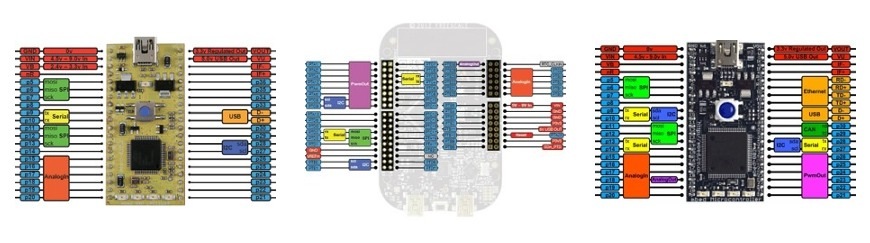
The BusOut Interface can be used on any pin with a blue label, and also with the on-board LEDs (LED1-LED4)

The BusOut Interface can be used to set the state of the output pin, and also read back the current output state. Set the BusOut to zero to turn it off, or 1 to turn it on.
/media/uploads/chris/pinout-thumbnails.jpg
See the Pinout page for more details


6 comments:

08 Jun 2011

What does the wait() do in this function? Does it clear the bus, or hold the information?

08 Jun 2011

It's just a small delay to make the led switching slow enough to be noticeable by a human.

08 Jun 2011

Thanks, and also I'm trying to debug a program. Do the pins get set in the order that they are declared in the constructor? So setting a BusOut variable like: BusOut CL(p19, p20, p18, p22); CL = 2; would make p19 store 2? CL = 3; would make p20 store 3? And so on?

09 Jun 2011

@Christopher Garner

I just commented on this very documentation deficiency in the Comments for BusIn(), and the documentation for this is even less well-specified, because you can't intuit its behavior even from the example.

Assuming that BusIn and BusOut are orthogonal, one can only assume that the following is the case (assuming active-high LEDs):

CL = 0; all LEDs off

CL = 1; a.k.a. 1<<0 or 0x1, (only) LED0 on

CL = 2; a.k.a. 1<<1 or 0x2, (only) LED1 on

CL = 4; a.k.a. 1<<2 or 0x4, (only) LED2 on

CL = 8; a.k.a. 1<<3 or 0x8, (only) LED3 on

That is, where the leftmost bits are the MSBs (most-significant bits) in the read/written "int" type, the parameters are actually passed in *reverse* order, LSB to MSB, as follows (as packed into bit positions 15..0 in an "int", respectively):

- - - - - - - - - - - - p22 p18 p20 p19

Even though the documentation isn't clear, from your example it seems like you're not "thinking binary" from your statement about p20 perhaps being "3". Each pin is a single *bit*... either a 1 or a 0. If you're not into thinking binary (yet), perhaps the following would help: http://www.arduino.cc/playground/Code/BitMath.

If it's still unclear, I'm guessing that the Forum would probably be a better place to get help.

31 Mar 2012

I still don't understand how BusOut works... i have 2 of them: BusOut lvl(p19, p20); BusOut col(p21, p22, p23, p24);

what do i have to write in lvl so that p19=1 and p20=0 and most of all what do i have to write in col so that i could have something like: p21=1 p22=0 p23=1 p24=1 (???)

please i really need your help! :D

31 Mar 2012

user Victor Corchez wrote:

what do i have to write in lvl so that p19=1 and p20=0 and most of all what do i have to write in col so that i could have something like: p21=1 p22=0 p23=1 p24=1 (???)

I would have thought that this would do it?

lvl = 0x1;
col = 0xd;

Posting comments for this page has been disabled