Twitter

This shows you how to tweet from your mbed.

This is basically a simple demo of the HTTPClient and HTTPMap classes, and is a good example for anyone looking to use web-based APIs.

Information

This demo does not yet use the official mbed networking stack

Step-by-step

  1. Initialize & setup your network interface (here, Ethernet)
  2. Create your HTTPClient instance
  3. Write your tweet in an HTTPMap instance
  4. POST your tweet ;) (but do not try to recover server's response, it's big and useless!)
  5. Read the result code

...and your tweet is online :).

Example code

Program

Information

The basic authentication service for twitter is going down at the end of the week. To continue using that program, the code has been updated to use http://supertweet.net which acts as an API proxy. Simply visit the website to setup your twitter account for this API. See: http://www.supertweet.net/about/documentation

#include "mbed.h"
#include "EthernetNetIf.h"
#include "HTTPClient.h"

EthernetNetIf eth; 

int main() {

  printf("Init\n");

  printf("\r\nSetting up...\r\n");
  EthernetErr ethErr = eth.setup();
  if(ethErr)
  {
    printf("Error %d in setup.\n", ethErr);
    return -1;
  }
  printf("\r\nSetup OK\r\n");

  HTTPClient twitter;
  
  HTTPMap msg;
  msg["status"] = "I am tweeting from my mbed!"; //A good example of Key/Value pair use with Web APIs

  twitter.basicAuth("myuser", "mypass"); //We use basic authentication, replace with you account's parameters
  
  //No need to retieve data sent back by the server
  HTTPResult r = twitter.post("http://api.supertweet.net/1/statuses/update.xml", msg, NULL); 
  if( r == HTTP_OK )
  {
    printf("Tweet sent with success!\n");
  }
  else
  {
    printf("Problem during tweeting, return code %d\n", r);
  }
  
  return 0;

}

You can also import the published program:

Results

Example trace with debug on:

Setting up...

HW Addr is : 00:00:00:f0:22:**.

In Setup.

DHCP Started, waiting for IP...

Connected, IP : 10.1.193.21

Setup OK

URL parsed,
Host: twitter.com
Port: 0
Path: /statuses/update.xml

DNS Query...

DNS Resolved.

Connecting...

Event 0 in HTTPClient::onTcpSocketEvent()

Data [len 22]:
status=I+am+an+mbed%21

Writing headers:

Authorization: Basic ZGdfY****************==

Content-Length: 22

Content-Type: application/x-www-form-urlencoded

Event 3 in HTTPClient::onTcpSocketEvent()

Event 3 in HTTPClient::onTcpSocketEvent()

Event 2 in HTTPClient::onTcpSocketEvent()

Response OK

Read header : Date: Fri, 09 Apr 2010 16:04:14 GMT
Read header : Server: hi
Read header : Status: 200 OK
Read header : X-Transaction: 1270829053-*****-*****
Read header : ETag: "ab0674524dc*********"
Read header : Last-Modified: Fri, 09 Apr 2010 16:04:13 GMT
Read header : X-Runtime: 0.46079
Read header : Content-Type: application/xml; charset=utf-8
Read header : Content-Length: 1869
Read header : Pragma: no-cache
Read header : X-Revision: DEV
Read header : Expires: Tue, 31 Mar 1981 05:00:00 GMT
Read header : Cache-Control: no-cache, no-store, must-revalidate, pre-check=0, post-check=0
Read header : Set-Cookie: guest_id=1270829053758; path=/; expires=Sun, 09 May 2010 16:04:13 GMT
Read header : Set-Cookie: lang=en; path=/
Read header : Set-Cookie: _twitter_sess=********
Read header : Vary: Accept-Encoding
Read header : Connection: close
All headers read.

Done :)!

HTTP Result 0

Req completed.
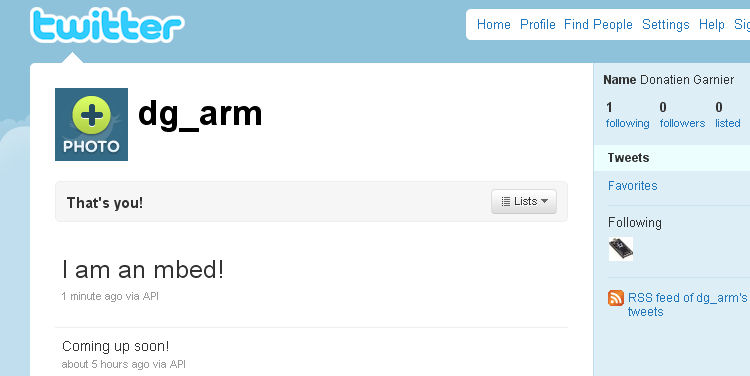
/media/uploads/donatien/tweetfrommbed.jpg

To go a bit further...

You can also play around with the different storage classes: HTTPMap, HTTPFile, HTTPText (or even create your own)!


20 comments:

16 Oct 2010

I set up the program to repeat a tweet every 60 seconds, the first tweet works, (in a loop) and the second one always hangs at this output string

"Setting up... [..\fwk\if\eth\EthernetNetIf.cpp:setup@86] HW Addr is : 00:02:f7:f0:34:03. [..\fw k\if\eth\EthernetNetIf.cpp:setup@99] DHCP Started, waiting for IP... [..\fwk\if\e th\EthernetNetIf.cpp:setup@142] Connected, IP : 192.168.1.106

Setup OK Tweet sent with success! Init

Setting up... [..\fwk\if\eth\EthernetNetIf.cpp:setup@86] HW Addr is : 00:02:f7:f0:34:03. [..\fw k\if\eth\EthernetNetIf.cpp:setup@99] DHCP Started, waiting for IP...

"

At this point in time the processor hangs in some sort of weird state and causes my router to stop working. (This causes my computer as well as the Mbed not to work via internet)

When I disconnect my ethernet, my computer regains its brain but my mbed does not until a hard reset.

Comments appreciated.

18 Oct 2010

It looks like you're invoking "EthernetErr ethErr = eth.setup();" in your loop. Can you try to remove this out of the loop ?

Another issue you will high likely encounter later is that Twitter set a cap on the number of Tweet per hours. And if your Tweets looks too similar, they might just ignore them (just add some timestamp in the tweet).

28 Oct 2010

It looks like Twitter shutted down basicAuth on 31/08 So how can this code still work for you? I get the error code 7 when trying to twitter.

28 Oct 2010

Hi David

Have a look at the top of the page, and also in the code snippet - you'll see the post is via supertweet; "The basic authentication service for twitter is going down at the end of the week. To continue using that program, the code has been updated to use http://supertweet.net which acts as an API proxy. Simply visit the website to setup your twitter account for this API. See: http://www.supertweet.net/about/documentation"

You'll need a supertweet account to carry on using twitter without OAUTH.

Regards Daniel

28 Oct 2010

Hi. I have a library for SuperTweet at http://mbed.org/users/shintamainjp/libraries/SuperTweet/latest. The test program is http://mbed.org/users/shintamainjp/programs/SuperTweet_TestProgram/latest. Please try it if you want. :) Regards Shin.

31 Oct 2010

Hi where can i get the printf trace information.is it in hyper terminal?

31 Oct 2010

Quote:

Hi where can i get the printf trace information.is it in hyper terminal?

  • You are right.
  • You can get the output if you remove "#if 0" and "#endif" lines.
  • Please see more information about the console outputs...
11 Nov 2010

Hi - I imported the twitter example code and added my username and password. The programme runs but I get the following message on the hyperterminal.

Connected, IP : 155.245.21.220 Setup OK Problem during tweeting, return code 7

15 Nov 2010

Hi,

I've downloaded TwitterExample_LPC1768.bin to my mbed but I get the follow error message: waiting for IP... [..\fwk\if\eth\EthernetNetIf.cpp:setup@131] Timeout. Error -65534 in setup.

So no IP is found. Does anybody know why this is so?

TIA for your help, danielle.

04 Feb 2011

Does anyone have a listing of the error codes and what they mean for this?

13 Feb 2011

My post got lost. Here it's again.

Make sure your pwd is that of the supertweet account and NOT your twitter account.

Use the HTTPCLient example program to test that everything is setup correctly.

Error 7 can be got if your twitter account is restricted to postings (edit my profile in twitter).

switch (r){ case HTTP_OK: printf("Success"); break; case HTTP_PROCESSING: printf("<Processing"); break; case HTTP_PARSE: printf("<URI Parse error"); break; case HTTP_DNS: printf("<Could not resolve name"); break; case HTTP_PRTCL: printf("<Protocol error"); break; case HTTP_NOTFOUND: printf("<HTTP 404 Error"); break; case HTTP_REFUSED: printf("6-<HTTP 403 Error"); break; case HTTP_ERROR: printf("7-<HTTP xxx error"); break; case HTTP_TIMEOUT: printf("<Connection timeout"); break; case HTTP_CONN: printf("<Connection error"); break; default: printf("unknown error");

01 Apr 2011

user Shinichiro Nakamura wrote:

Quote:

Hi where can i get the printf trace information.is it in hyper terminal?

  • You are right.
  • You can get the output if you remove "#if 0" and "#endif" lines.
  • Please see more information about the console outputs...

Hi ! Where are theses lignes ? -> "#if 0" and "#endif" lines. To see the debug lines ?

thanks

12 Jun 2011

deleted<

11 Jul 2011

this example show us how to "post" using HTTPMap. Anyone know how to "get" using HTTPMap?

14 Dec 2011

Problem HTTP_REFUSED

How can it be solved ??

02 Mar 2012

Dear all ,I tried the program but it gave error return code 7 ? any help thanx in advanced

29 Jul 2012

Help me! . Error came out after compiling a lot.

09 Aug 2012

user Mohammed Aldalbahi wrote:

Dear all ,I tried the program but it gave error return code 7 ? any help thanx in advanced

Same thing here. Really frustrating

10 Aug 2012

Hi, I'm getting this error while compile the code "cannot open source input file "TCPSocketConnection.h": No such file or directory" in file "HTTPClientHTTPClient.h", Line: 27, Col: 32, please help me.

10 Aug 2012

Unfortunately, this project has not yet been ported to the official mbed networking library. This project is using an old and unmaintained networking library.

As soon as a Twitter client is developed for the official mbed networking library, we will update the TCP/IP protocols and APIs page.

Perhaps, if you are up for a challenge, one of you could be the author of the twitter client library featured on the official page.

Cheers, Emilio