Servo
A library for controlling a Radio Control (R/C) model Servo.
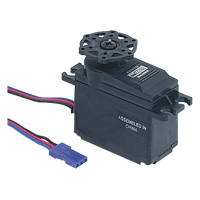
Hello World!
Library
Import library
Public Member Functions |
|
| Servo (PinName pin) | |
|
Create a servo object connected to the specified PwmOut pin.
|
|
| void | write (float percent) |
|
Set the servo position, normalised to it's full range.
|
|
| float | read () |
|
Read the servo motors current position.
|
|
| void | position (float degrees) |
|
Set the servo position.
|
|
| void | calibrate (float range=0.0005, float degrees=45.0) |
|
Allows calibration of the range and angles for a particular servo.
|
|
| Servo & | operator= (float percent) |
|
Shorthand for the write and read functions.
|
|
This library controls a standard R/C model servo using a PwmOut signal, and provides control of the servo between min and max by setting it to 0.0 - 1.0.
As all servos respond differently, you can also use the calibrate function the range, so 0.0 - 1.0 is the maximum range of the servo.
Details
The underlying PwmOut period is set to 20ms, and by varying the pulsewidth (up to a maximum of 0.5ms to 2.5ms) the position of the servo is changed, usually by around 180 degrees. The library lets you calibrate the exact range.
The servo must connect to a PwmOut, and be supplied with a separate power supply, usually in the range 4.5-6.0v.
Warning
A servo requires higher current than the USB port can safely provide, and so it is essential that you power the servo using an external supply, such as a 4xAA (6v) battery pack or an appropriate DC power adaptor.
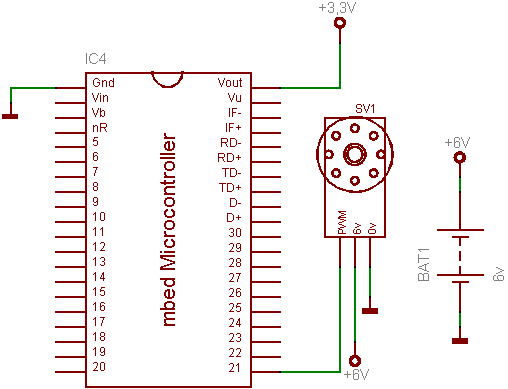
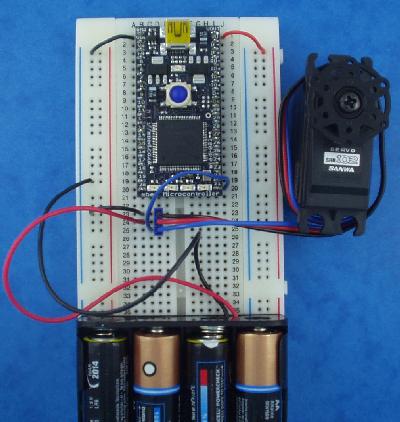
Examples
Import program
00001 #include "mbed.h"
00002 #include "Servo.h"
00003
00004 Servo myservo(p21);
00005 Serial pc(USBTX, USBRX);
00006
00007 int main() {
00008     printf("Servo Calibration Controls:\n");
00009     printf("1,2,3 - Position Servo (full left, middle, full right)\n");
00010     printf("4,5 - Decrease or Increase range\n");
00011
00012     float range = 0.0005;
00013     float position = 0.5;
00014
00015     while(1) {
00016         switch(pc.getc()) {
00017             case '1': position = 0.0; break;
00018             case '2': position = 0.5; break;
00019             case '3': position = 1.0; break;
00020             case '4': range += 0.0001; break;
00021             case '5': range -= 0.0001; break;
00022         }
00023         printf("position = %.1f, range = +/-%0.4f\n", position, range);
00024         myservo.calibrate(range, 45.0);
00025         myservo = position;
00026     }
00027 }