SPI driven QVGA TFT

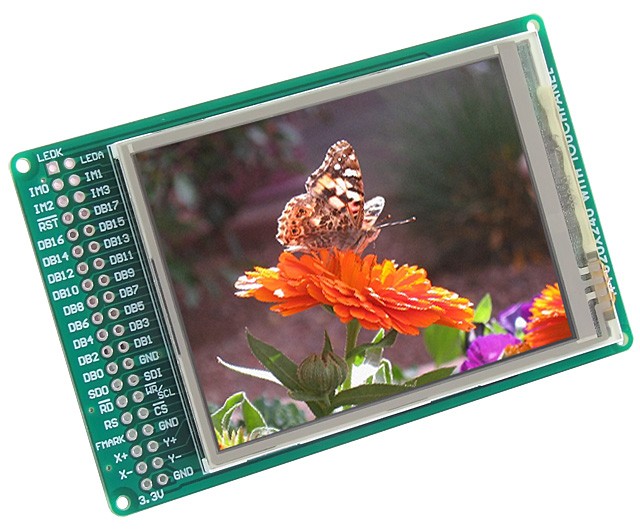
The TFT from MikroElektronika http://www.mikroe.com/eng/products/view/474/tft-proto-board/ come on a pcb with a easy to use pinout.

/media/uploads/dreschpe/tft_proto_01.jpg

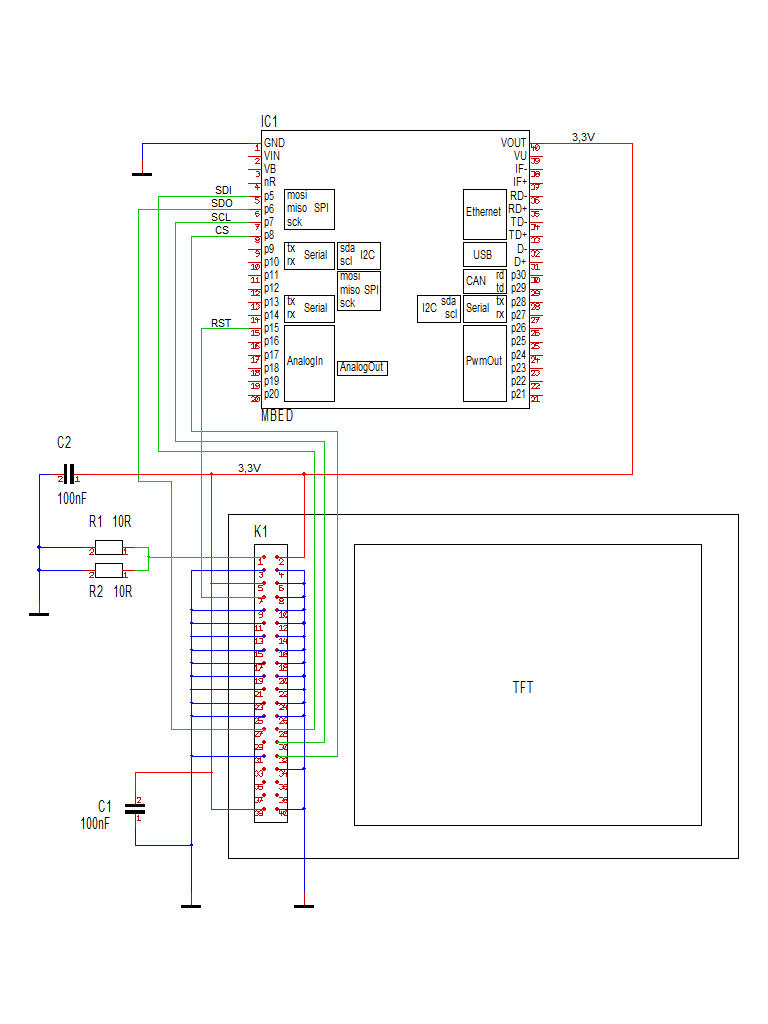
Connecting to the mbed

The board use 3.3V so we can attach it direct to the mbed. The backlite LED need a resistor to limit the current. I use two 10R resistors parallel to get 5R driven by 3.3V.

The interface can be driven in 16 bit,8 bit, 18 bit, 9 bit or SPI mode. Because I don't want to spend all mbed IOs to the display I use the SPI mode. The IMx-pins have to set to IM0,IM1,IM3 : GND, IM2 : 3.3V. The RST pin is connected to reset, RS and FMARK are not used.

For SPI mode we need only the tree SPI signals, a cs and a reset signal. 5 pins at all. SPI is serial and we have to transfer 320 * 240 * 16 = 1228800 bits to the display to fill it up. Will it be to slow ? No ! We can drive the SPI to display with 48Mhz clock speed ! 50Mhz is the limit, but the mbed is running at 96Mhz and we can divide this clock by two.

The lib supports also the new Freescale KL25Z board. At the moment it is working at 10MHz SPI clock.
/media/uploads/dreschpe/tft.png

Software: SPI_TFT library

latest Version :

DMA use

The lib use a io pin to generate the cs signal again. The automatic spi cs could make problems when interrupted by interrupts or RTOS. My tests with the RTOS are stable.

The cls() is six times faster !

Bugfix : the bmp from filesystem is working again http://mbed.org/users/dreschpe/code/SPI_TFT/

If you use a LPC11U24 the DMA is not used If you use a KL25Z the DMA is not used

If you want to switch off DMA use, comment out the NO_DMA define at top of spi_tft.h file

How to get nice looking fonts ?

To print characters to a graphic screen we need a font. To code a font by paper is ok for a small lcd, but for a 320*240 pixel display we need bigger fonts. A 12*12 pixel font is readable, but a lot of work to construct.

Fonts can be made with the GLCD Font Creator also from http://www.mikroe.com .

With this program you can load a window font and convert it into a c-array. To use this Font with my lib you have to add 4 parameter at the beginning of the font array. - the number of byte / char - the vertial size in pixel - the horizontal size in pixel - the number of byte per vertical line (it is vertical size / 8 ) You also have to change the array to char[]. After that you can switch between different fonts with set_font(unsigned char* font); The horizontal size of each character is also stored in the font. It look better if you use bigger fonts or italic. The letter M is wider than a l.

Here are some Fonts from me : http://mbed.org/users/dreschpe/code/TFT_fonts/

The small made for the mbed lab board : http://mbed.org/users/dreschpe/code/LCD_fonts/

And from Peter Holzleitner : http://mbed.org/users/pholzleitner/code/SourceCodePro31-SB/

Text commands :

You can use the claim() function to redirect the output to stdout or stderr to the TFT. After claim(stdout) you can simply use the printf function to print to the TFT.

  • locate(x,y); function is used to setup the cursor position. x,y are the pixel position. This was changed from row,column in older lib !

There are two parameter to setup the color of the text :

  • background(color);
  • foreground(color); All color are 16bit: R5 G6 B5.
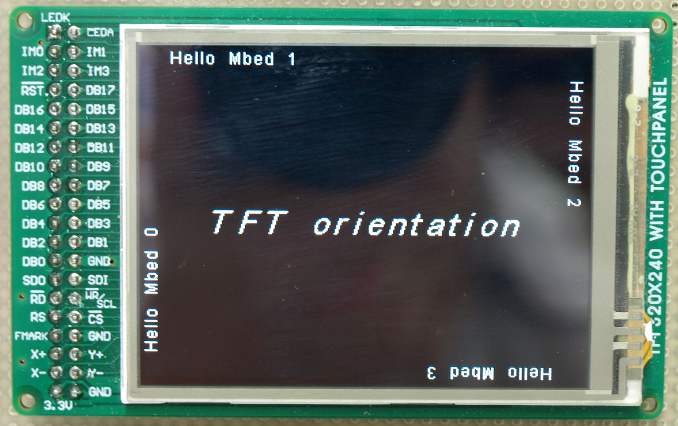
  • set_orientation(); This command select one of the 4 directions to use the display. This command is also working on the graphical commands.

Graphic commands :

  • cls(); Fill the screen with background color
  • pixel(x,y,color); set a single pixel at x,y with color
  • line(x0,y0,x1,y1,color); draw a line from x0,y0 to x1,y1 with color
  • rect(x0,y0,x1,y1,color); draw a rectangle x0,y0 to x1,y1 with color
  • fillrect(x0,y0,x1,y1,color); draw a filled rectangle
  • circle( x0,y0,radius ,color); draw a circle around x0,y0 with radius
  • fillcircle(x0,y0,radius ,color); draw a filled circle around x0,y0 with radius
  • Bitmap(x0,y0,w,h,*bitmap); paint a bitmap with width w and high h starting at x0,y0 (upper left corner)
  • BMP_16(x0,y0,*bmp); paint a bmp file out of the internal drive

How to transfer a grafic to the mbed ?

The hard way - but fast to load :

Load from mbed flash. To construct a bitmap array we can use gimp. http://www.gimp.org/ Load a image (edit and resize) and save it as BMP. You have to select the option 16 bit R5 G6 B5 !

To convert this file into a c-array you can use the hex-editor winhex. (http://www.x-ways.net/winhex/index-m.html) The eval version can handle the small files. We don`t need the bmp header. Mark the data starting at offset 0x46 to the end of file. Use "edit -> copy block -> C Source" to export this data as C array. Paste the data into a C file into the mbed compiler. The editor will generate a array of char[]. To use 16 bit DMA on this we have to put a __align(2) in front of the definition. To put it into Flash we change it to static const unsigned char bmp[]{...}

__align(2)
static const unsigned char bmp[]{
      0xCB, 0x5A, 0x5C, 0xE7,....

};

The easy way - but slower to load:

With the BMP_16 command we can load a picture out of the internal drive to the display.

  • BMP_16(x0,y0,"test.bmp"); paint test.bmp out of the internal drive to x0, y0

simply copy test.bmp to mbed usb drive - saved with the options 16 bit R5 G6 B5 and load it. The KL25Z board does not support the local filesystem.

The demo code : (It is difficult to make pictures from the screen - it looks better)

 // example to test the TFT Display
 // Thanks to the GraphicsDisplay and TextDisplay classes from 

#include "stdio.h"
#include "mbed.h"
#include "SPI_TFT.h"
#include "string"
#include "Arial12x12.h"
#include "Arial24x23.h"
#include "Arial28x28.h"
#include "font_big.h"

extern unsigned char p1[];  // the mbed logo

// the TFT is connected to SPI pin 5-7 
SPI_TFT TFT(p5, p6, p7, p8, p15,"TFT"); // mosi, miso, sclk, cs, reset

// possible setup for the KL25Z board :
//SPI_TFT TFT(PTD2, PTD3, PTD1, PTD0, PTD5,"TFT"); // mosi, miso, sclk, cs, reset

int main() {
    int i;
    TFT.claim(stdout);      // send stdout to the TFT display 
    //TFT.claim(stderr);      // send stderr to the TFT display

    TFT.background(Black);    // set background to black
    TFT.foreground(White);    // set chars to white
    TFT.cls();                // clear the screen
    TFT.set_font((unsigned char*) Arial12x12);  // select the font
      
    // first show the 4 directions  
    TFT.set_orientation(0);
    TFT.locate(0,0);
    printf("  Hello Mbed 0");
    TFT.set_orientation(1);
    TFT.locate(0,0);
    printf("  Hello Mbed 1");
    TFT.set_orientation(2);
    TFT.locate(0,0);
    printf("  Hello Mbed 2");
    TFT.set_orientation(3);
    TFT.locate(0,0);
    printf("  Hello Mbed 3");
    TFT.set_orientation(1);
    TFT.set_font((unsigned char*) Arial24x23);
    TFT.locate(48,115);
    TFT.printf("TFT orientation");
       
    wait(5);        // wait two seconds 
/media/uploads/dreschpe/orientation.jpg

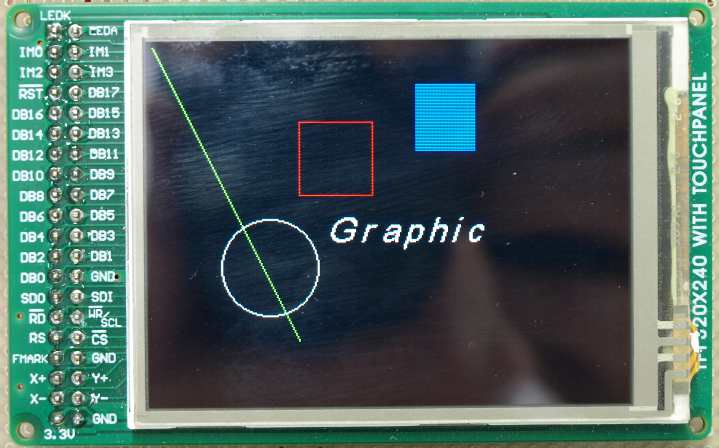
 // draw some graphics 
    TFT.cls();          
    TFT.set_orientation(1);
    TFT.set_font((unsigned char*) Arial24x23);
    TFT.locate(120,115);
    TFT.printf("Graphic");
     
    TFT.line(0,0,100,200,Green);
    TFT.rect(100,50,150,100,Red);
    TFT.fillrect(180,25,220,70,Blue);
    TFT.circle(80,150,33,White);
/media/uploads/dreschpe/graphic.jpg

 wait(5);        // wait two seconds
    
    // bigger text
    TFT.foreground(White);
    TFT.background(Blue);
    TFT.cls();
    TFT.set_font((unsigned char*) Arial24x23);
    TFT.locate(0,0);
    TFT.printf("Different Fonts :");
    
    TFT.set_font((unsigned char*) Neu42x35);
    TFT.locate(0,50);
    TFT.printf("Hello Mbed 1");
    TFT.set_font((unsigned char*) Arial24x23);
    TFT.locate(50,100);
    TFT.printf("Hello Mbed 2");
    TFT.set_font((unsigned char*) Arial12x12);
    TFT.locate(55,150);
    TFT.printf("Hello Mbed 3");
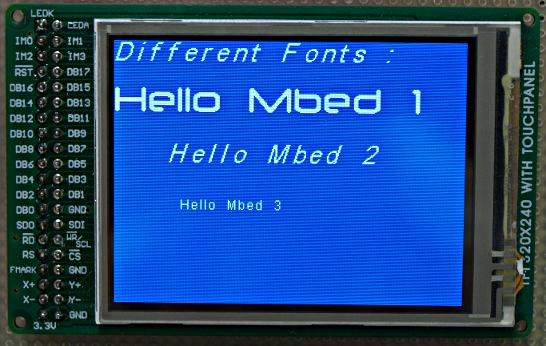
/media/uploads/dreschpe/fonts.jpg

wait(5);
  
    // mbed logo  
    TFT.set_orientation(1);
    TFT.background(Black);
    TFT.cls();
    TFT.Bitmap(90,90,172,55,p1);
}
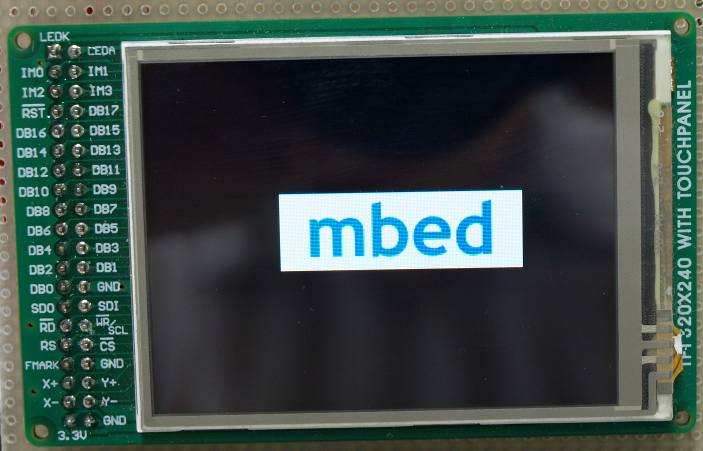
/media/uploads/dreschpe/logo.jpg

The touchscreen

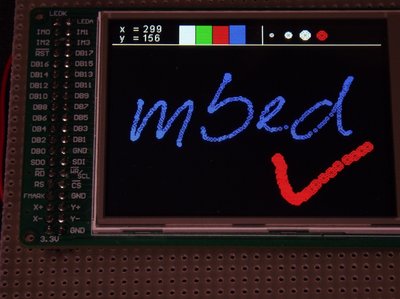
The Touch_tft class is derived from the SPI_TFT class.

I add the support for the touchscreen :

http://mbed.org/users/dreschpe/notebook/touchscreen/

http://mbed.org/users/dreschpe/libraries/Touch_tft/lx1972
/media/uploads/dreschpe/_scaled_touch.jpg

A Demo to use the touch function : http://mbed.org/users/dreschpe/notebook/micro-paint/


2 related questions:


71 comments:

15 Aug 2011

Colour LCD for the masses. This looks very cool indeed.They are available from www.mcustore.com in Southampton.

06 Sep 2011

Hey Peter, I noticed that you've updated your TFT / touch routines yesterday. Anything important in the updates? ...kevin

06 Sep 2011

Hello Kevin, i change the locate function to index pixel. You can place the text more precise. After that i realize that other people are using this lib and have to change the code. I think i will add a locate_xy function to address pixel and change back the locate to row and column. Minor fix : I changed the numbers fonts to a constant wide. It looks better if you print out numbers. I also patch a bug inside the Bitmap function. You have to padd the number of data in a line to a multiple of 4.

Peter

15 Sep 2011

Hi Peter, This is a very nice piece of work. It saved me a load of time and the display boards are very reasonably priced. Also, mine was delivered extremely fast, actually the next day.

I have a minor problem, perhaps someone can help. When I try to compile the example code, it fails because the linker can't find the external char p1[] (the MBED bitmap). Have you published this, or can you tell me where I can get a copy? Much thanks in advance,

Mark

15 Sep 2011

You could use google, and find the software to make the image into an array. Or of course, the easy way: Wait for him to answer ;-)

Lerche

15 Sep 2011

This is probably the BEST graphical LCD I have used, so easy (with your code)

hear are two test files to replace p1,

a R5G6B5 version (not tested, because I have modified the code to read standard Windows 24 Bit RGB)

... just remove the .pdf on the end (I hope)

/media/uploads/ceri/mbed16.bmp.pdf

/media/uploads/ceri/mbed24.bmp.pdf

Enjoy

Ceri

15 Sep 2011

Not possible to open files, not recognized. Rename the .bmp to .doc, and upload again, this should be possible.

Lerche

15 Sep 2011

I have tested them just now, download file, then remove the .pdf from end of file name.

Ceri

15 Sep 2011

Try this file. I converted it using GIMP 2.6.11. Be sure to remove the ".txt" from the file name before using. Use orientation 0 on TFT to load the image.

...kevin

/media/uploads/loopsva/test.bmp.txt

16 Sep 2011

Here is the code with the graphic: http://mbed.org/users/dreschpe/programs/TFT/lxnh2g

The fastest way to get a graphic to the screen is to load it with GIMP, save it as BMP with options 16 bit R5 G6 B5 and put it to the mbed drive.

BMP_16(x0,y0,myfile.bmp);

will load the picture.

Hint : it is slow, compared with the flash.

...Peter

19 Sep 2011

Very good Peter! Your work is great! I can't visualize bitmap if I use -Bitmap function of TFT library:why? I followed your instructions that are: 1) convert bitmap 16 in array C trhough WinHex from address 0x46 2) create an array in the project 3)call Bitmap function with orientation = 0 for example

Image doesn't appear : why?

Obviusly if I use BMP16 it works fine; can you or anyone help me?

Thanks

19 Oct 2011

Please have you got an example of bmp file with the corresponding C array ? The function "Bitmap" doesn't work, I think that conversoin is the problem Thanks

19 Oct 2011

Hello GB R

can u upload as a sample of your c arry and how are u calling it using Bitmap ... i already used this function successfully

19 Oct 2011

user Mesbah Uddin Mohammed wrote:

Hello GB R

can u upload as a sample of your c arry and how are u calling it using Bitmap ... i already used this function successfully

certainly. This is the functions

  1. include "p1.h"

extern unsigned char data[];

TFT.Bitmap(90,90,172,55,data);

p1.h is in attachment with the corresponding .bmp /media/uploads/giamby3000/icon.zip I followed your instructions that are: 1) convert bitmap 16 in array C trhough WinHex from address 0x46 2) create an array in the project 3)call Bitmap function Thanks

20 Oct 2011

The problem is here:

TFT.Bitmap(90,90,172,55,data); coordinates isn't correct with bmp weight and height

thanks!

23 Nov 2011

Can anyone help, we have modified the library for the BMP16 method within the SPI_TFT file to use the SD card as a source for the bitmap files. This works well for 2 images but when we try to put a 3rd image up it does not show. I have been through the code but can't find the fault. Can anyone help? We are using the SD Card Filesystem as in the cookbook. Thanks...

23 Nov 2011

Hello Mark, have you try to load this image from the internal drive ? The image has to be 16 bit. The code test if the image fits on the screen. At the moment my code does not clip the picture.

Peter

12 Dec 2011

Hi Peter,

I'm having trouble with the pixel function, I was wondering if you (or anyone else) could help? I'm trying to make the screen display a graph of some data using the pixel command, this wasn't working, so I worked back to trying to output a few pixels when it initialises the graph axis and that's not working either, can you see what I'm doing wrong?

void DrawGraphOutline(void) {
    //Draw Graph Outline Function
    
    tt.line(0,220,319,220,Black);               // Graph Line Across
    tt.line(25,25,25,239,Black);                // Graph Line Down  
    
    tt.locate(1,1);
    printf("Temps");
    
    tt.locate(260,222);                         // X axis labels
    printf("1");    
    tt.locate(200,222);
    printf("2");    
    tt.locate(140,222);
    printf("3");    
    tt.locate(80,222);
    printf("4");
    
    tt.locate(1,170);                         // Y axis labels
    printf("25");    
    tt.locate(1,120);
    printf("50");
    tt.locate(1,70);
    printf("75");
    
    tt.pixel(150, 150, Red);
    tt.pixel(150, 151, Red);
    tt.pixel(150, 149, Red);
    tt.pixel(151, 150, Red);
    tt.pixel(149, 150, Red);
    
    tt.pixel(50, 150, Red);
    tt.pixel(50, 151, Red);
    tt.pixel(50, 149, Red);
    tt.pixel(51, 150, Red);
    tt.pixel(49, 150, Red);
    
    tt.pixel(50, 50, Red);
    tt.pixel(50, 51, Red);
    tt.pixel(50, 49, Red);
    tt.pixel(51, 50, Red);
    tt.pixel(49, 50, Red);
}

All of the tt.line and printf statements work, but the tt.pixel doesn't output anything to the screen.

Any ideas?

Cheers,

Matt

12 Dec 2011

Hello Matt, you have found a bug. I have fix the pixel function. Please use the new version.

To speed up the setting of pixels, i set only two of the four registers wich declare the actual painting area. This work if you use the WindowMax() function before. The WindowMax function itself is declared protected - you can only use it inside the class at the moment.

I decide to fix the pixel function by setting the area every time. This use some additional register transfers, but the user has not to send a WindowMax() in front of pixel operations.

Peter

14 Dec 2011

Hi Peter,

That's great thanks, that solved my issue :-)

Cheers,

Matt

21 Dec 2011

Hi Peter, me again :-)

I've noticed that writing out an array of pixels one at a time is a bit slow, and I was wondering if I could speed it up. Here's my code:

void DrawGraph(void) {   
    tt.fillrect(26,26,319,219,Black);
    int pix;
    int width = GraphWidth - ScreenWidth;
    for(pix = GraphWidth; pix > width ; pix--){
        if(GPUtemp[pix] > 0){tt.pixel(pix - 1, 220 - (GPUtemp[pix] * 2), Green);}
        if(CPUtemp[pix] > 0){tt.pixel(pix - 1, 220 - (CPUtemp[pix] * 2), Blue);}
        if(SYStemp[pix] > 0){tt.pixel(pix - 1, 220 - (SYStemp[pix] * 2), Red);}
    }
    tt.locate(30,30);                         
    printf("GPU: %i", GPUtemp[GraphWidth - 1]);    
    tt.locate(30,45);
    printf("CPU: %i", CPUtemp[GraphWidth - 1]);    
    tt.locate(30,60);
    printf("SYS: %i", SYStemp[GraphWidth - 1]);    
}

Do you think that building a bitmap in code and writing that to the screen would be quicker?

Cheers,

Matt

21 Dec 2011

Hello Matt,

if you set up a bitmap you don't have to erase the screen with the fillrect. This will be be fast, but you need to much ram :

(319 - 26 + 1) * (219 - 26 + 1) = 57036 word = 114072 byte !

I have speed up the pixel command from 45 byte to 25 byte spi transfer. A lot of Registers for 2 bytes of color...

Please test the new version.

You can try to erase only the old pixel. I think the fillrect will be slower because it set all pixel. You only need 3 times a second array for the old temperatures.

Peter

23 Dec 2011

Hi Peter,

That worked really well, removing the rectangle and just erasing the old pixel made things look a lot smoother, as you didn't get the pause while the whole graph had to be redrawn.

I've also reduced the number of times I need to set the pixels by checking if the value I'm replacing is the same.

void DrawGraph(void) {   
    int pix;
    int width = GraphWidth - ScreenWidth;
    for(pix = GraphWidth; pix > width ; pix--){
        if((GPUtemp[pix] > 0) && (GPUtemp[pix - 1] != GPUtemp[pix])){
            if(GPUtemp[pix -1] > 0){tt.pixel(pix - 1, 220 - (GPUtemp[pix - 1] * 2), Black);}
            tt.pixel(pix - 1, 220 - (GPUtemp[pix] * 2), Green);
            }
        if((CPUtemp[pix] > 0) && (CPUtemp[pix - 1] != CPUtemp[pix])){
            if(CPUtemp[pix -1] > 0){tt.pixel(pix - 1, 220 - (CPUtemp[pix - 1] * 2), Black);}
            tt.pixel(pix - 1, 220 - (CPUtemp[pix] * 2), Blue);
            }
        if((SYStemp[pix] > 0) && (SYStemp[pix - 1] != SYStemp[pix])){
            if(SYStemp[pix -1] > 0){tt.pixel(pix - 1, 220 - (SYStemp[pix - 1] * 2), Black);}
            tt.pixel(pix - 1, 220 - (SYStemp[pix] * 2), Red);
            }
    }
    tt.locate(30,30);                         
    printf("GPU: %i", GPUtemp[GraphWidth - 1]);    
    tt.locate(30,45);
    printf("CPU: %i", CPUtemp[GraphWidth - 1]);    
    tt.locate(30,60);
    printf("SYS: %i", SYStemp[GraphWidth - 1]);    
}

Thanks again :-)

Matt

29 Dec 2011

Hey Peter, On the latest code, tt.cls doesn't always work ...kevin

30 Dec 2011

cls bug fixed

Peter

30 Dec 2011

Thanks Peter, CLS is fixed. I have another issue regarding vectored lines. (imagine displaying an analog or mechanical meter movement...) I am constantly repainting a vectored line every time the meter has a change in "movement". When the movement starts, first I paint over the old line in Black to erase it (Black background), then paint the new line in White. I do this fairly often, 5 - 6 times a second. About 30% of the time, the old line never fully erases before painting the new line. This leaves ghosts of partial old While lines lying around.

This use to work properly in your older code, but broken in the later updates. I do switch between orientation 0 and 1 quite a bit. 0 for text and 1 for graphics.

...kevin

30 Dec 2011

"I do switch between orientation 0 and 1 quite a bit. 0 for text and 1 for graphics. " Oops!! I meant 0 for graphics and 1 for text ...kevin

02 Jan 2012

Hello Kevin, I think I have a fix, but the publish function has problems since yesterday. Try it with a WindowMax(); at the end of the set_orientation() function.

Peter

05 Jan 2012

Peter, All is right with the world now. The new version of SPI_TFT has fixed my issues. I did not have to add WindowMax(); either. I made no other changes other than to update your code. Thanks.

...kevin

01 Feb 2012

Peter, FYI, I wrote a program that turns the TFT into an analog meter. Made for users of the MikroElektronika TFT display. Right now it's just a demo program, but is easily expandable.

http://mbed.org/users/loopsva/programs/AnalogMeter-100/m4n3pw

Note that my TFT pin out is different from the defaults in your example. ...kevin

19 Aug 2012

what tool did you use to create the C++ array for the mbed logo ?

21 Aug 2012

Kevin Braun

Can you post a picture of the analog meter display? I'm interested in what it looks like but dont have the actual display yet.

21 Aug 2012

Here Matt, Some poor quality pictures which doesn't do the display justice. It's hard to see, but the date/time are in the lower right-corner, a digital number representing the needle's position in the lower-left corner and the meter's scale (1x, x10, x100, x1k) in the upper-right corner. Meter's frame color also represents the scale.

...kevin

/media/uploads/loopsva/bluemeter.jpg /media/uploads/loopsva/greenmeter.jpg /media/uploads/loopsva/yellowmeter.jpg /media/uploads/loopsva/orangemeter.jpg

09 Sep 2012

How can I read the memory from the TFT?

Thanks!

10 Sep 2012

Hello Andreas,

the TFT use the HX8347D LCD Controller. The Datasheet say "Not support GRAM read" (SPI mode). I try to read, because the HX8347-A chip has support for reading the GRAM, but without success. I think this is a bug in this revision of the controller. The SDO pin has no function. At the moment, it is not possible to read out the actual graphic ram with SPI. You have to use the 8 or 16 bit bus to do. You can try to double buffer parts of the screen, but you possible run out of ram.

10 Sep 2012

Hello Maverick,

the mbed logo was created "the hard way - but fast to load" described on top of the page.

Use gimp to create a 16 bit bitmap. Use the 565 option to export it to bmp format. Then use a hex editor to cut off the first 0x45 byte. With "winhex" you can also export the block 0x46 to the end into a c coded array.

10 Sep 2012

Thanks Peter great lib by the way :) I managed it after a little more reading (brain was in the off position that day)I did it the way you described, worked a treat. I noticed the library doesn't play nice sometimes with the new official Ethernet libs, could this be down to the use of malloc used in the lib. I read somewhere in the docs that malloc should be avoided in RTOS (which the new ether libs sit ontop of). would swapping malloc for a global array help there ? I am still a bit of a C++ noob tbh

10 Sep 2012

Hello Peter,

it is a pity that this does not work. I do not want to change my hardware and take plan "b". Double buffer a part of the screen. I have a bmp 80x320 (80px x 320px x 2Byte = 51200Byte) and split it so I can use the both memory banks (0x2007C000).

10 Sep 2012

The malloc is used to free the memory after using it. A global array will block the memory. If you use the RTOS or some interrupt code you have to be careful. There is some code which possible has to be marked as critical section. If you interrupt the low level access to the controller register with a interrupt or task switch - the lcd controller can run into problems.

I plan to transfer one of my projects to the new network stack. I will have a look on this and secure some things.

11 Sep 2012

I have update the lib. The lib is using a io pin to set the cs again. The spi driven signal could cause problems, because if the spi fifo get empty the signal is raised to high. This will stop the data transfer for the tft controller. If the spi will continue sending data, the tft controller is waiting or a new command....

My first tests with the RTOS are running ok. Use a mutex to secure all TFT writes.

Peter

12 Sep 2012

Hi Peter, I don't know what you did, but the display is much more stable - and your timing on releasing the TFT update impeccable. I am building an application using the MLX90620 16x4 IR sensor array. The TFT is perfect for displaying false color representation of the IR pixels. With the previous TFT driver, I was getting white screens that wouldn't go away, even after a tt.cls();. Now it seems flawless. All I have running is the SPI TFT (and analog touch screen) and an I2C device for I/O. No other interrupts. I do 4 screen updates per second. I've attached a crappy picture of the application screen.

Thanks Peter, ...kevin /media/uploads/loopsva/09-11-12_1756.jpg

12 Sep 2012

Cool project. I have also thought about this chip after seeing the specs. I hope I have hit the problem.

12 Sep 2012

Since seeing the cool projects people were making with this, I thought I'd post my PC temperature monitor :-) /media/uploads/Mephi/img_20120912_224516.jpg

12 Sep 2012

/media/uploads/dreschpe/hauptmenu2.jpg

Here is the application i wrote the lib. The screen shows the status of a GPS locked frequency reference. The two bars show the deviation of the frequency and the PPS on a log. scale.

18 Sep 2012

i was just checking this project from top to bottom and it's awesome, congratulations!

10 Oct 2012

Hi Peter, This a very cool and usefull lib. There is a display MI0283QT-2 from Watterott which has also the the HX8347-D and works great with your lib.

I tried to bring this piece of hardware to work whith your lib. But there was a problem, cause i used SPI1 on 5,6,7. And this won't work. I was going mad by finding the problem.

But now I have found the bug and I fix it with the following changes.

I have moved the check for the SPI port to the top, cause the reset function uses code, which need to know the port.

SPI_TFT::SPI_TFT(PinName mosi, PinName miso, PinName sclk, PinName cs, PinName reset, const char *name)
    : _spi(mosi, miso, sclk), _cs(cs), _reset(reset),GraphicsDisplay(name)
{
    if (mosi == p11 || mosi == P0_18) spi_port = 0;  // we must know the used SPI port to setup the DMA
    else spi_port = 1;
    tft_reset();
    orientation = 0;
    char_x = 0;
}

Then i change your DMA definitions in the SPI_TFT.h file.

#define DMA_DEST_SSP1_TX        (2UL << 6)
#define DMA_DEST_SSP0_TX        (0UL << 6) 

At last, i have changed the following line of code at all places in the SPI_TFT.cpp file from this...

        LPC_GPDMACH0->DMACCConfig  = DMA_CHANNEL_ENABLE | DMA_TRANSFER_TYPE_M2P;

... to this line of code.

        LPC_GPDMACH0->DMACCConfig  = DMA_CHANNEL_ENABLE | DMA_TRANSFER_TYPE_M2P | (spi_port ? DMA_DEST_SSP1_TX : DMA_DEST_SSP0_TX);

Now all works great on both SPI ports. :-D

12 Oct 2012

Hans, thanks for the patch. It is always better to test the code with all hardware setups. I have changed the lib.

29 Jan 2013

Hi all,

I needed a font for large readouts (like on a multimeter), so I created one with 55x31 characters based on Source Code Pro semi-bold, which is published under OFL 1.1 (http://sourceforge.net/projects/sourcecodepro.adobe/). It includes optional characters for mu/micro (µ), omega/Ohm (Ω), superscript 2 and 3 (² ³), plus-minus (±), degree (°).

Here's a sample image (full screen shown):

/media/uploads/pholzleitner/_scaled_scpro31sb.jpg

Code at http://mbed.org/users/pholzleitner/code/SourceCodePro31-SB/

Regards, Peter

02 Feb 2013

Hi, Thanks for the driver. Works great... for one display. I am trying to drive two displays and as soon as I define the second display as below, neither work. If I only enable one at a time (comment out one of the two commands below as well as the follow-on commands for that display), I can get either to work, but not both at the same time. Any suggestions? I can't use the other SPI port since I need those pins for a canbus.

SPI_TFT TFT0(p5, p6, p7, p8, p15,"TFT"); mosi, miso, sclk, cs, reset

SPI_TFT TFT1(p5, p6, p7, p16, p15,"TFT"); mosi, miso, sclk, cs, reset

02 Feb 2013

I tried using the other SPI port just as a test and I get the same result if I try to use both at the same time so it appears defining two different TFT displays confuses the library and it's not related to my trying to just use the cs to select between the two. I would be happy to attempt to fix in my own area but don't even know where to begin to debug something like this. What would make two calls to the same routine interfere with each other? I don't even need to try to access the second display. Just adding the second SPI_TFT command to the demo program provided causes it to crash (jumps immediately to the final MBED display - skipping all the font and graphics examples and sleep commands - and LED1-4 are flashing in a "something went very wrong" sort of way). Not looking for a handout - just a hint on what to google would be greatly appreciated.

SPI_TFT TFT0(p5, p6, p7, p8, p15,"TFT"); mosi, miso, sclk, cs, reset

SPI_TFT TFT1(p9, p10, p11, p16, p17,"TFT"); mosi, miso, sclk, cs, reset

user Tick Tock wrote:

Hi, Thanks for the driver. Works great... for one display. I am trying to drive two displays and as soon as I define the second display as below, neither work. If I only enable one at a time (comment out one of the two commands below as well as the follow-on commands for that display), I can get either to work, but not both at the same time. Any suggestions? I can't use the other SPI port since I need those pins for a canbus.

SPI_TFT TFT0(p5, p6, p7, p8, p15,"TFT"); mosi, miso, sclk, cs, reset

SPI_TFT TFT1(p5, p6, p7, p16, p15,"TFT"); mosi, miso, sclk, cs, reset

02 Feb 2013

Without testing it, could it be that you give both the same name? Try changing the name of one of them to for example TFT2 (the name which is the last argument of the constructor).

02 Feb 2013

Start with the older Version without Dma. Using different spi with one dma channel will crash. If using both displays on the same spi will require a type of semaphore to prevent interruptions of actions. Peter

02 Feb 2013

user Peter Drescher wrote:

Start with the older Version without Dma. Using different spi with one dma channel will crash. If using both displays on the same spi will require a type of semaphore to prevent interruptions of actions. Peter

Thanks. Old version has a very similar behavior but I will take your advice and stick with it for debug. Same symptom, though. TFT demo works unless I add the second TFT1 line below then it jumps to MBED logo and flashing LEDs. Also, the old version appears to only work on the second SPI interface (wouldn't work on p5-p7 even with one display) so I couldn't try putting each display on a dedicated SPI interface.

SPI_TFT TFT0(p11, p12, p13, p14, p16,"TFT"); mosi, miso, sclk, cs, reset

SPI_TFT TFT1(p11, p12, p13, p15, p16,"TFT"); mosi, miso, sclk, cs, reset

02 Feb 2013

user Peter Drescher wrote:

Start with the older Version without Dma. Using different spi with one dma channel will crash. If using both displays on the same spi will require a type of semaphore to prevent interruptions of actions. Peter

It looks like the older version (http://mbed.org/users/dreschpe/libraries/SPI_TFT/m369bx) referenced at the top of this page also uses DMA. Is there an older version somewhere?

03 Feb 2013

I have changed the lib to detect if a LPC11U24 is used and switch of the DMA use. If you want to switch off it manually, you can activate the #define NO_DMA at the top of spi_tft.h . Peter

03 Feb 2013

user Peter Drescher wrote:

I have changed the lib to detect if a LPC11U24 is used and switch of the DMA use. If you want to switch off it manually, you can activate the #define NO_DMA at the top of spi_tft.h . Peter

Thanks! I think I found a cut-n-paste error in the SPI_TFT.cpp at the hline member - looks like an extra for:next loop got copied in above the #if defined USE_DMA command.

I was able to modify this to make it support two displays with DMA enabled. Kind of a hack, but I just modified the SPI_TFT class to include two cs pins and added a member called set_display to set which of the two _cs pins to enable. It should work for my purposes. I was able to modify your touch program to work with both. Thanks again for the library; it is really excellent work!

/media/uploads/TickTock/spi_tftx2.jpg

03 Feb 2013

Stereo use ! What do you plan to build ? I have deleted the line.

Peter

03 Feb 2013

user Peter Drescher wrote:

Stereo use ! What do you plan to build ? I have deleted the line.

Peter

Sorry, no cool 3d goggles project. I'm just working on a dual-CAN, dual-Display information center for my Nissan Leaf to display driving efficiency, remaining battery charge, regen efficiency, pack volts, battery temp, etc. Didn't want to have to squint at it to read the information while driving.

14 Mar 2013

Hi, thanks for the info. Very helpful indeed~

Just wandering, can I use this with MCU LPC1769? Or I need to rewrite a substantial amount of code?

14 Mar 2013

user Kelsie ZHAO wrote:

Hi, thanks for the info. Very helpful indeed~

Just wandering, can I use this with MCU LPC1769? Or I need to rewrite a substantial amount of code?

I'm running it unmodified on the LPCxpresso 1769 board.

Matt

19 Mar 2013

Just ordered one of these for using with my new FRDM-KL25Z board! Looking forward to getting started with it!

24 Mar 2013

Hey, so I now have my screen up and running and its great! However, I can't seem to get the Bitmap function to work. It all compiles fine, I have my image stored as a c array in an included header file, but all I get is a white space on the screen where the image should be!

Has anyone else tried this on the FRDM-KL25Z board and got it working? Everything else seems to be working fine! Any ideas what could cause this?

25 Mar 2013

bmp bug for kinetis is patched. Please test new lib.

25 Mar 2013

user Peter Drescher wrote:

bmp bug for kinetis is patched. Please test new lib.

Fantastic! Thanks so much for the quick response! It seems to be working fine now, although I can only manage to get one image working, if I try and add any more (regardless of size seemingly) I get the compile error - "No space in execution regions with .ANY selector" for a bunch of object files. Is this down to the flash size of the freedom board? The generated .bin before I add another 2kB image is 52kB. I thought this should be fine for the 127kB flash on the KL25Z, but is there reserved space there?

25 Mar 2013

user Ewan Harwood wrote:

user Peter Drescher wrote:

bmp bug for kinetis is patched. Please test new lib.

Fantastic! Thanks so much for the quick response! It seems to be working fine now, although I can only manage to get one image working, if I try and add any more (regardless of size seemingly) I get the compile error - "No space in execution regions with .ANY selector" for a bunch of object files. Is this down to the flash size of the freedom board? The generated .bin before I add another 2kB image is 52kB. I thought this should be fine for the 127kB flash on the KL25Z, but is there reserved space there?

I also ran into this problem. I post a question in the forum, but i get no answer until now.

27 Mar 2013

Thanks for all your help Peter, one final question if you wouldn't mind? Is the freedom board still running at 10MHz SPI? Is there any way to increase this? The refreshing of the screen is quite noticeable at the moment and makes any real-time updates of items on screen hard. I looked through some of the sub functions and it looks like it is setting the spi to 48MHz for both devices, but I'm not sure if I am reading it correctly.

Thanks again!

27 Mar 2013

Problem will also be that regardless of the speed the SPI bus is set at, as long as the standard SPI library is used there is simply alot of overhead. If you use DMA (as done for the LPC1768 here) or direct register access you can get a way higher speed.

27 Mar 2013

user Erik Olieman wrote:

Problem will also be that regardless of the speed the SPI bus is set at, as long as the standard SPI library is used there is simply alot of overhead. If you use DMA (as done for the LPC1768 here) or direct register access you can get a way higher speed.

Thanks Erik, I see your point! I've had a look around about using DMA with the KL25 but there doesn't seem to be any information about it. Will continue to look, at the moment I'll just need to deal with the speed with some 'smarter' control over updating the screen.

27 Mar 2013

I have not optimized the KL25Z version until now. The scope shows 10 MHz spi frequency. 24MHz will be possible, but i have to get closer to the clocking of the device. The datasheet tell that SPI0 and SPI1 are sorced from different clocks...

I will add direct spi and dma support if i have some spare time. It will be 2-4 times slower than the LPC1768 because of the slower cpu and the 8 bit mode. But you will see a speedup ...

Peter

28 Mar 2013

user Peter Drescher wrote:

I have not optimized the KL25Z version until now. The scope shows 10 MHz spi frequency. 24MHz will be possible, but i have to get closer to the clocking of the device. The datasheet tell that SPI0 and SPI1 are sorced from different clocks...

I will add direct spi and dma support if i have some spare time. It will be 2-4 times slower than the LPC1768 because of the slower cpu and the 8 bit mode. But you will see a speedup ...

Peter

Thanks for your support Peter. I have been doing some further work adding a temp sensor for my project, but I think there is definitely something odd going on with the memory allocation and the bmp function. When I added the new input for my temp sensor, the program just hangs on the bmp function, comment out the new input and it works fine again! Without the bmp function the code runs fine and my temp sensor input works without a hitch!

I have not had time to look further into it yet though. Will also need to investigate a way of debugging in real time, as doing it blind and not being able to see where the code is going is frustrating! Still, I have been able to get so much done pretty quickly thanks to this amazing library!

14 Apr 2013

I wrote a Mandelbrot viewer for this: http://mbed.org/users/RorschachUK/code/Mandelbrot/

This is on LPC1768, on the KL25Z the screen works but the touch panel doesn't.

/media/uploads/RorschachUK/_scaled_p4130004.jpg