Recent changes
Slingshot user guide
tag Guide, user
NFCLamp user guide
tag Guide, user
Homepage
MPL115A2
Compiler Error 42
From the mbed microcontroller Cookbook.  

NGX mX Baseboard

The NGX mX Baseboard makes it possible for you to get started with experiments and prototyping immediately. The Baseboard can also be used together with the mbed module.It is compatible with the LPCXpresso boards as well. It is designed keeping in mind the requirements of a development engineer, who could be interested in rapid prototyping using mbed.
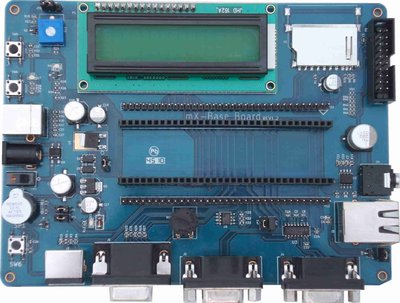
/media/uploads/ashwin_athani/_scaled_mx-baseboardv1.jpg

Features

NGX mX Baseboard has various peripherals with two 27 pin expansion dual row header connectors (P9-P11) and (P10-P12) (Male & female, 2.54mm pitch) for the mbed and simple connections

Board Schematics

The board can be ordered at NGX Technologies


calendar Page history
Last modified 14 Sep 2011, by   user Ashwin Athani   tag No tags | 10 comments  

10 comments on NGX mX Baseboard:

09 Nov 2010

Please post the manual online ...

29 May 2011

hello Ashwin. I bought this board few weeks ago. 2 days ago whn i start working on this board the very 1st LCD display doesnt work on it. after few hours debugging on it i found dat der is bug in LCD baklight circuit for which board is not able to display any thing on LCD. i m using JHD20x4 LCD . whn i m interfacing mbed externaly with LCD display is working perfectly, but on board itz not.i did tracd all the tracks for LCD connection on the board.de looks fine except LCD backlite ckt. Pls do check the ckt connection and fix the bug. i will post more in detail very soon. thnkyou. ------------------------

30 May 2011

hey hii der... it looks like i hv fixed the LCD dispaly problem. /media/uploads/chinmay/schematic1.jpg if you give look this schematic of the LCD back light connection, you can notice dat, the designer of this board had put a triggering ckt at p16(GND)of LCD for backlite. i dont know why board designer had put such an unnecessary ckt der. wht i did is i just removed the transistor Q2 n basing resistor R23 n shot to ground pt direcly. and guess wht LCD display start working. one more thing previously i chked every thing only on USB power n found der is a excess current drop at dis gnd pt. dis time i hv tested with both USB power and external power. on more thing i also noticed the analong pot R14 is directly connected with p20. so if ur using p20 as one of the data pin of LCD, make it sure dat R14 resistance lies between 50% of total resistance or better you remove the pot to get ur display working properly. I wud appreciate if sombody 4m NGX will comment on it. Thank you.

18 Oct 2011

Problem with mx Baseboard rev1.2 da NGXTechnologies

I bought one of the baseboard NGXTechnologies mX, I'm not able to send a string to the LCD with LPC1768 mbed. I am using the program posted by Mr. Ashwin Athani to test mX baseboard. Please someone has managed to make it run properly with an mbed?

greetings

Benedetti Marcos

18 Oct 2011

Hello Marcos,

You will have to make certain connections for the LCD to work. Please refer to Page 7 & 8 of the user manual. See here http://www.shop.ngxtechnologies.com/download/user_manual/mbed_Xpresso_Baseboard/NGX_mbed_mX_BaseBoard.pdf

All the best.

-Ashwin

18 Oct 2011

I just checked the manual and noticed that the connection for LCD_D7 is missing.

18 Oct 2011

I cross checked, the LCD_D7 is mentioned on Page 8, the diagram states that pin 30 on the mbed needs to be connected to Pin 24 on the baseboard (P12).

18 Oct 2011

user Marcos Benedetti wrote:

Problem with mx Baseboard rev1.2 da NGXTechnologies

I bought one of the baseboard NGXTechnologies mX, I'm not able to send a string to the LCD with LPC1768 mbed. I am using the program posted by Mr. Ashwin Athani to test mX baseboard. Please someone has managed to make it run properly with an mbed?

greetings

Benedetti Marcos

Hello Benedetti

how r u doing? oky its look like u r having some problem displaying on LCD. I would Advice u go through my previous post , i have explain about bugg n have d solution ther. till now i m having fun With this board after fixing d bugg.. so u try it out. if u u unable to locate the components refer the board schematics.

18 Oct 2011

Hi Ashwin, I just checked the board manual pdf again on my PC and the wire to LCD_D7 is showing OK. However, when I checked it before on my tablet the pre-installed pdf viewer did not show that wire! Must be an issue with the pdf viewer.

23 Oct 2011

There was a contest from NXP. My cousin - Livint Vlad won. The prize was a NGX mX Baseboard. There are 3 months now since the winners have been selected ... and no prize. Anyone of you encountered the same problem?

http://picasaweb.google.com/112031734932782342682/NXPLPCXpressoContest#5575063979002162642

http://www.nxp.com/campaigns/cortex-m0/index.php?sub=photo10

Please login to post comments.